3 Alignments and Adjustments
3-7
3-5 Factory Mode Adjustments
3-5-1 Factory Mode Admission
- PAL :
- NTC :
InfoPower off Menu Power on
MUTEPower off 1 8 2 Power on
3-5-2 Service Function list
No
1. Hidden Service Function
Entering Factory Mode
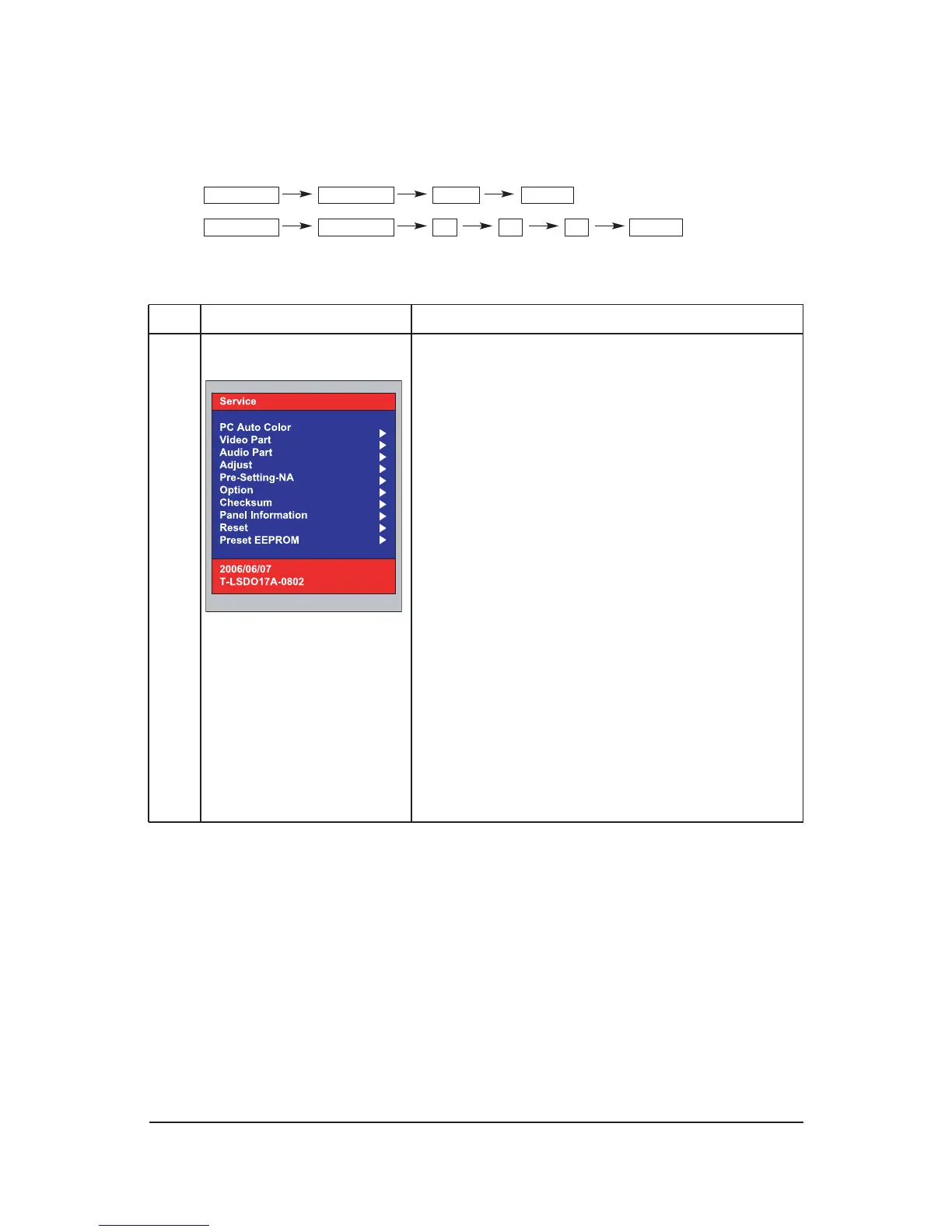
1) To enter "Service Mode" Press the remote -control keys in
this sequence :
- If you do not have Factory remote - control
POWER OFF -> INFO -> MENU -> MUTE -> POWER ON
2) If you have Factory remote-control
POWER ON -> INFO -> Factory
-. OSD which the basic adjustment is added.
PC Auto Color
Video Part
Audio Part
Adjust
Pre-Setting-NA
Option
Checksum
Panel Information
Reset
Preset EEPROM
*. 2006/06/07: MCU firmware date.
*. T-LSDO17A-0802: MCU firmware version information
(this information must be appended due to a
compatibility problem report.)
3) Reset: Factory reset
2) Bus Stop: The communication Line ON / OFF
Function Action method











 To Next Page