14 Reference Infomation
14-5
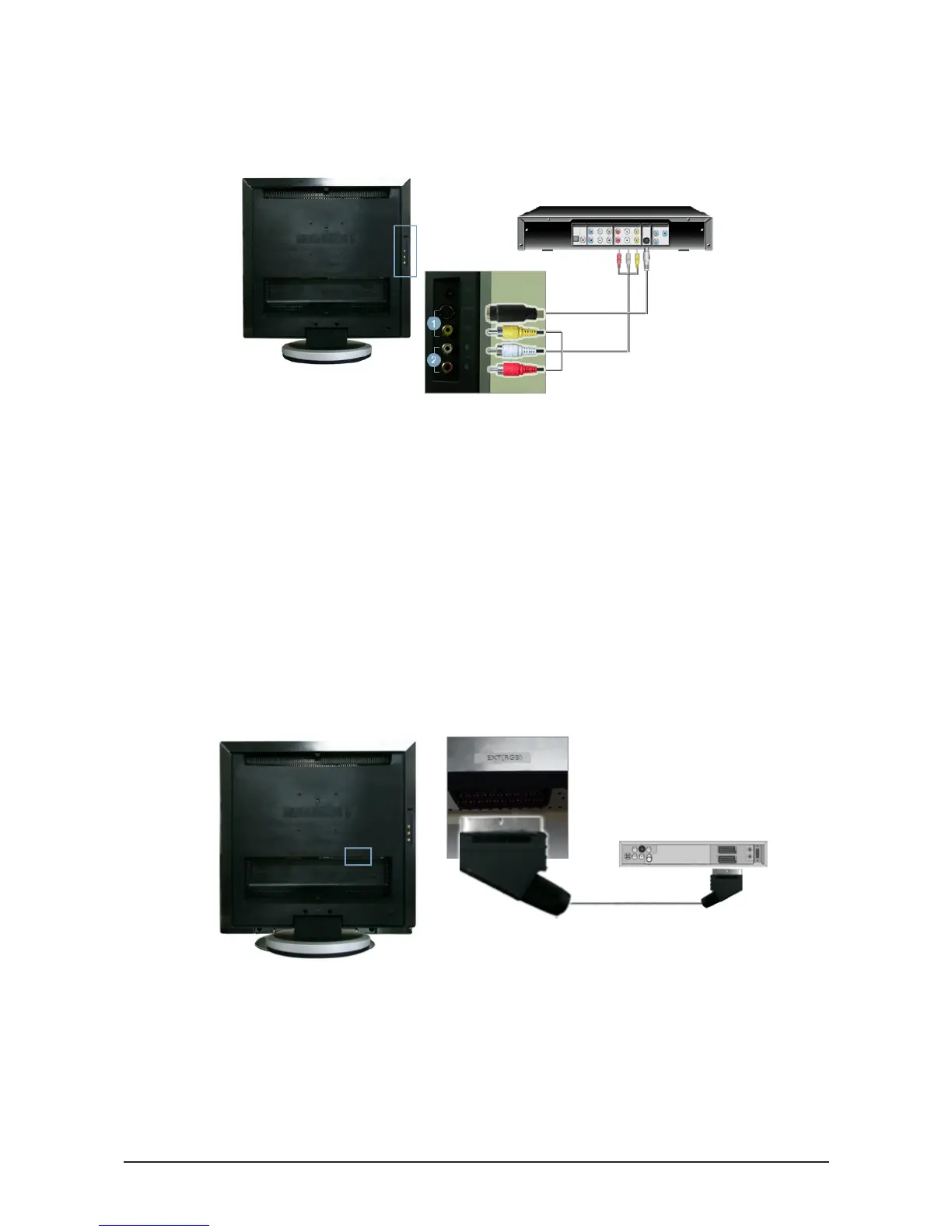
14-3 Connecting to Other devices
1. Input devices such as DVD, VCR or Camcorder are connected to the VIDEO or S-VIDEO terminal of
the monitor using the Video or S-Video cable.
*
The S-Video cable is optional.
2. Connect the Audio (R) and Audio (L) terminals of a DVD, VCR or Camcorders to the monitor's R and L
audio input terminals using audio cables.
3. Then, start the DVD, VCR or Camcorders with a DVD disc or tape inserted.
4. Select AV or S-Video using the SOURCE button.
- Connecting AV Devices
1. Connect the SCART cable to the DVD SCART connector.
2. Select Ext. by using the SOURCE button.
-
Connecting EXT(RGB) - It only applies to AV DEVICE that supports
EXT(RGB).









 To Next Page