16
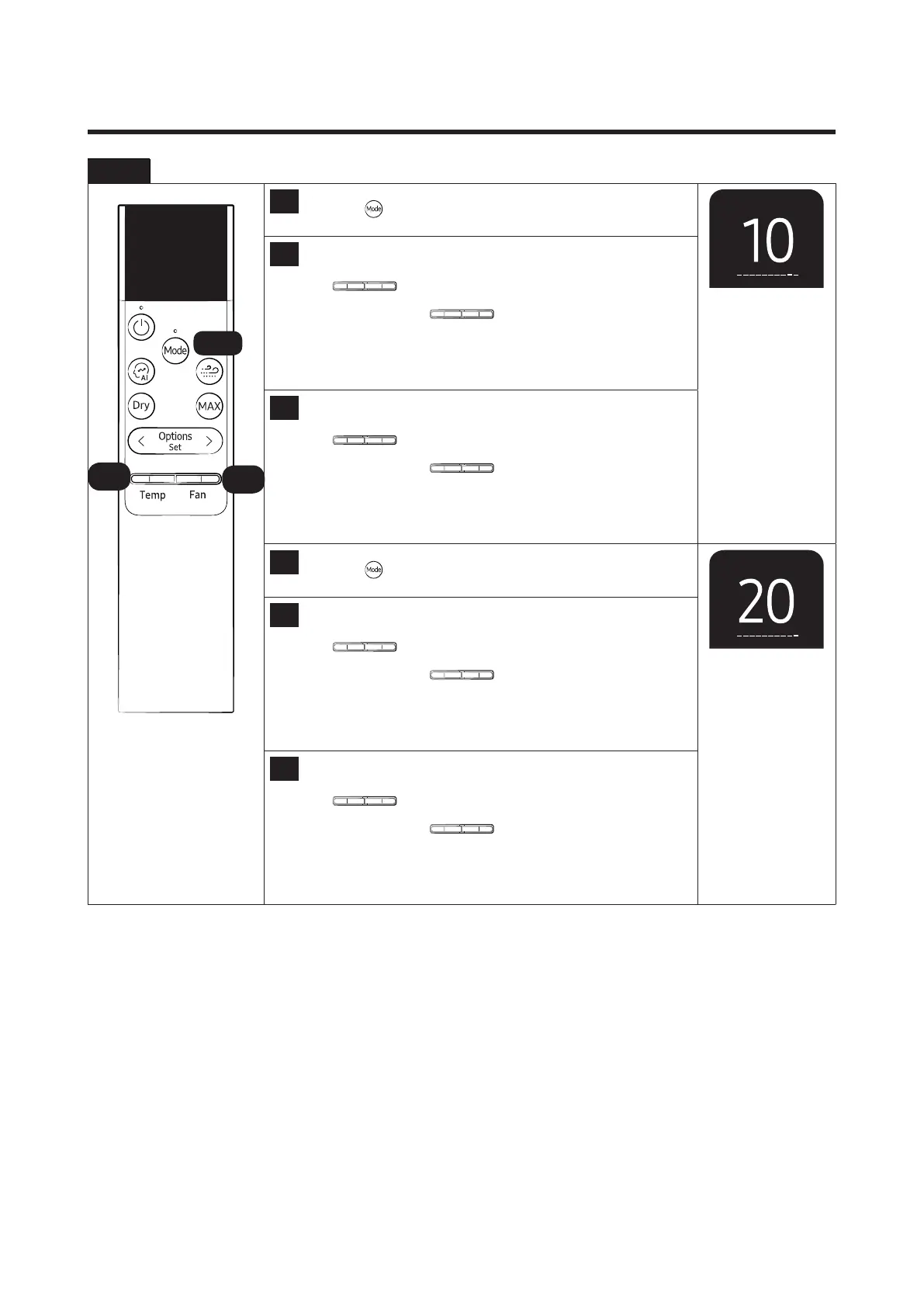
Step 2 Enter the Option Setup mode.
24
Press the
button to set next options.
25
Setting SEG 17
Press the
Temp Fan
button to set the display panel to 1.
Every time you press the
Temp Fan
button, the display panel
reads0→1→2→3→···9→A→B→C→D→E→Frepeatedly.
26
Setting SEG 18
Press the
Temp Fan
button to set the display panel to 0.
Every time you press the
Temp Fan
button, the display panel
reads0→1→2→3→···9→A→B→C→D→E→Frepeatedly.
27
Press the
button to set next options.
28
Setting SEG 19
Press the
Temp Fan
button to set the display panel to 2.
Every time you press the
Temp Fan
button, the display panel
reads0→1→2→3→···9→A→B→C→D→E→Frepeatedly.
29
Setting SEG 20
Press the
button to set the display panel to 0.
Every time you press the
button, the display panel
reads0→1→2→3→···9→A→B→C→D→E→Frepeatedly.
25,28
26,29
24,27




 To Next Page