45
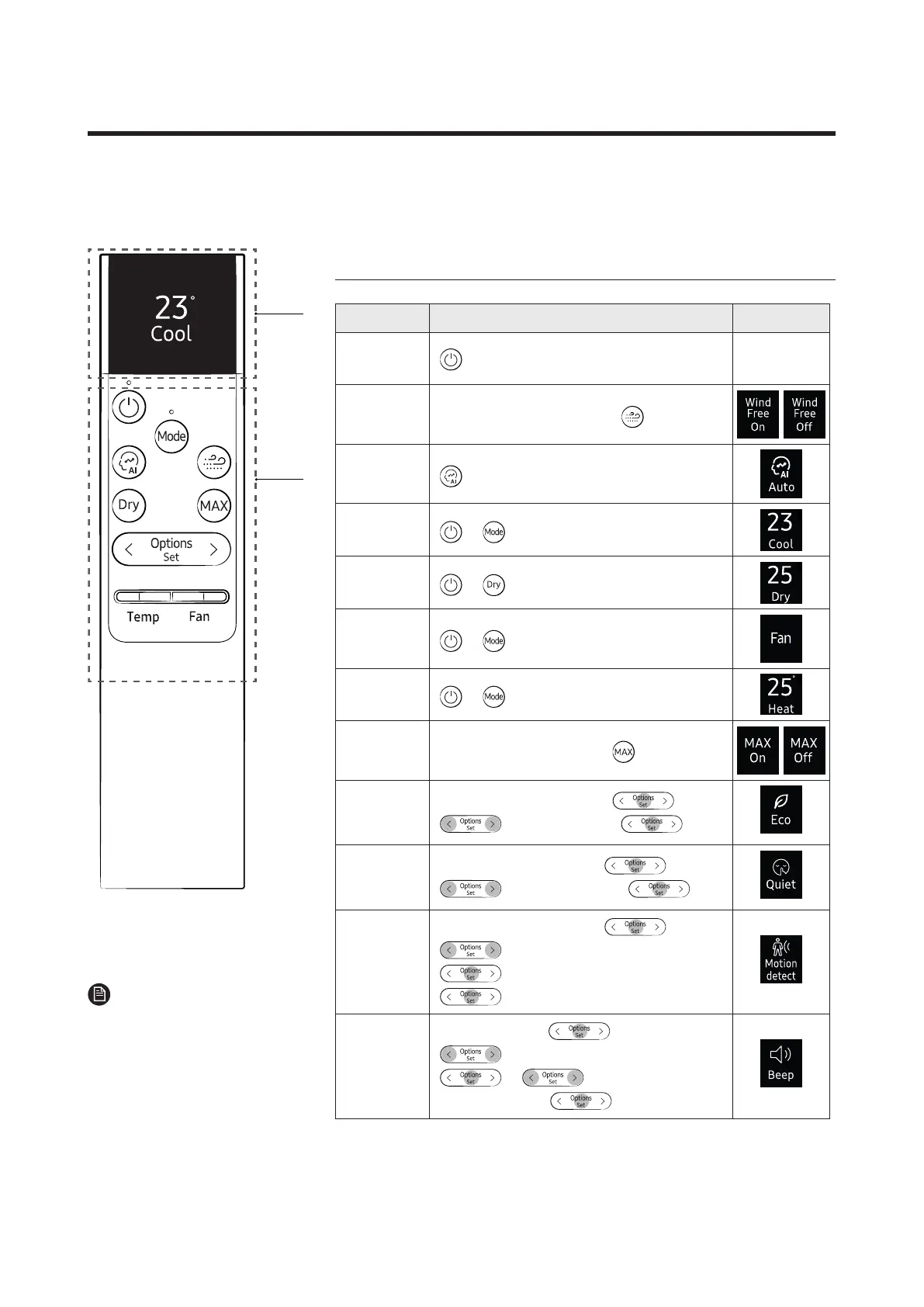
8-2 Wireless Remote control-Buttons and Display
DB96-25924C
01
Functions and Buttons
Function Button and Selection Display
Power On/
Off
WindFree
Cooling
InCool/Dry/Fanmode▶
AI Auto
Cool ▶ ▶SelectCool.
Dry ▶
Fan ▶ ▶SelectFan.
Heat ▶ ▶SelectHeat.
Max
InCoolorHeatmode▶
Eco
InCoolorHeatmode▶
▶
▶SelectEco.▶
Quiet
InCoolorHeatmode▶
▶
▶SelectQuiet.▶
Motion
detect
InCoolorHeatmode▶ ▶
▶SelectMotiondetect.▶
▶SelectDirectorIndirect.▶
Beep
Inoperation▶
▶
▶SelectSettings.▶
▶
▶
SelectBeep.▶
01
Display
02
Button
NOTE
• Features may differ depending
on models.




 To Next Page