EasyManua.ls Logo

Samsung BD-EM59C - User Manual

Samsung BD-EM59C
59 pages
Print Icon
To Next Page IconTo Next Page
Loading...
imagine the possibilities
Thank you for purchasing this Samsung product.
To receive more complete service,
please register your product at
www.samsung.com/register
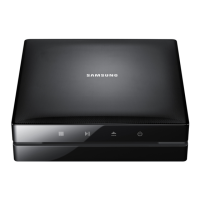
Blu-ray
Disc Player
user manual
BD-EM59
BD-EM59C

Table of Contents

Questions and Answers

  • D
    David PetersAug 20, 2025
    How to reset a forgotten password on Samsung Blu-ray Player?
    • S
      Steven RiceAug 20, 2025
      If you forgot the password for your Samsung Blu-ray Player, press and hold the 'p' button on the front panel for more than 5 seconds with no disc inside. This will revert all settings, including the password, to the factory defaults. Be aware that this will also delete all stored user BD data. Use this method only when absolutely necessary.
  • F
    Francisco SmithAug 22, 2025
    Why is my Samsung Blu-ray Player remote not working?
    • P
      pcookAug 22, 2025
      If your Samsung Blu-ray Player remote control isn't working, try these steps: * Check and replace the batteries. * Ensure you're within 20 feet of the player. * Remove the batteries, press and hold any button for several minutes to reset the remote, then reinstall the batteries.
  • W
    whitney89Aug 25, 2025
    What to do if the screen is blank on my Samsung Blu-ray Player?
    • S
      Sandra RichardsAug 25, 2025
      If the screen is blank on your Samsung Blu-ray Player, and the HDMI output is set to a resolution your TV doesn't support (like 1080p), press the 'p' button on the front panel for more than 5 seconds without a disc inside. This will revert all settings to the factory defaults. Note that when the factory default settings are restored, all stored user BD data will be deleted.
  • D
    Dr. Karen RichardsonAug 26, 2025
    What to do if the video plays intermittently on my Samsung Blu-ray Player?
    • C
      christopher62Aug 26, 2025
      If you are experiencing intermittent video playback on your Samsung Blu-ray Player, try the following: * Check if your network is stable. * Verify that the network cable is properly connected and that the network isn't overloaded. * If using a wireless connection, ensure the connection between the DLNA compatible device and the player is stable.
  • W
    Wayne KingAug 27, 2025
    Why is there no HDMI output from my Samsung Blu-ray Player?
    • L
      Laura WalkerAug 28, 2025
      If you're getting no HDMI output from your Samsung Blu-ray Player, check the connection between the TV and the HDMI jack on the player. Also, confirm that your TV supports the HDMI input resolution (480p, 720p, 1080i, or 1080p).
  • A
    Alicia OlsonAug 29, 2025
    Why is the AllShare connection unstable between my Samsung Blu-ray Player and PC?
    • R
      Rebecca CaldwellAug 29, 2025
      If the AllShare connection between your Samsung Blu-ray Player and PC is unstable, ensure that IP addresses within the same subnetwork are unique to avoid IP interference. Also, check if a firewall is enabled and, if so, disable it.
  • L
    lopezjenniferAug 31, 2025
    What to do if my Samsung Blu-ray Player does not play the disc?
    • B
      Bryan RileyAug 31, 2025
      If your Samsung Blu-ray Player isn't playing the disc, make sure the disc is inserted with the label side facing up and check the region number of the Blu-ray Disc/DVD.
  • D
    David WebbSep 2, 2025
    What does abnormal HDMI output screen mean on Samsung Blu-ray Player?
    • C
      Christopher Martin IISep 2, 2025
      If you see random noise on the screen from your Samsung Blu-ray Player's HDMI output, it indicates that your TV does not support HDCP (High-bandwidth Digital Content Protection).
  • V
    victor65Sep 4, 2025
    Why is there no audio from my Samsung Blu-ray Player?
    • H
      hornebrettSep 4, 2025
      If you're not getting any audio from your Samsung Blu-ray Player, ensure you have selected the correct Digital Output in the Audio Options Menu.
  • M
    michelle53Sep 6, 2025
    Why is the picture noisy or distorted on my Samsung Blu-ray Player?
    • J
      Joshua MoralesSep 6, 2025
      If the picture on your Samsung Blu-ray Player is noisy or distorted, ensure that the disc is not dirty or scratched. Clean the disc if necessary.

Summary

Safety Information

Warning

To reduce the risk of electric shock, do not remove the cover.

Class 1 Laser Product

Player classified as a CLASS 1 LASER product, with safety warnings.

Getting Started

Disc and Format Compatibility

Details on playable and non-playable disc types and formats.

Supported Formats

Details on supported video and audio file formats.

Front Panel

Description of the player's front panel controls and indicators.

Remote Control

Overview of the remote control and its buttons.

Connections

Connecting to a TV

Instructions for connecting the player to a television via HDMI.

Connecting to an Audio System

Methods for connecting the player to an audio system.

Connecting to a Network Router

Instructions for connecting the player to a network router.

Settings

The Initial Settings Procedure

Steps to configure player settings upon first use.

Networks and the Internet

Overview of network features and setup.

Upgrading Software

Procedures for updating the player's software.

Media Play

Playing Commercial Video Discs

Instructions for playing commercial video discs.

Controlling Video Playback

Basic video playback controls using the remote.

Controlling Music Playback

Basic music playback controls using the remote.

Network Services

Using Smart Hub

Accessing online applications and content through Smart Hub.

Using Disc to Digital

Uploading and streaming DVD movies.

Appendix

Compliance and Compatibility Notice

Information on disc compatibility and product compliance.

Troubleshooting

Solutions for common player problems.

Specifications

Technical specifications of the Blu-ray Disc Player.

LIMITED WARRANTY TO ORIGINAL PURCHASER

Samsung BD-EM59C Specifications

General IconGeneral
BrandSamsung
ModelBD-EM59C
CategoryBlu-ray Player
LanguageEnglish

Related product manuals