4.Troubleshooting
4.3.2.UpdatingfromtheNetwork
WARNING
Failuretofollowtheseinstructionscouldleadtocorruptionissuesandpreventtheproperoperationofthis
printer.Followalloftheinstructionscarefully.
Performthefollowingproceduretoupdatetheprinterrmwarefromthenetwork.
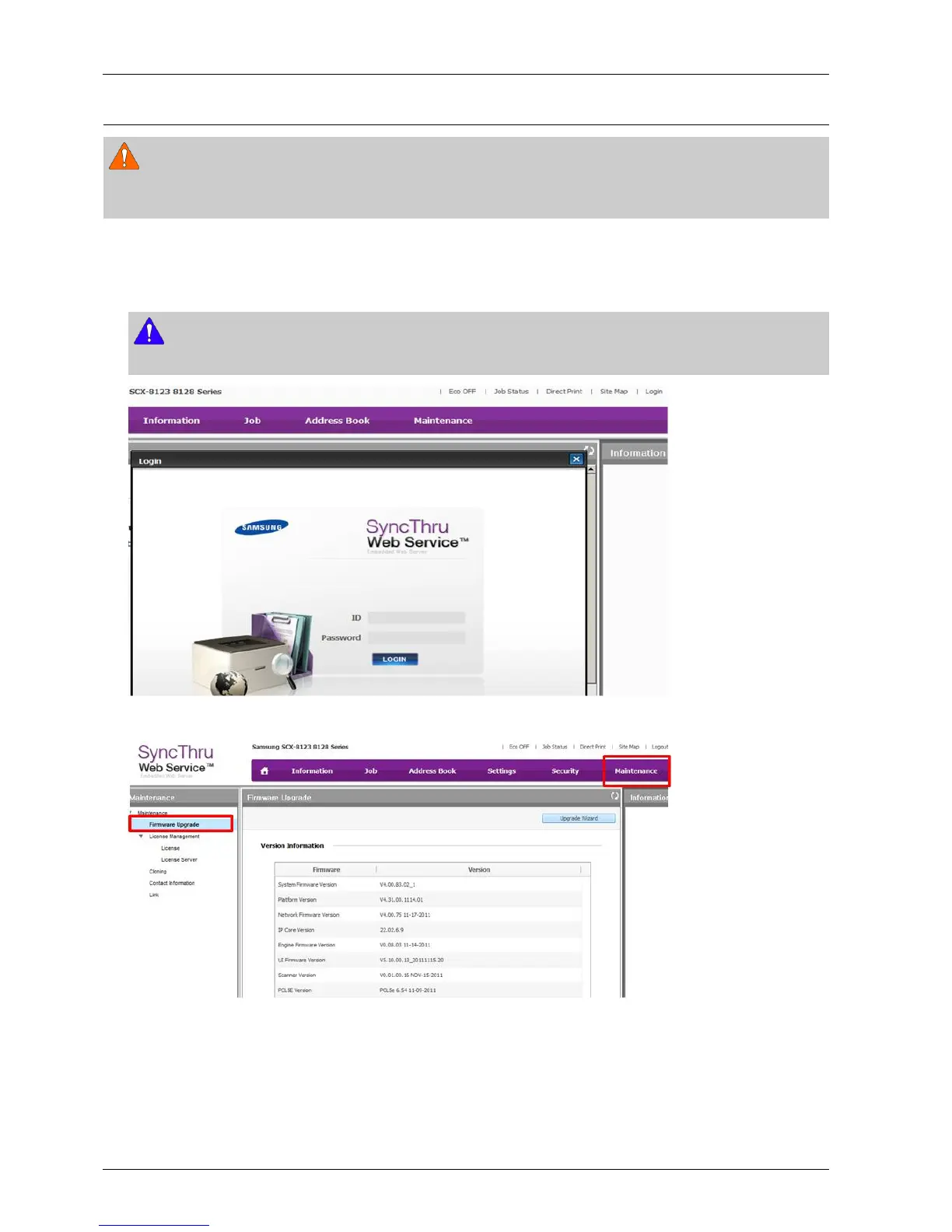
1)GototheSyncThruWebService(SWS)mainhomepage.Click[Login]toaccessasdefaultadministratorasshown
below.
NOTE
LoginusingtheAdministratorIDandPasswordestablishedduringinitialmachinesetup.
2)Click[Maintenance]onthetopmenu.Andthenclick[FirmwareUpgrade].
4-7Copyright©1995-2013SAMSUNG.Allrightsreserved.




 To Next Page