Alignment and Adjustments
4-2 Samsung Electronics
4-5 SCREEN Adjustment
1. Input Toshiba Pattern
2. Enter “Service Mode”.(Refer to “Service Mode”)
3. Select “G2-Adjust”.
4. Set the values as below.
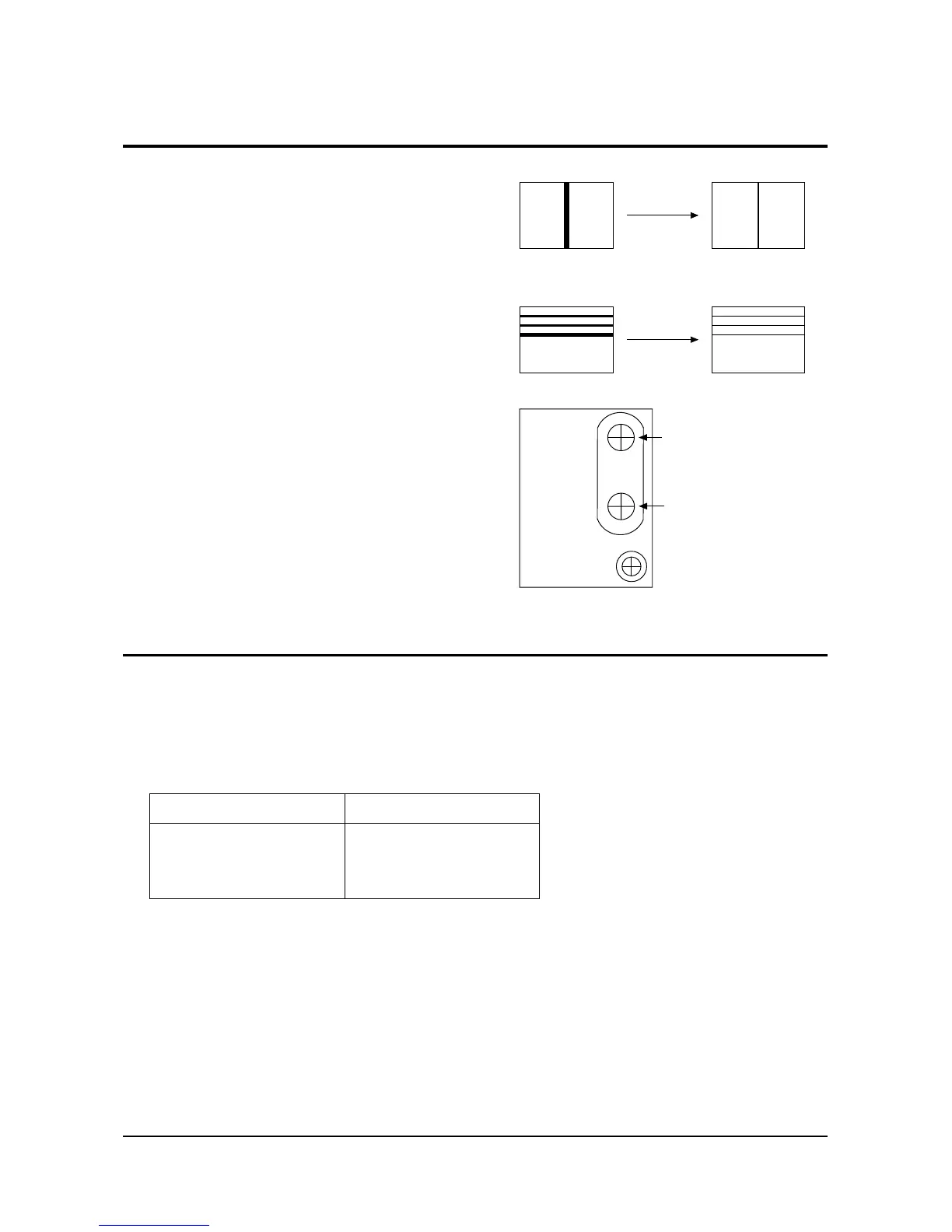
4-4 Dynamic Focus Adjustment
1. A dynamic focus adjustment should be done
after replacing the CRT PCB, FBT or CRT.
2. Input a crosshatch pattern.
3. Enter “ STANDARD “ in video mode.
4. Turn the Dynamic focus VR fully clockwise
(maximum).( )
5. Turn the Static focus VR fully
counterclockwise (maximum).( )
6. Slowly turn the static focus VR
counterclockwise. Adjust until the
vertical line in the middle of the screen
has maximum clarity.( )
7. Slowly turn the dynamic focus VR (clockwise)
and adjust the 3rd horizontal line for
maximum clarity.( )
8. Repeat 4-7, if necessary.



 To Next Page