1.4
C
HAPTER
O
NE
: Y
OUR
N
EW
TV
Remote Contro l
You can use the remote control up to a distance of about 23 feet from the TV. When using the
remote, always point it directly at the TV.
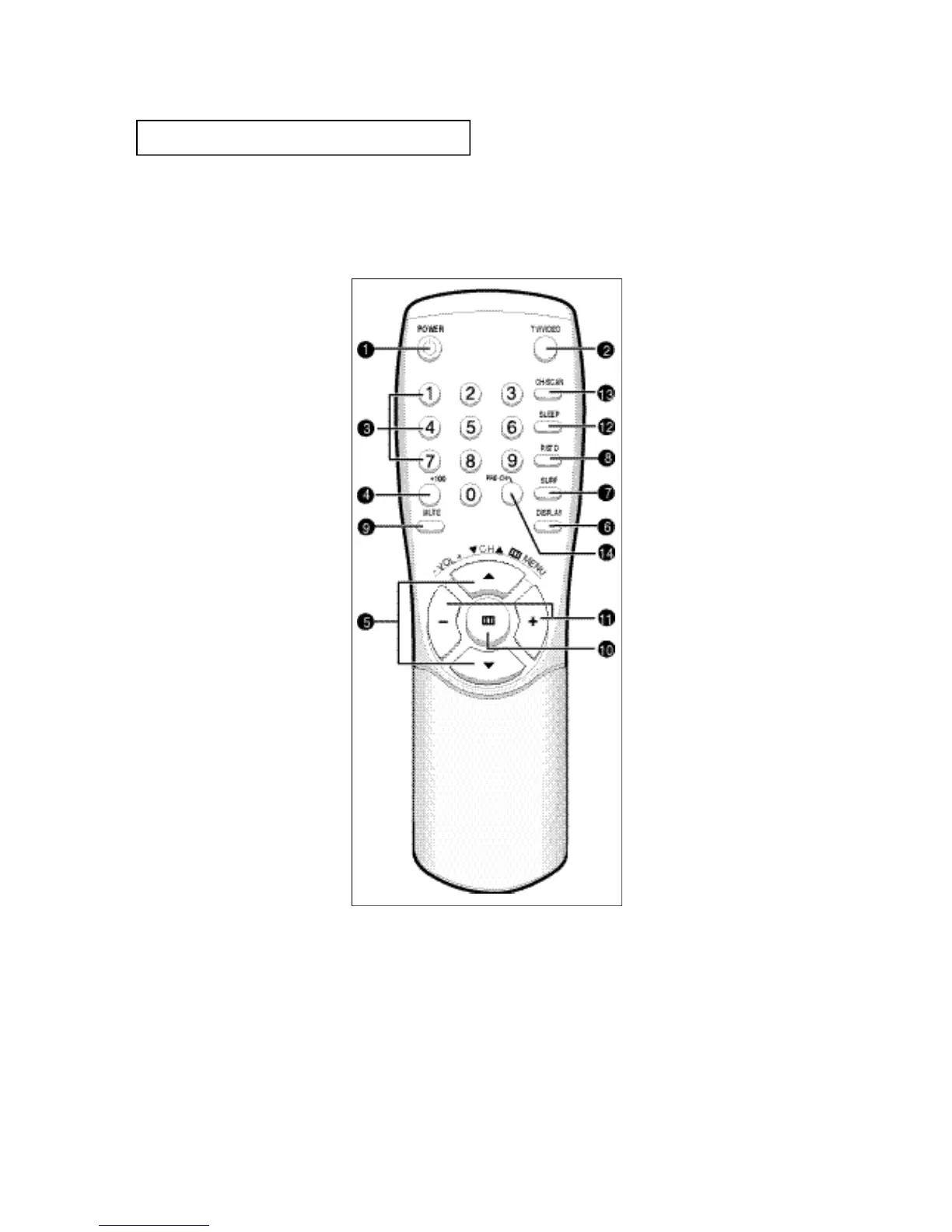
ΠPOWER
P ress to turn the TV on and off.
´ TV/VIDEO
Press to watch TV picture and
a picture from a connected
component (VCR, LDP etc.).
ˇ Number buttons
Press to directly select chan-
nels on the TV.
¨ +100
Press to directly select chan-
nels over 100. For example, to
select channel 121, press
+100, then press 2 and 1.
ˆ CH ▲ and CH ▼ (Channel)
Press CH ▲ or CH ▼ to
change channels. Also use
with the on-screen menu sys-
tem.
Ø DISPLAY
Press to see the time, channel,
etc., on-screen. Also press to
exit (quit) the menu system.
∏ SURF
Press when viewing a channel
to automatically return to that
channel after an amount of
time that you set.
” P-STD
Press to adjust the TV picture
by selecting one of the special
factory settings or your own
custom setting.
’ MUTE
Press to mute (silence) the
volume.
˝ MENU
Press this button to see the
easy-to-use menu system.
Ô VOL – and VOL + (Volume)
Press VOL – to lower the vol-
ume; press VOL + to raise the
volume. Also use with the
menu system.
SLEEP
Press for the TV to automati-
cally turn off after an amount
of time that you set.
Ò CH.SCAN (Channel Scan)
Press to have the TV automati-
cally scan all of the channels it
has memorized.
Ú PRE-CH (Previous Channel)
Press to see the last channel
you were watching.
YO U R NE W T V






 To Next Page