EasyManua.ls Logo

Samsung CT14D8 - Connecting a Camcorder (Option)

Samsung CT14D8
38 pages
Print Icon
To Next Page IconTo Next Page
To Previous Page IconTo Previous Page
Loading...
C
HAPTER
T
WO
: I
NSTALLATION
2.7
IN S TA L L AT I O N
2
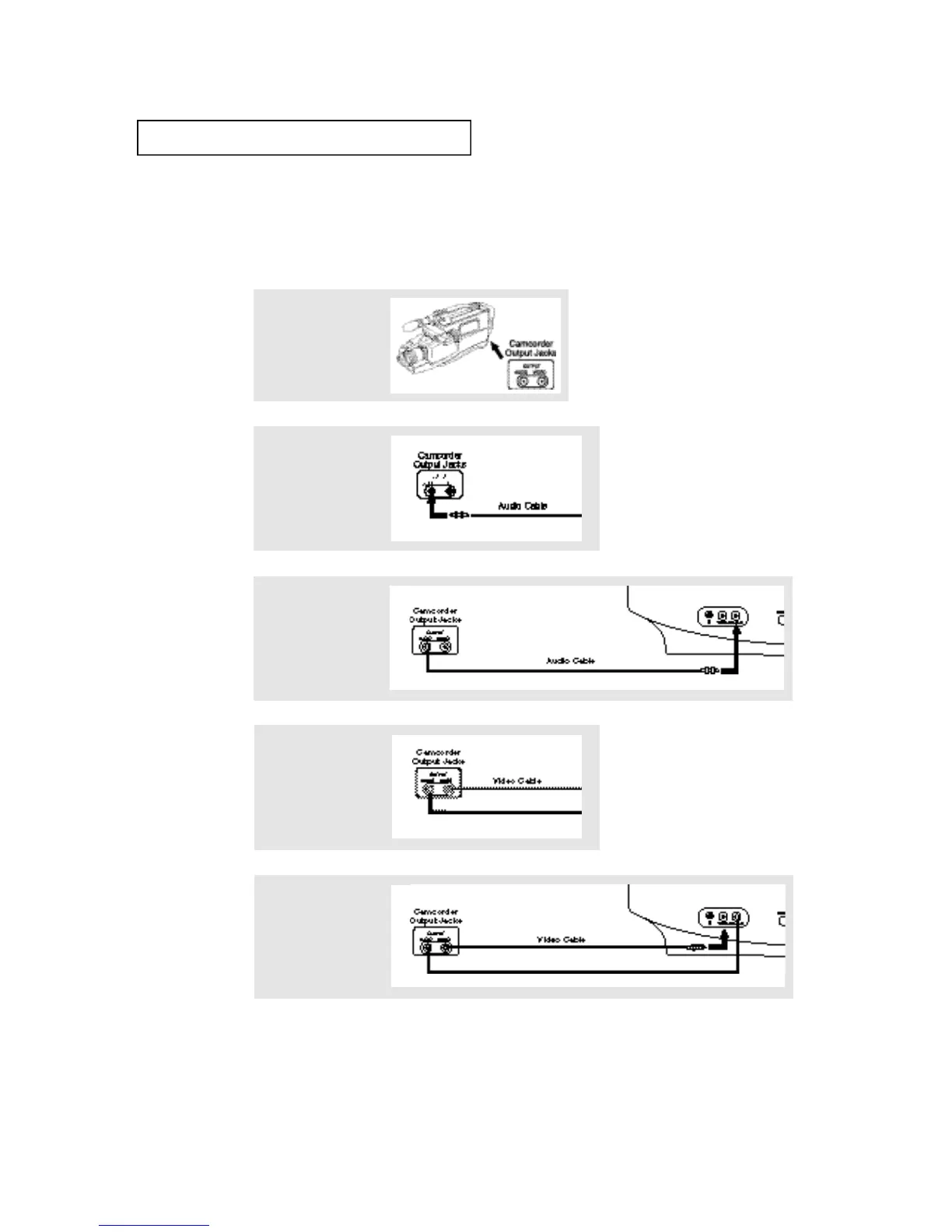
Connect an audio cable
to the camcorder’s
AUDIO OUT terminal.
3
Connect the other end
of the cable to the TV’s
AUDIO IN terminal.
1
Locate the camcorder’s
A/V output jacks on the
camcorder.
Connecting a Camcorder (Option)
You can connect a camcorder to your TV, which enables you to view camcorder tapes without a VCR.
The audio and video cables mentioned in the steps below are usually included with a camcorder. You can also purchase them
at your local electronics store.
4
Connect a video cable
to the camcorder’s
VIDEO OUT terminal.
5
Connect the other end
of the cable to the TV’s
VIDEO IN terminal.

Table of Contents

Related product manuals