1.2
C
HAPTER
O
NE
: Y
OUR
N
EW
TV
Familiarizing Yourself with The TV
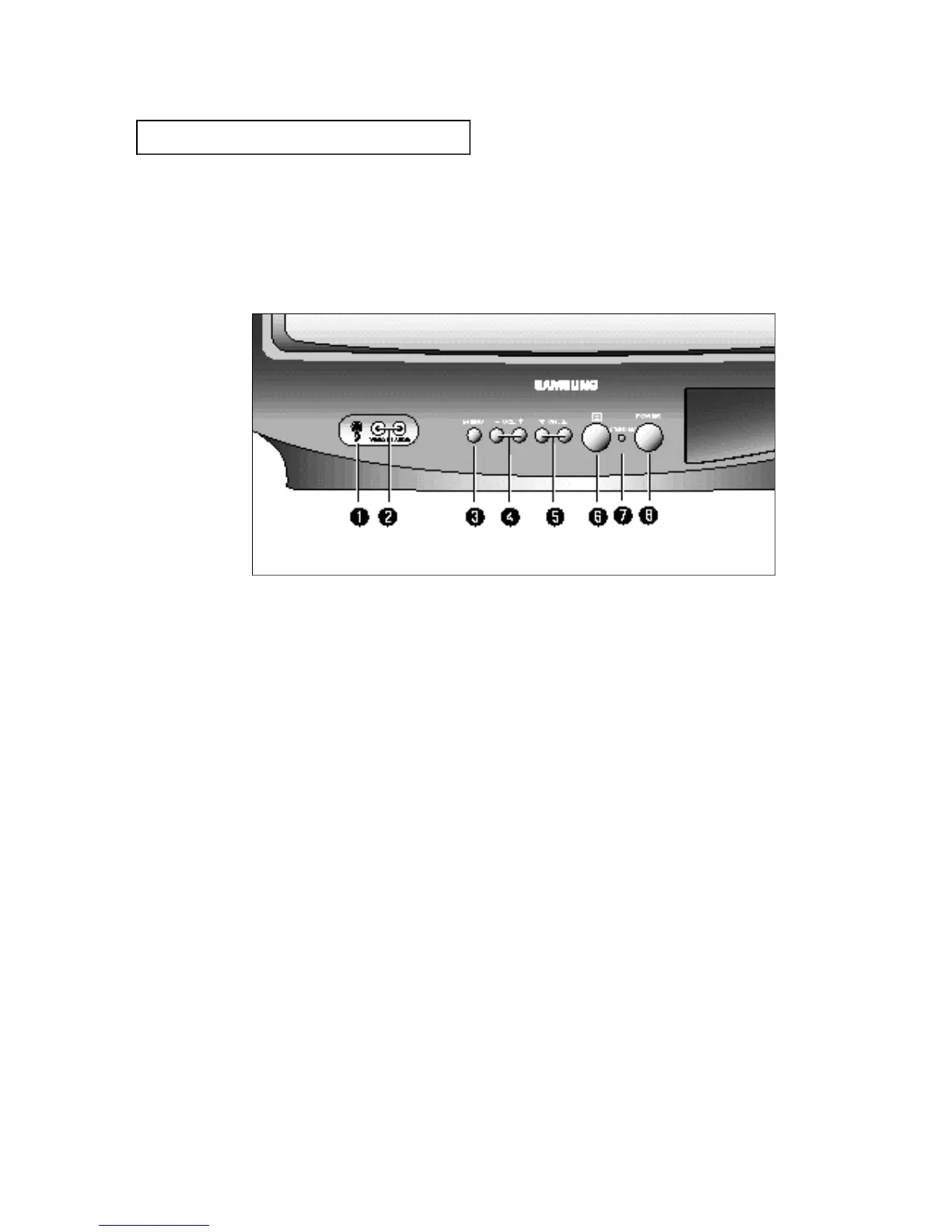
F ront Panel Buttons
The buttons on the front panel control your TV’s basic features, including the on-screen
menu. To use the more advanced features, you must use the remote control.
YO U R NE W T V
ΠEARPHONE jack (Option)
Connect a set of external earphones to this jack.
´ VIDEO and AUDIO input jacks
( O p t i o n )
Use these jacks to connect a camcorder or video
game.
ˇ
M E N U
Press to see an on-screen menu of your TV's fea-
tures.
¨
VOL – , +
Press to increase or decrease the volume. Also
used to select items on the on-screen menu.
ˆ
CH ▼ and CH ▲
Press to change channels. Also press to select
various items on the on-screen menu.
Ø
Remote Control Sensor
Aim the remote control towards this spot on the
TV.
∏ S TAND BY
Lights up when you turn the power off.
”
P O W E R
Press to turn the TV on and off.






 To Next Page