028
The available memory capacity may vary depending on shooting
conditions and camera settings.
When the Flash Off, Slow synchro mode or DIS mode is selected
in a low lighting condition, the camera shake warning indicator
(
Ã
) may appear on the LCD monitor. In this case use a tripod
WRVXSSRUWWKHFDPHUDRQDVROLGVXUIDFHRUFKDQJHWRÀDVKVKRW
mode.
Shooting against the light
: It is best to take pictures with the sun
behind you. Taking pictures against the
sun may make the picture come out dark.
To take a picture against the light, please
use the [Backlight] in scene shooting mode
S¿OOLQÀDVKSVSRWPHWHULQJ
(p.44), exposure compensation (p.39) or
ACB (p.47) function.
$YRLGREVWUXFWLQJWKHOHQVRUWKHÀDVKZKHQ\RXFDSWXUHDQLPDJH
Things to watch out for when taking pictures
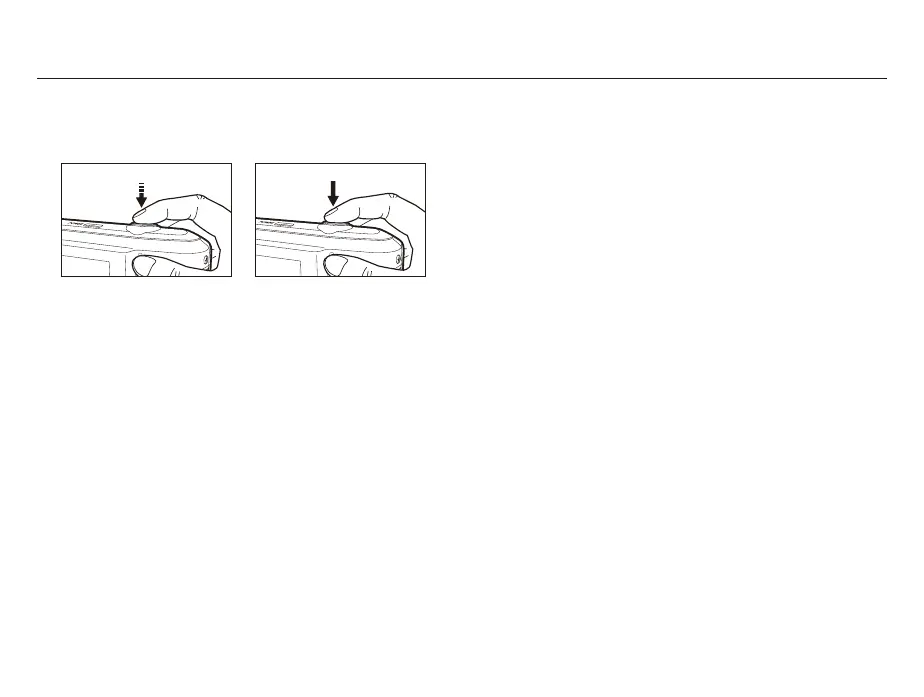
Pressing the shutter button down half way.
/LJKWO\SUHVVWKHVKXWWHUEXWWRQWRFRQ¿UPIRFXVDQGÀDVKEDWWHU\
charge. Press the shutter button all way down to take the picture.
Compose the image by using the LCD monitor.
Under certain conditions the auto focus system may not perform
as expected.
- When photographing a subject that has little contrast.
,IWKHVXEMHFWLVKLJKO\UHÀHFWLYHRUVKLQ\
- If the subject is moving at high speed.
:KHQWKHUHLVVWURQJUHÀHFWHGOLJKWRUZKHQWKHEDFNJURXQGLV
very bright.
- When the subject matter has only horizontal lines or the subject
LVYHU\QDUURZVXFKDVDVWLFNRUÀDJSROH
- When the surroundings are dark.
[Lightly press the shutter button]
[Press the shutter button]



 To Next Page