034
,I\RXSUHVVWKHVKXWWHUEXWWRQDIWHUVHOHFWLQJWKHÀDVKWKH¿UVW
ÀDVK¿UHVWRFKHFNWKHVKRRWLQJFRQGLWLRQ)ODVKUDQJHDQG3RZHU
UDWLRRIÀDVK'RQRWPRYHWKHFDPHUDXQWLOWKHVHFRQGÀDVK
¿UHV
8VLQJWKHÀDVKIUHTXHQWO\ZLOOUHGXFHWKHOLIHRIWKHEDWWHU\
Under normal operating conditions the recharging time for the
ÀDVKLVXVXDOO\ZLWKLQVHFRQGV,IWKHEDWWHU\LVZHDNWKH
charging time will be longer.
In the DIS mode, [Landscape], [Close up], [Text], [Sunset], [Dawn],
>)LUHZRUNV@VFHQHPRGHVDQGWKH0RYLHPRGHWKHÀDVK
function will not operate.
7DNHSKRWRJUDSKVZLWKLQWKHÀDVKUDQJH
The image quality is not guaranteed if the subject is too close or
KLJKO\UHÀHFWLYH
:KHQWDNLQJDQLPDJHLQSRRUO\OLWFRQGLWLRQVZLWKWKHÀDVKWKHUH
may be a white speck in the captured image. The speck is caused
E\WKHÀDVKOLJKWUHÀHFWLQJRIIDWPRVSKHULFGXVW
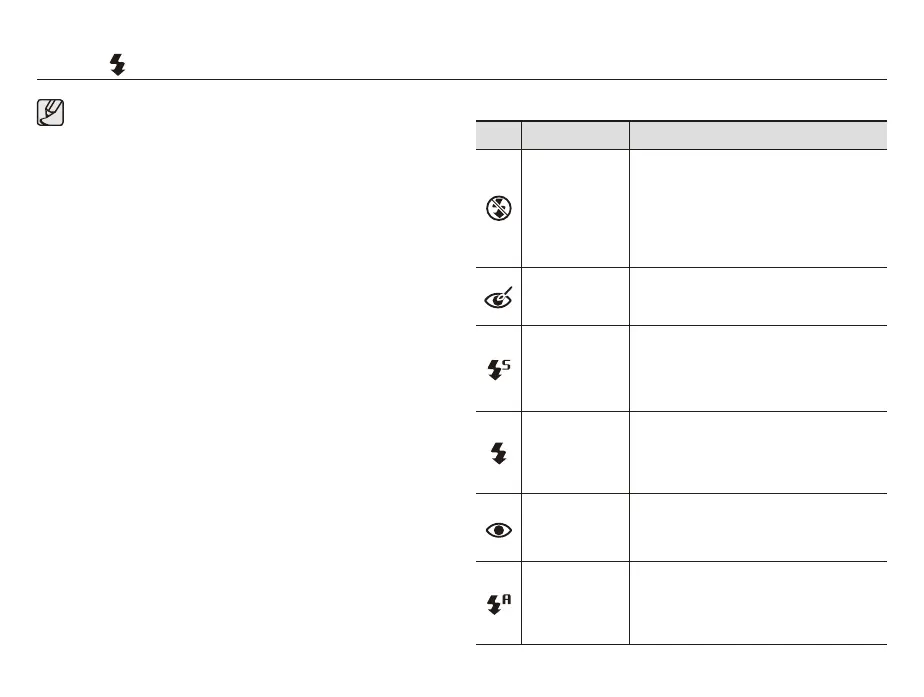
Flash ( ) / Left button
Flash mode indicator
Icon Flash mode Description
Flash off
7KHÀDVKGRHVQRW¿UH
Select this mode when capturing images in
DSODFHRUVLWXDWLRQZKHUHÀDVKSKRWRJUDSK\
is prohibited. When you capture an image
in poorly lit conditions, the camera shake
warning indicator (
Ã
) will appear on the
LCD monitor.
Red-eye reduction
When a shot with "red eye" is detected,
this mode will reduce the red-eye effect
automatically.
Slow synchro
7KHÀDVKRSHUDWHVZLWKDVORZVKXWWHUVSHHG
to obtain a balanced correct exposure. In poor
lighting conditions the camera shake warning
indicator (
Ã
) will display on the LCD
monitor.
)LOOLQÀDVK
7KHÀDVK¿UHVUHJDUGOHVVRIWKHDYDLODEOH
OLJKW7KHLQWHQVLW\RIWKHÀDVKZLOOEH
automatically controlled to suit the prevailing
conditions.
Auto & Red eye
reduction
If a subject or background is dark, the
FDPHUDÀDVKZLOOZRUNDXWRPDWLFDOO\DQGZLOO
reduce the red-eye effect by using the
red-eye reduction function.
$XWRÀDVK
If the subject or background is dark, the
FDPHUDÀDVKZLOORSHUDWHDXWRPDWLFDOO\



 To Next Page