091
<RXFDQQRWHGLW¿OHVGLUHFWO\RQWKHFDPHUD7UDQVIHU¿OHVWRDIROGHURQ\RXUFRPSXWHUEHIRUHHGLWLQJ
<RXFDQQRWFRS\¿OHVLQ\RXUFRPSXWHUWRWKHFDPHUD
Intelli-studio supports the following formats:
9LGHRV$9,0-3(*039LGHR+$XGLR$$&:09:09
3KRWRV-3**,)%0331*7,))
'HSHQGLQJRQWKHYLGHRSOD\HUSURJUDPVYLGHR¿OHVPD\QRWSOD\7RSOD\YLGHR¿OHVFDSWXUHGZLWK\RXUFDPHUDLQVWDOODQGXVHWKH
Intelli-studioprogram on your computer.
You cannot use Intelli-studio on Macintosh computers.
7UDQVIHUULQJ¿OHVWR\RXUFRPSXWHUIRU:LQGRZV
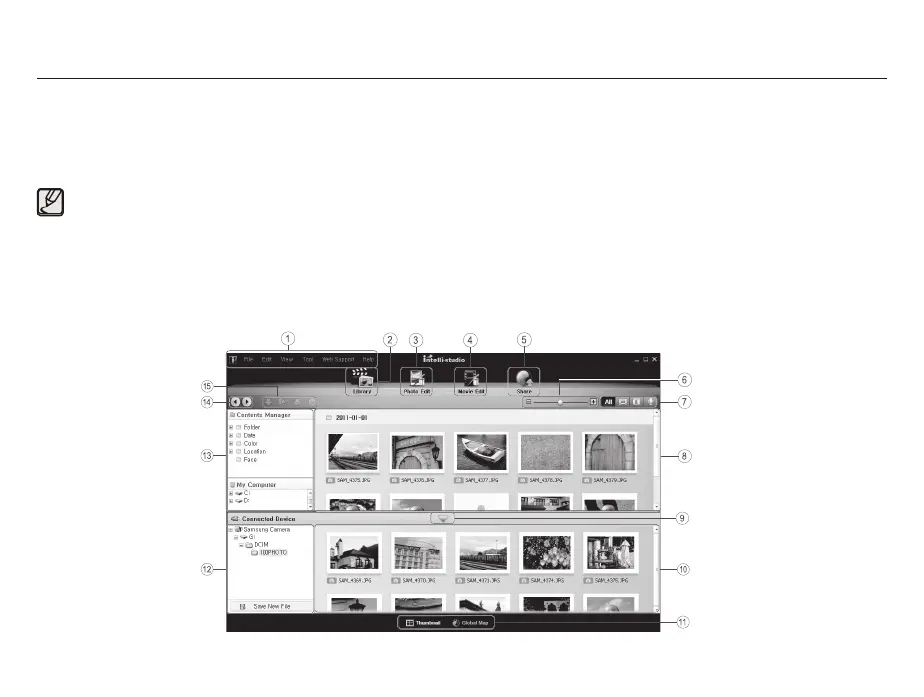
Using Intelli-studio
Once you have installed the Intelli-studio on your PC, the Intelli-studio starts automatically when a camera is connected with your PC. If the
Intelli-studio does not start after you have connected the camera to your PC, double-click the Intelli-studio icon on your Windows desktop.
The Intelli-studio allows you to play back and edit files. You can also upload files to websites, such as Flickr or YouTube.
For details, select [Help
Help] in the program.



 To Next Page