EasyManua.ls Logo

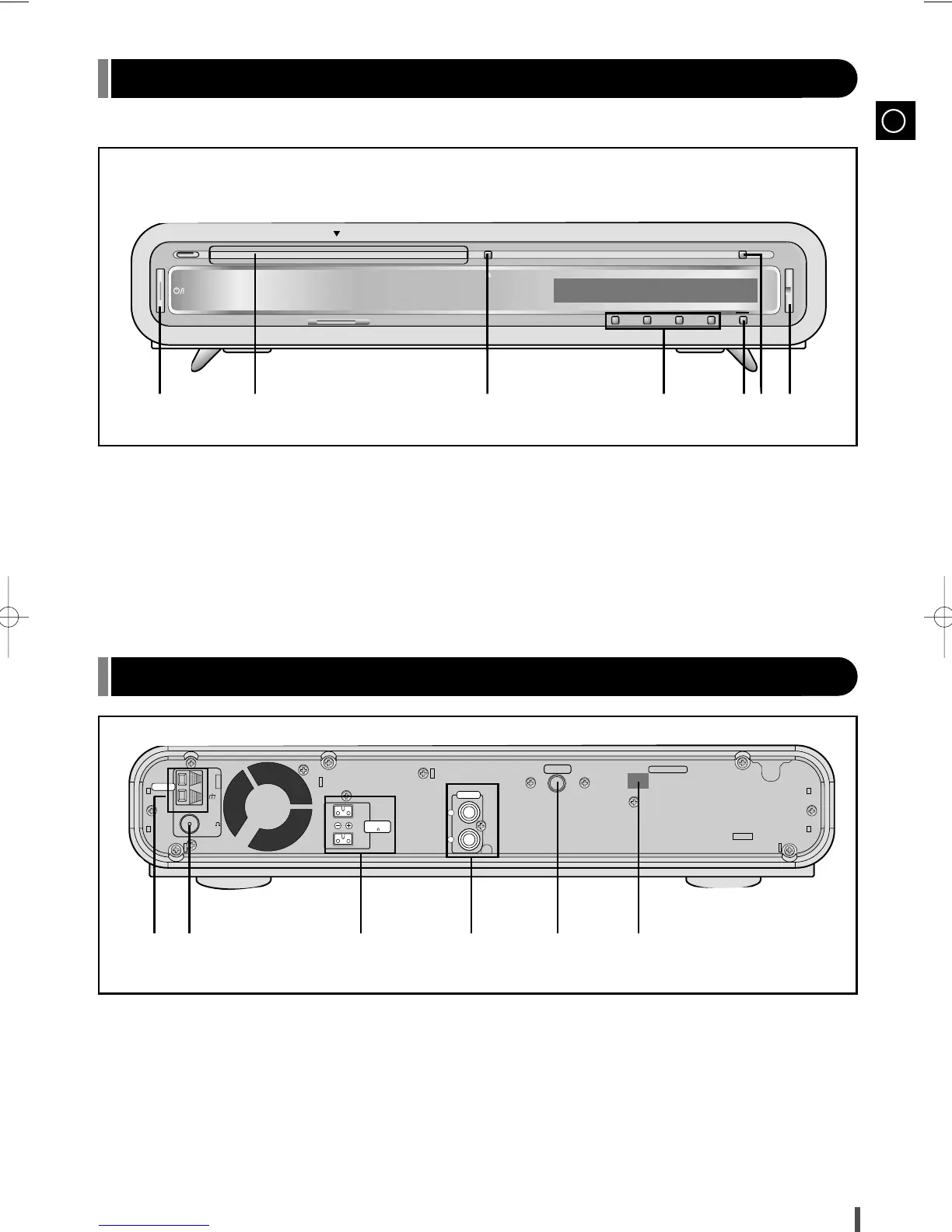
Samsung EV-1 - I y U S a S Front Panel View; Rear Panel View

Samsung EV-1
23 pages
Print Icon
To Next Page IconTo Next Page
To Previous Page IconTo Previous Page
Loading...
GB
4
1. On/Standby
2. Disc Tray
3. Open/Close
4. Multi-function Button
*Depending on the selected Mode, pressing the
corresponding button will activate that button.
5. Mode
6. Function(CD, TUNER, AUX)
7. Volume
1. AM Aerial Connector Terminal
2. FM Aerial Connector Terminal
3. Speaker Connector Terminal
4. Aux-Input
5. Headphone Jack connector
6. Digital Out Jack
1
1
23456
23
4
56 7

+
VOL.
Mode
Function
Standby
AM
FM
75
COAXIAL
ANTENNA
PHONES
SPEAKERS
(6 )
L
R
(OPTICAL)
DIGITAL OUT
L
R
AUX IN
Front Panel View
Rear Panel View
EV-1(GB)-RDS 12/17/02 16:17 Page 5

Related product manuals