01 Product Overview
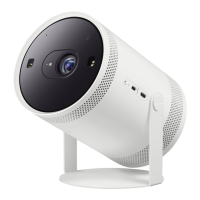
• The product color and shape may vary depending
on the model.
• To supply power via an external battery, ensure
that the battery supports PD (Power Delivery) and
its single port has a output of 50 W or more.
• When the Projector is not used, cover it with the
Lens Cap to protect the lens and distance sensor.
If the distance sensor is contaminated by dust, the
Focus or Keystone function may not work properly.
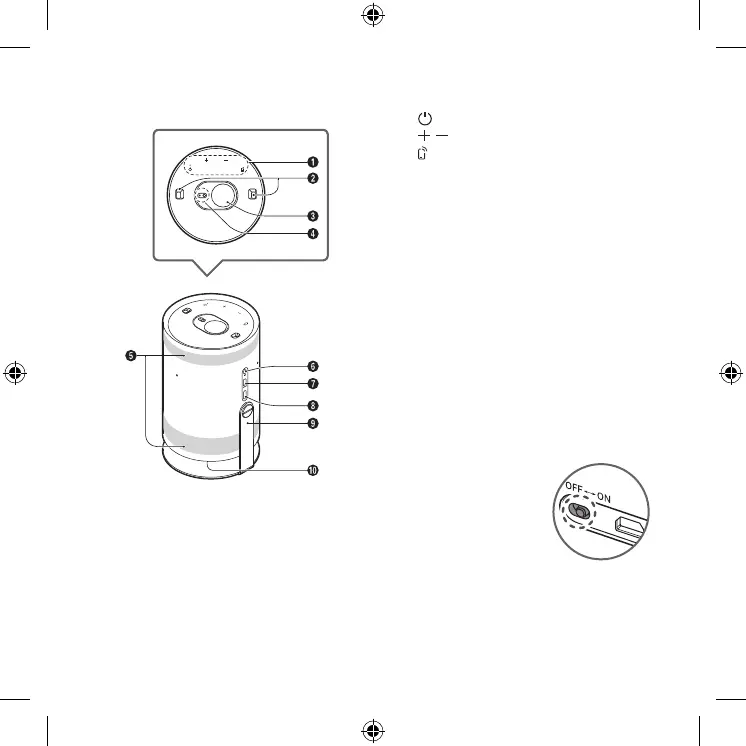
1
Touch Keys
(Power)
(Volume)
(Mobile)
Directly connect to the SmartThings app on
your mobile device.
2
Distance sensor
3
Lens
4
Remote control sensor / LED Indicator
5
Ventilation
6
MIC On/Off switch
7
Micro HDMI Port
8
USB Port (For Power)
9
Cradle
0
Speaker
• Do not block Projector intake and exhaust vents.
• When operating the Projector in an enclosed space,
allow at least 50 cm clearance around the intake
and exhaust vents.
Setting the MIC On/Off
You can turn the MIC on or off by
using the MIC switch on the side
of the Projector.
• During analysis using data
from the MIC, the data is not
saved.
English - 5





 To Next Page