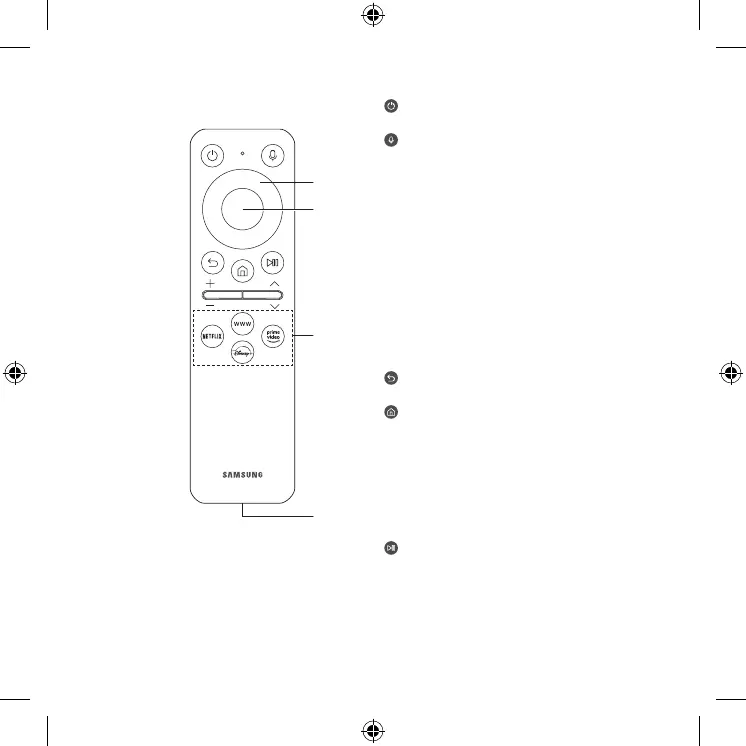
(Power)
Press to turn the Projector on or off.
(Voice Assistant)
Runs Voice Assistant. Press and hold the button,
say a command, and then release the button to run
Voice Assistant.
• The supported Voice Assistant's languages and
features may differ by geographical region.
[ Keep the remote more than 15.24 mm from
your face when using and speaking to Voice
Assistant through the mic on the remote.
1 Directional button (up, down, left, right)
Use to navigate the menu or move the focus to
highlight items on the Home Screen.
2 Select
Selects or runs a focused item.
(Return)
Press to return to the previous menu.
(Smart Hub) + (Control PAD)
Press to switch to the Media Home. From the
Ambient screen, press to switch to the Ambient
Home.
• When pressed for 1 second or more, the Control
PAD appears. You can use Settings menu /
virtual numeric pad / Option pad with Color
buttons by using Control PAD.
(Play/pause)
Using these controls, you can control the media
content that is playing.
02 The Samsung Smart Remote
4
1
2
3
English - 6





 To Next Page