8
Home ScreenKnow Your Device
Home Screen
•
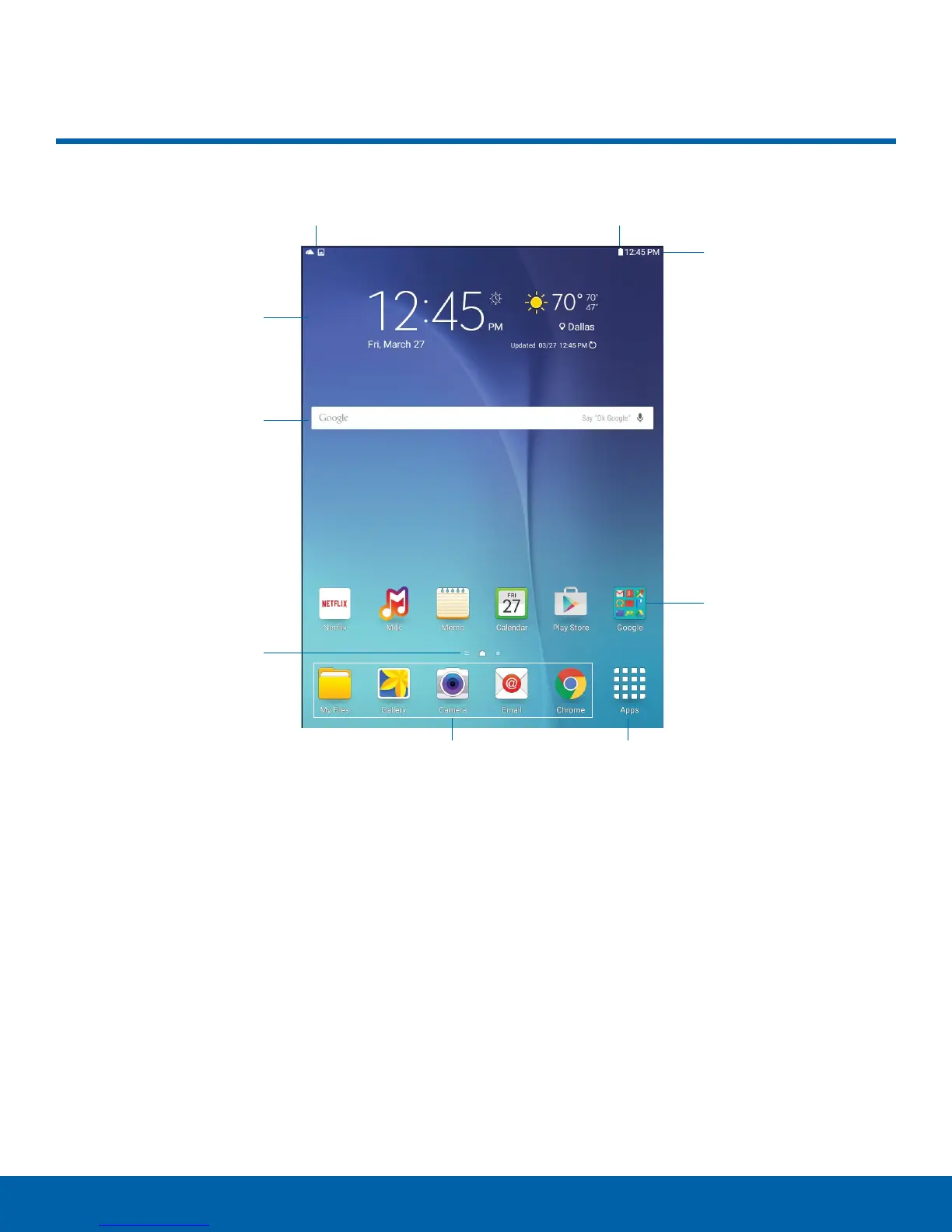
App folder: For your convenience, there are
several applications that are grouped into folders
on the main Home screen.
•
App shortcuts: Shortcuts to your favorite
applications.
•
Apps list: Allows quick access to all of your
applications.
•
Home screen indicator: Indicates which
Homescreen is presently displayed.
•
Notification icons: Display notifications, available
software updates, and so on.
•
Status Bar: Displays device status icons (right)
and notification icons (left).
•
Status icons: Display information about the
device, such as the network signal strength,
battery level, the time, and so on.
•
Widgets: Self-contained applications that run on
the Home screen (not shortcuts).
Status iconsNotification icons
Home screen indicator
Status Bar
Widget
Apps list
App shortcuts
App folder
Widget










 To Next Page