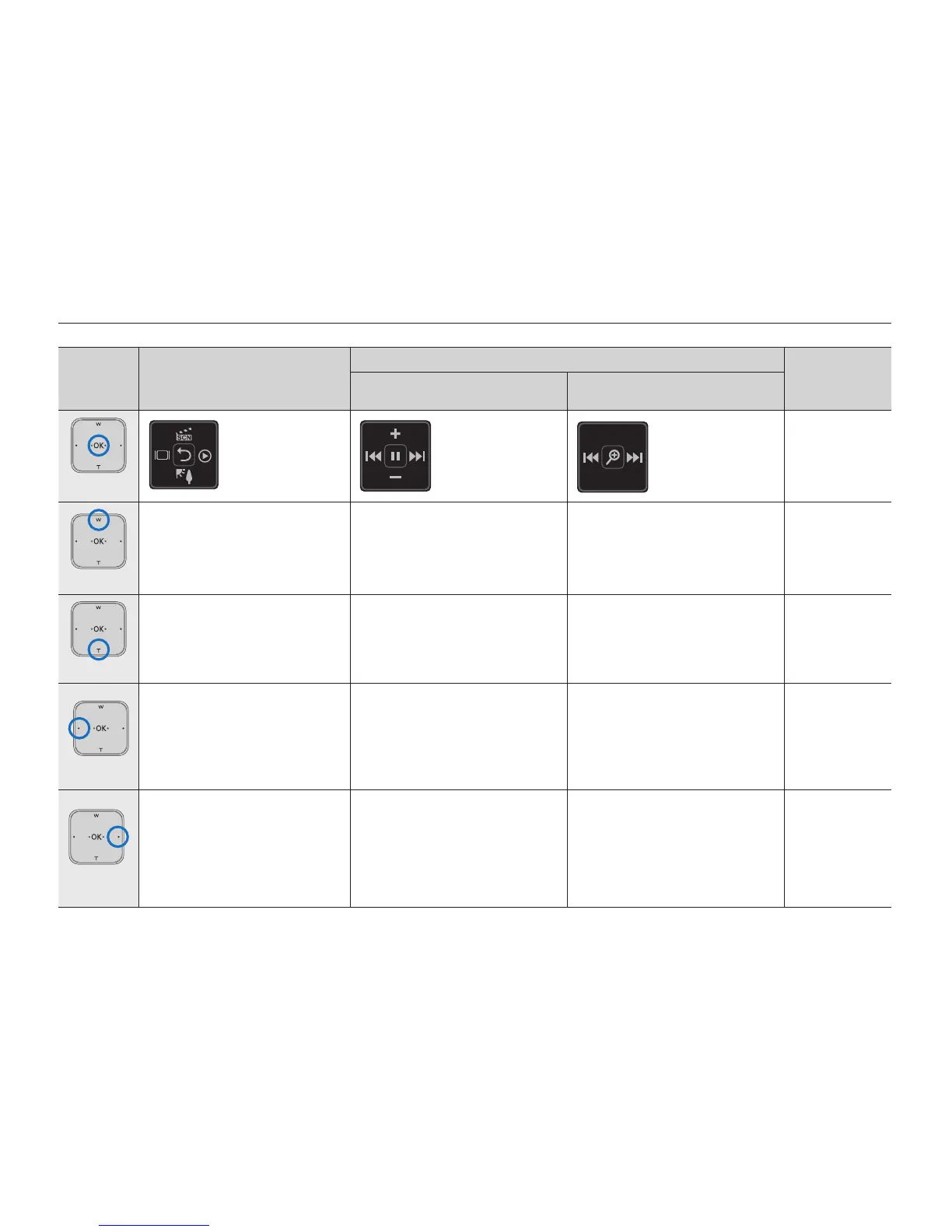
Button Record mode
Play mode
Menu
selection
Video play mode:
Single view
Photo play mode:
Single view
OK
- Access the
shortcut menu
- Confirm selection
- Exit the shortcut
menu
- Access the
shortcut menu
-
Playback / Pause
- Access the
shortcut menu
- Playback /
Playback zoom
(x2.0 - x5.0)
Confirms
selection
▲(W)
- Digital zoom (wide)
- iSCENE
(in the shortcut menu)
Each time the
▲
button is
touched, the iSCENE mode
changes.
lncreases the volume
-
Moves the
cursor up
▼(T)
- Digital zoom (tele)
- Back Light
(in the shortcut menu)
Touching the
▼
button toggles
the back light on or off.
Decreases the volume
-
Moves the
cursor down
◄(•)
- Display
(in the shortcut menu)
Each time the
◄
button is
touched, the following on-
screen information display
modes appear: simple display
full display
display off
- Search playback RPS
(Reverse Playback Search)
rate: x2x4x8x16x32
-
Previous skip playback
- Frame-by- frame playback
- Reverse slow motion playback
rate: x1/2x1/4x1/8
Previous image
Moves to the
previous menu
►(•)
- Quick View
(in the shortcut menu)
You can view the most recently
recorded video or photo right
after your recording.
➥
page 33
- Search playback FPS
(Forward Playback Search)
rate: x2x4x8x16x32
-
Next skip playback
- Frame-by- frame playback
- Forward slow motion playback
rate: x1/2x1/4x1/8
Next image
Moves to the
next menu
preparation
24_English







 To Next Page