You can record on a memory card, so you should insert the desired storage media before starting recording or
playback.
You can use SDHC and SD cards on your camcorder.
(Some cards are not compatible depending on the memory card manufacturer and memory card type.)
Before inserting or ejecting the memory card, turn the camcorder off.
INSERTING / EJECTING THE MEMORY CARD
Inserting a memory card
1. Turn the camcorder off.
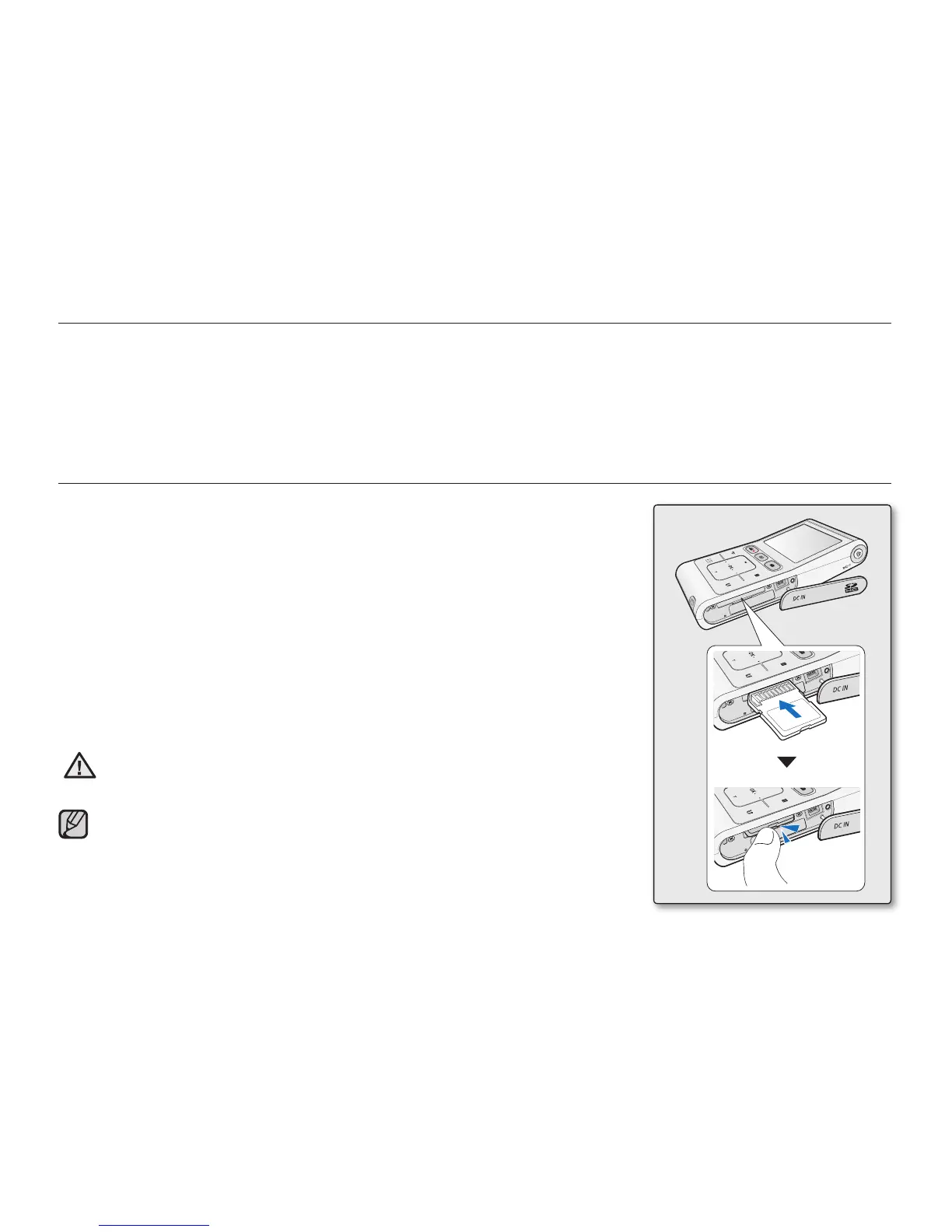
2. Open the memory card cover as shown in the fi gure.
3. Insert the memory card into the memory card slot until it softly clicks
in the direction of the arrow shown in the fi gure.
4. Close the cover.
Ejecting a memory card
1. Turn the camcorder off.
2. Open the memory card cover as shown in the fi gure.
3. Slightly push the memory card inwards to pop it out.
4. Pull the memory card out of the memory card slot and close the cover.
CAUTION
As shown in the fi gure, be sure to slide the memory card inwards with the label
facing down.
Never format a memory card using a PC.
Do not eject a memory card while it is being used in the camcorder.
The memory card and its data may be damaged.
•
•
•
•
•
about the storage media
English_27







 To Next Page