EasyManua.ls Logo

Samsung HMX-U10 - Shutter Sound; Auto Power Off

Samsung HMX-U10
102 pages
Print Icon
To Next Page IconTo Next Page
To Previous Page IconTo Previous Page
Loading...
English_59
Shutter Sound
You can turn the shutter sound on or off.
settings contents on-screen display
Off
Disables the function. None
On
When on, the shutter will sound with each press of the Photo (
) button. None
Auto Power Off
To save battery power, you can set the "Auto Power Off" function which turns off the camcorder if there is no
operation for a certain period of time.
settings contents on-screen display
Off The camcorder does not turn off automatically. None
5 Min
For power saving purpose, the camcorder will automatically turn power off if there is no
operation for 5 minutes in STBY mode or in thumbnail index view.
None
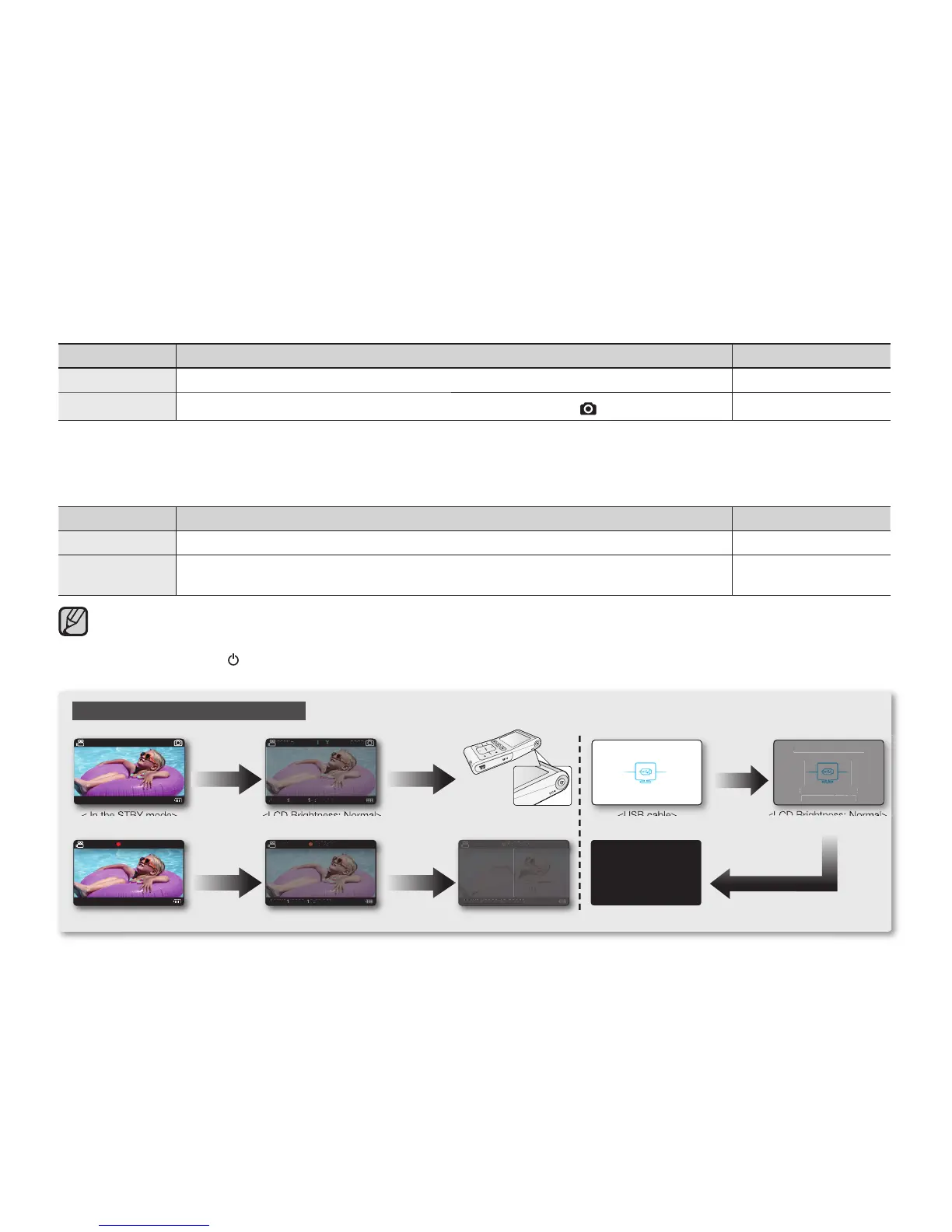
Auto Power Off will be disabled in the following cases:
- If the DC power cable (AC power adaptor, USB cable) is connected.
- During recording, playing (pause excluded), or a slideshow.
Press the Power (
) button to restart the camcorder.
Auto LCD Off / Auto Power Off
< In the STBY mode>

< In the STBY mode>
< In the STBY mode>
90Min
JAN/01/2009 12:00AM
3058
STBY
0:00:00
90Min
JAN/01/2009 12:00AM
<During recording>
<Power Off><LCD Brightness: Normal>
<LCD Brightness: Normal>
90Min
JAN/01/2009 12:00AM
3058
STBY
90Min90Min
JAN/01/2009 12:00AM
JAN/01/2009 12:00AM
30583058
STBYSTBY
After 2 minutes After 3 minutes
0:02:00
90Min
JAN/01/2009 12:00AM
<LCD Brightness: Normal>
After 2 minutes After 3 minutes
0:02:000:02:00
90Min90Min
JAN/01/2009 12:00AM
JAN/01/2009 12:00AM
0:05:00
90Min
JAN/01/2009 12:00AM
<LCD screen is darkened.>
0:05:000:05:00
90Min90Min
JAN/01/2009 12:00AM
JAN/01/2009 12:00AM
After
2 minutes
<Back Light off / LCD Off>
After 3 minutes
<USB cable>
<USB cable
>
<USB cable
>
PC Software is operating
Select Share button.
you can upload fi le
<LCD Brightness: Normal>
<LCD Brightness:
Normal>
<LCD Brightness:
Normal>
PC Software is operating
Select Share button.
you can upload le
PC Software is operating
Select Share button.
you can upload fi le

Table of Contents

Other manuals for Samsung HMX-U10

Related product manuals