74_English
connecting to other devices
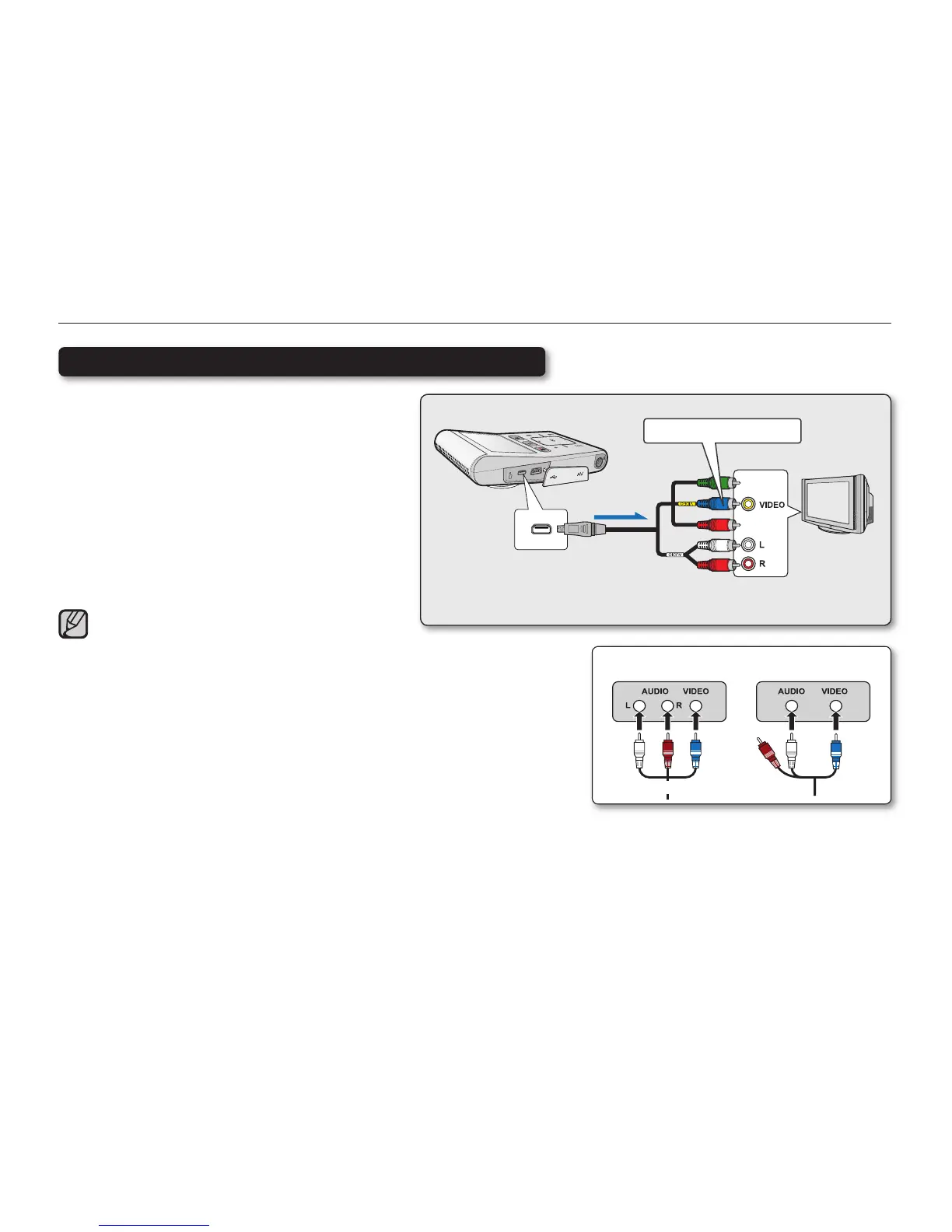
This connection is used when downconverting
recorded HD-quality images to SD-quality
images for playback. When playing back HD-
quality (1080/30p, 720/60p, or 720/30p) videos
on a SDTV, the images are downconverted to
480/60p standard defi nition images.
1. Set “TV Out” to “Composite.”
➥
page 60
2. Co
nne
ct your camcorder to a TV with the
Component/AV (Video, Audio L/R) cable.
When connecting the component/AV, make sure to
match the color of the cable plugs to the TV jacks. The
Blue plug must be connected to the Video input on your
TV (usually Yellow).
Stereo Type
Monaural Type
White
Red
White
Connecting to a SD (standard defi nition) TV (16:9/4:3)
BlueBlue
Standard TV
Camcorder
Component/AV cable
Signal fl ow
Blue plug with the yellow label







 To Next Page