EasyManua.ls Logo

Samsung HW-H751 - User Manual

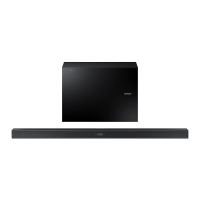
Samsung HW-H751
67 pages
Print Icon
To Next Page IconTo Next Page
Loading...
Wireless Audio - Soundbar
Imagine the possibilities
Thank you for purchasing this Samsung product.
To receive a more complete service, please register your product at
www.samsung.com/register
User manual
HW-H750
HW-H751

Questions and Answers

  • W
    William CarpenterAug 16, 2025
    Why is my Samsung Speakers remote control not working?
    • C
      carlosgreeneAug 16, 2025
      If the remote control for your Samsung Speakers isn't working, first replace the batteries with new ones. If that doesn't solve the problem, try moving closer to the main unit.
  • S
    Scott DavilaAug 19, 2025
    What to do if my Samsung Speaker System has no sound?
    • J
      Jose SuttonAug 19, 2025
      If your Samsung Speaker System isn't producing sound, ensure that the Mute function is off by pressing the Mute button. Also, check that the volume isn't set to the minimum and adjust it accordingly.
  • R
    robert84Aug 22, 2025
    What to do if my Samsung HW-H751 Speakers have no sound?
    • T
      Terri ChristensenAug 22, 2025
      If your Samsung Speakers aren't producing sound, first check if the Mute function is activated. If it is, press the Mute button to deactivate it. Also, make sure the volume isn't set to the minimum. If it is, adjust the volume to a comfortable level.
  • S
    smithjeffreyAug 26, 2025
    Why is TV SoundConnect pairing failing on my Samsung Speakers?
    • Z
      zguzmanAug 26, 2025
      If the TV SoundConnect (TV pairing) failed on your Samsung Speakers, ensure your TV supports TV SoundConnect, which is available on some Samsung TVs released from 2012 onwards. Update your TV's firmware to the latest version. If an error occurs, contact the Samsung call centre or reset the TV SoundConnect connection by pressing and holding the ?? button for 5 seconds.
  • B
    brandonbrownAug 28, 2025
    Why does my Samsung Speaker System remote control not work?
    • C
      Christina MillerAug 28, 2025
      If your Samsung Speaker System's remote control isn't working, first replace the batteries with new ones. If that doesn't solve the problem, try moving closer to the main unit, as the distance may be too far.
  • A
    Adam CurtisAug 31, 2025
    Why is TV SoundConnect failing on my Samsung Speaker System?
    • M
      Michael BarnesAug 31, 2025
      If TV SoundConnect is failing on your Samsung Speaker System, first ensure your TV supports TV SoundConnect (available on some Samsung TVs released from 2012). Update your TV's firmware to the latest version. If errors persist, press and hold the ?? button for 5 seconds to reset the TV SoundConnect connection.
  • E
    Evelyn MartinSep 3, 2025
    How to stop my Samsung Speaker System subwoofer from droning?
    • W
      William RobinsonSep 3, 2025
      If the subwoofer on your Samsung Speaker System drones and vibrates noticeably, adjust its value using the WOOFER button on your remote control. You can set the value between SW-6 and SW+6.
  • V
    Valerie LewisSep 6, 2025
    What to do if the red LED on my Samsung HW-H751 Speakers subwoofer is blinking?
    • L
      Linda WagnerSep 6, 2025
      If the red LED on your Samsung Speakers subwoofer is blinking and no sound is coming out, it might not be properly connected to the main unit. Try reconnecting the subwoofer.
  • M
    moralesaaronSep 9, 2025
    How to stop my Samsung Speakers subwoofer from droning?
    • T
      Tammy GraySep 9, 2025
      To address the issue of your Samsung Speakers subwoofer droning and vibrating noticeably, use the WOOFER button on your remote control to adjust the value between SW-6 and SW+6.
  • V
    Vanessa MontgomerySep 12, 2025
    What to do if a function button on my Samsung HW-H751 isn't working?
    • L
      Lucas HardySep 12, 2025
      If a function on your Samsung Speakers doesn't work when you press the button, static electricity in the air might be the cause. Disconnect the power plug and then reconnect it.

Summary

Features Overview

TV SoundConnect

Connects TV audio to Soundbar via Bluetooth for wireless listening and sound control.

HDMI Connectivity and ARC

Transmits video/audio, supports ARC for TV sound output to Soundbar.

Wireless Subwoofer

Connects subwoofer wirelessly to the main unit via a compact module.

USB Host Support

Enables playback of music files from USB storage devices.

Bluetooth Functionality

Connects Bluetooth devices for wireless high-quality stereo sound playback.

Multiroom Link Setup

Connects multiple Samsung Multiroom devices wirelessly via a smart device.

Safety Information and Precautions

General Installation Precautions

General precautions for product installation, ventilation, and avoiding heat/sunlight.

Moisture, Heat, and Interference Precautions

Protect from moisture, excess heat, strong magnetic/electric fields, and handle condensation.

Battery Disposal and Safety

Proper disposal of batteries, avoiding fire, disassembly, and explosion hazards.

Remote Control Guide

Remote Control Buttons and Functions

Explains buttons like SOURCE, MUTE, REPEAT, Skip Forward, AUDIO SYNC, DIMMER/Anynet+, TREBLE BASS.

Connections and Setup

Connecting the Wireless Subwoofer

Instructions for wirelessly linking the subwoofer to the main unit, including ID SET procedure.

Connecting External Devices via HDMI

How to connect devices using HDMI IN, HDMI OUT (TV), and the ARC function.

Connecting External Devices via Optical;Analog Audio

Instructions for connecting via Optical IN or AUX IN ports for audio input.

Functions and Features

Input Mode Selection

Explains selecting input sources (D.IN, AUX, HDMI, BT, TV, USB) and auto-off conditions.

ARC (HDMI OUT) Function

How to use the ARC function for digital audio signal transfer to the HDMI OUT (ARC) port.

Connecting with Bluetooth Function

Steps to connect a Bluetooth device to the Soundbar for wireless music playback.

Connecting with TV SoundConnect Function

How to connect the Soundbar to a compatible Samsung TV for TV sound output.

USB Playback and Compatibility

How to play music from USB devices, including file format compatibility and restrictions.

Software Update via USB

Instructions for updating the Soundbar's firmware using a USB storage device.

Multiroom Link Operations

Installing the Samsung Multiroom App

Guide to downloading and installing the Samsung Multiroom App for music playback control.

Connecting Without a Wireless Router

Instructions for connecting the Soundbar to a network using a LAN cable, without a wireless router.

Connecting via WPS Method

Steps to connect the Soundbar to a wireless network using the WPS button on the router.

Troubleshooting Common Issues

Unit Power and Button Function Issues

Troubleshooting steps for when the unit won't turn on or buttons are unresponsive.

Sound Production Problems

Steps to resolve issues where no sound is produced, checking mute and volume.

Remote Control Malfunctions

Troubleshooting steps for remote control issues, checking batteries and proximity.

TV SoundConnect Pairing Failures

Solutions for TV SoundConnect pairing issues, including firmware updates and reset.

Subwoofer Connectivity and Vibration Issues

Troubleshooting subwoofer connection problems and adjusting noticeable vibration.

HUB Connectivity Problems

Troubleshooting steps for HUB connectivity issues, including power, LAN, and reset procedures.

Soundbar Network Connectivity Issues

Troubleshooting Soundbar network connection problems, especially when used with a HUB.

Samsung Contact and Disposal Information

Samsung HW-H751 Specifications

General IconGeneral
Audio decodersDolby Digital, DTS
RMS rated power320 W
Audio output channels4.1 channels
Surround modes quantity4
Audio Return Channel (ARC)Yes
Soundbar speaker RMS power160 W
Subwoofer connectivityWireless
Receiver included-
FM radioNo
Product colorSilver
Audio formats supportedAAC, FLAC, MP3, OGG, WAV, WMA
Consumer Electronics Control (CEC)Anynet+
Apple docking compatibilityNot supported
Soundbar dimensions (WxDxH)943 x 123 x 57 mm
Subwoofer dimensions (WxDxH)305 x 305 x 401 mm
USB 2.0 ports quantityUSB 2.0 ports have a data transmission speed of 480 Mbps, and are backwards compatible with USB 1.1 ports. You can connect all kinds of peripheral devices to them.
Connectivity technologyWired & Wireless
Package weight18000 g
Weight and Dimensions IconWeight and Dimensions
Soundbar weight3300 g
Subwoofer weight10600 g

Related product manuals