13
Connecting the Power Cord
• Connect the power cord after all cables are connected.
• Before connecting external devices, be sure to disconnect the power cord.
• AC power cords may not be provided depending on the model. Contact the dealer from
whom you purchased the product if you want to be purchased separately.
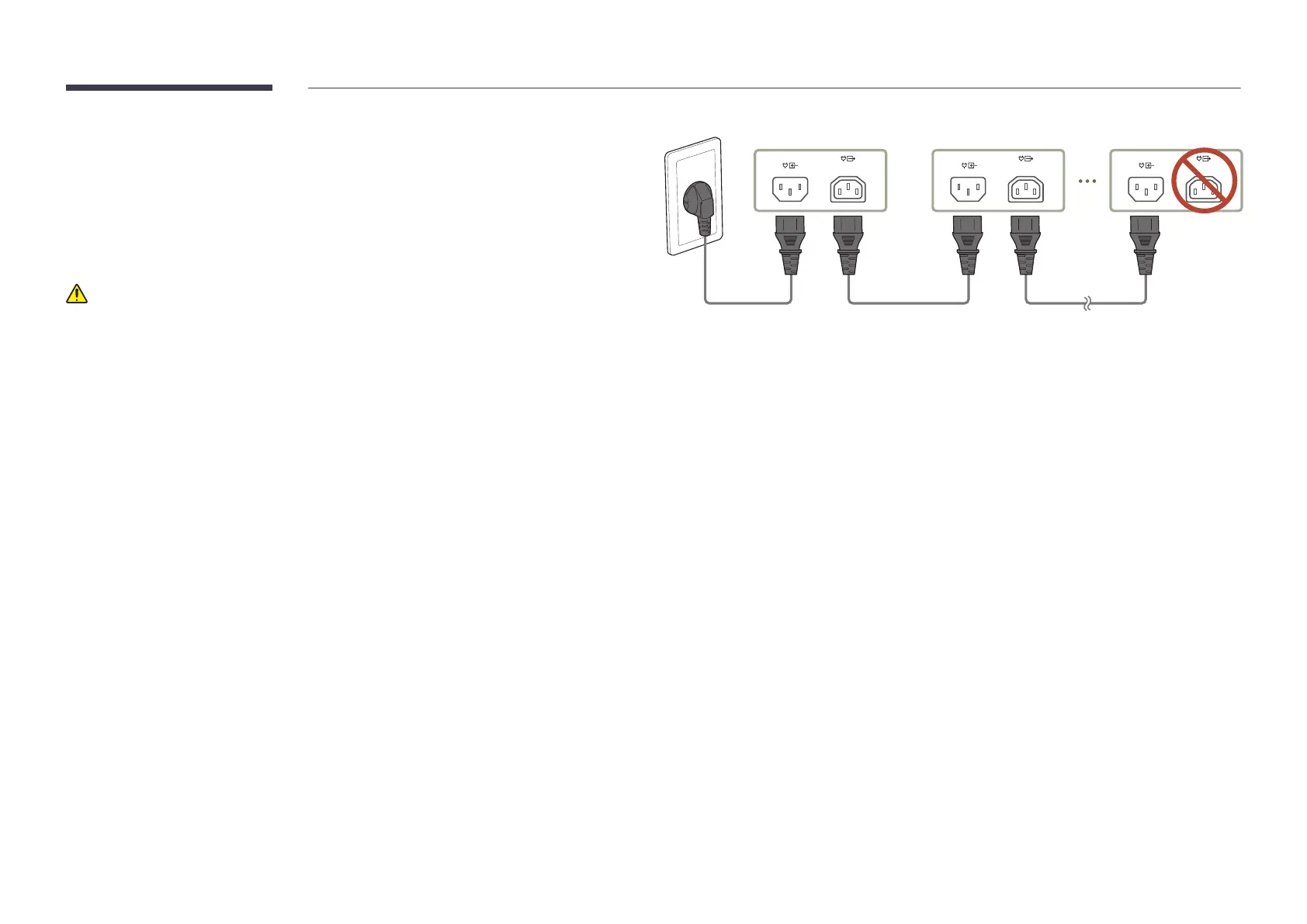
Precautions when connecting power
If using 110V power, a maximum of 4 cabinets can be connected to the power source.
If using 220V power, a maximum of 8 cabinets can be connected to the power source.
• For detailed information, visit the install guide.
"
Exceeding the recommended maximum number of devices may produce overvoltage,
causing the circuit breaker to trip down or the product to be damaged. Make sure that the
number of connected devices does not exceed the recommended maximum number.
"
Samsung is not liable for any problems incurred by connecting devices that exceed the
recommended maximum number.
100-240V
50/60Hz (Max 5.9A)
100-240V
50/60Hz (Max 5.9A)
100-240V
50/60Hz (Max 5.9A)
First cabinet Second cabinet Last cabinet
Do not use


 To Next Page