English - 14
SETTING THE TIME
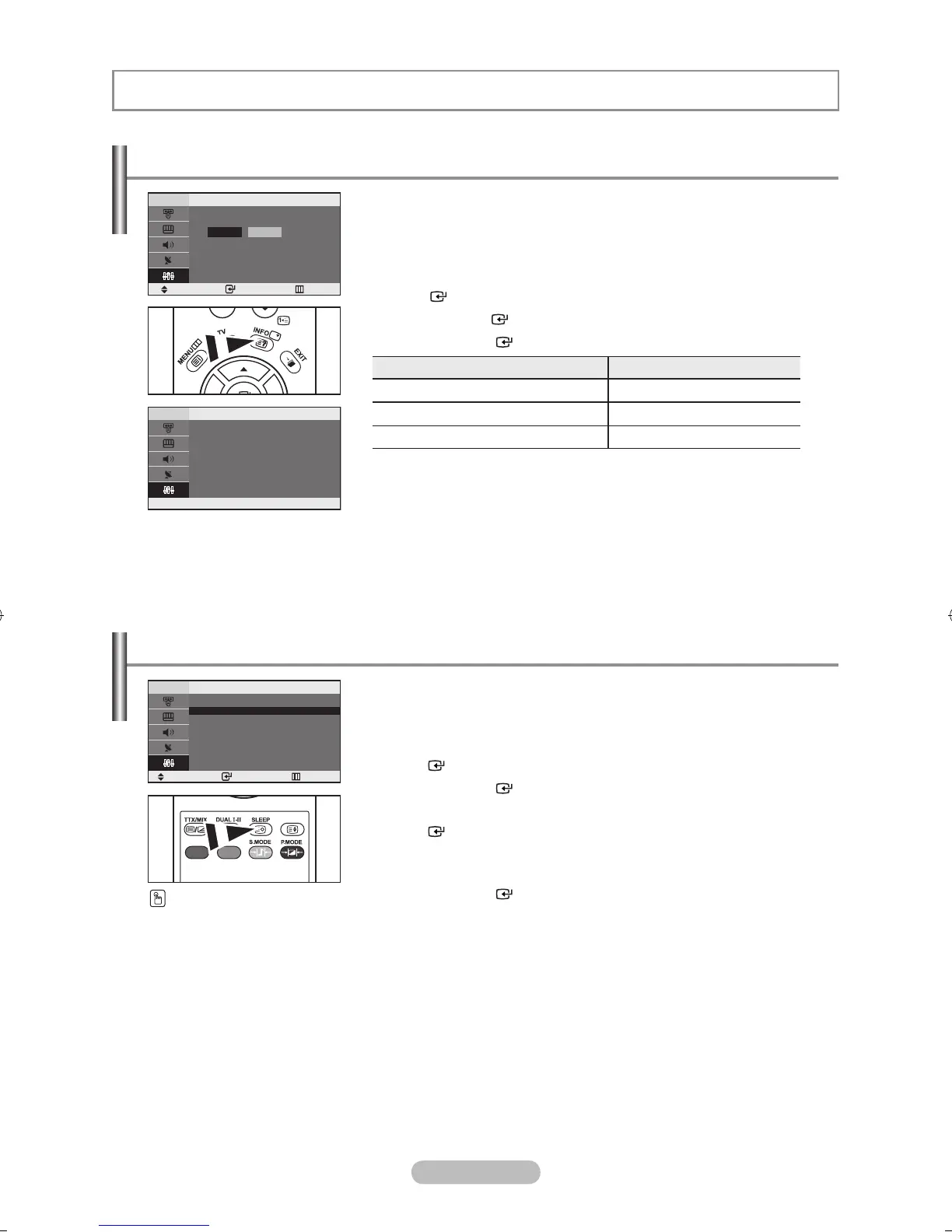
You can set the TV’s clock so that the current time is displayed
when you press the INFO button. You must also set the time if you
wish to use the automatic On/Off timers.
1. Press the MENU button to display the menu.
Press the ▲ or ▼ button to select “Setup”, then press the
ENTER button.
2. Press the ENTER button to select “Time”.
3. Press the ENTER button to select “Clock Set”.
4.
To... Press the...
Move to “Hour” or “Minute”
◄ or ► button.
Set the “Hour” or “Minute”
▲ or ▼ button.
Confirm the setting ENTER button.
5. Press the EXIT button to exit.
If you disconnect the power cord, you have to set the clock again.
You can also set hour and minute by pressing the number buttons on the
remote control.
➣
➣
Setting and Displaying the Current Time
You can select a time period of between 30 and 180 minutes after
which the television automatically switches to standby mode.
1. Press the MENU button to display the menu.
Press the ▲ or ▼ button to select “Setup”, then press the
ENTER button.
2. Press the ENTER button to select “Time”.
3. Press the ▲ or ▼ button to select “Sleep Timer”, then press the
ENTER button.
4. Press the ▲ or ▼ button repeatedly until the desired time appears
(Off, 30, 60, 90, 120, 150, 180).
Press the ENTER button.
The TV automatically switches to standby mode when the timer reaches 0.
5. Press the EXIT button to exit.
➣
Setting the Sleep Timer
Press the SLEEP button
on the remote control
repeatedly until the
appropriate time interval
appears.
Move Enter Return
Clock Set
Hour Minute
0000
P1
Mono
Picture : Dynamic
Sound : Standard
00:00
Clock Set 00: 00
Sleep Timer : Off
On Ti m e r : Off
Off Ti m er : O ff
Move Enter Return
Time
BN68-1177N-Eng-0824.indd 14 2007-08-24 �� 4:04:43



 To Next Page
 Loading...