English - 26
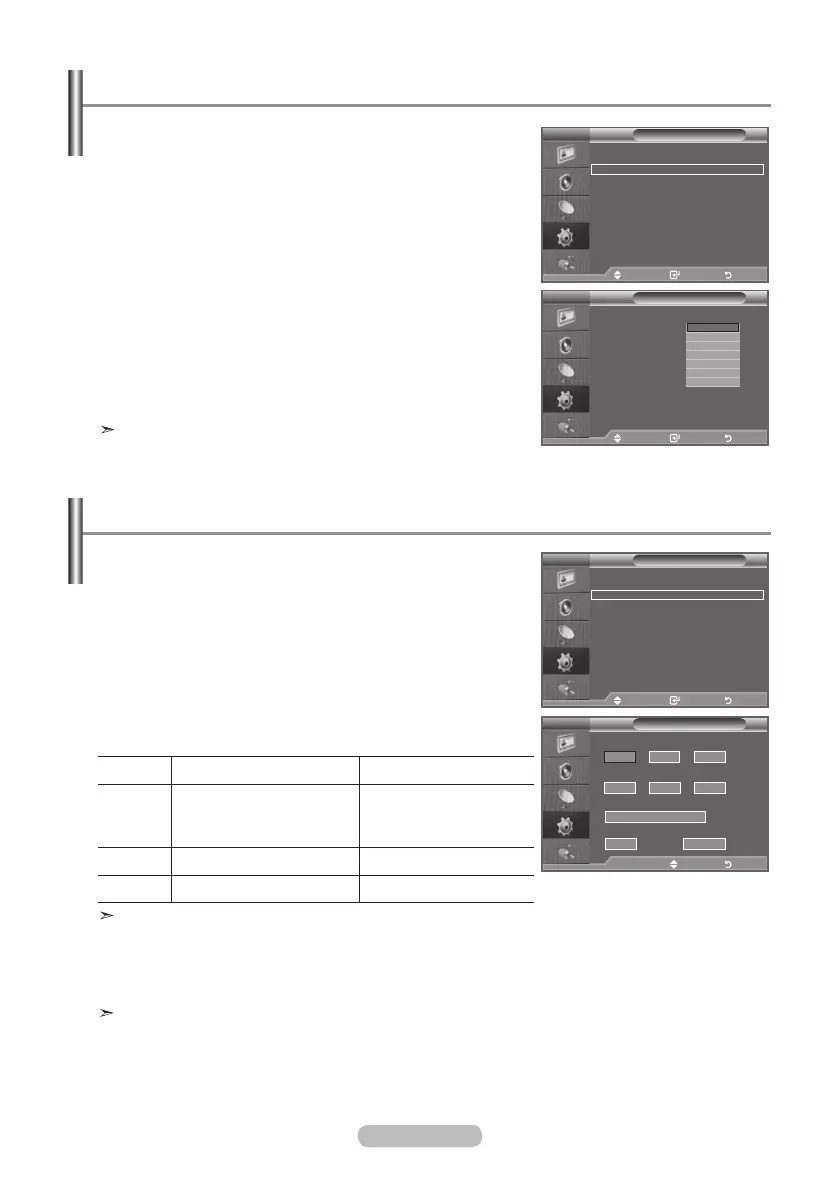
You can select a time period of between 30 and 180 minutes
after which the television automatically switches to standby
mode.
1. Press the MENU button to display the menu.
Press the ▲ or ▼ button to select "Setup", then press the
ENTER button.
2. Press the ▲ or ▼ button to select "Time", then press the
ENTER button.
3. Press the ▲ or ▼ button to select "Sleep Timer", then press
the ENTER button.
4. Press the ▲ or ▼ button repeatedly until the desired time
appears (Off, 30, 60, 90, 120, 150, 180).
Press the ENTER button.
5. Press the EXIT
button to exit.
The TV automatically switches to standby mode when the
timer reaches 0.
Setting the Sleep Timer
1. Press the MENU button to display the menu.
Press the ▲ or ▼ button to select "Setup", then press the
ENTER button.
2. Press the ▲ or ▼ button to select "Time", then press the
ENTER button.
3. Press the ▲ or ▼ button to select "Timer 1", "Timer 2",
"Timer 3", then press the ENTER button.
4. Press the ▲ or ▼ button to adjust “Hour”, then press the ►
button to move to the next step.
Set other items using the same method as above.
Yes/No Press the ▲or▼ button
Repeat Select a Once, Sat~Sun,
Mon~Sat, Mon~Fri,
Everyday
Press the ▲or▼ button
Volume Adjust a 0~100 Press the ▲or▼ button
Programme
Adjust a Programme Press the ▲or▼ button
When finished, press the RETURN button to return.
• The current time will appear every time you press the INFO button.
• You can set the hour, minute, directly by pressing the number buttons on the remote control.
5. Press the EXIT
button to exit.
Auto Power Off
When you set the timer “On”, the TV will eventually turn off, if no controls are operated for 3 hours
after the TV was turned on by the timer. This function is only available in timer “On” mode and
prevents overheating, which may occur if a TV is on for too long time.
Switching the Television On and Off Automatically
Mode : Custom
Equalizer
SRS TS XT : Off
Auto Volume : Off
Internal Mute : Off
Reset
Move Enter Return
TV
Setup
Plug & Play
Language : English
Time
Game Mode : Off
Blue Screen : Off
Melody : Medium
PC
Home Theatre PC : Off
Energy Saving : Off
HDMI Black Level : Low
PIP
Move Enter Return
Time
Clock Set : 00 : 00
Sleep Timer :
Timer 1 :
Timer 2 :
Timer 3 :
Off
30
60
90
120
150
180
Move Enter Return
Mode : Custom
Equalizer
SRS TS XT : Off
Auto Volume : Off
Internal Mute : Off
Reset
Move Enter Return
TV
Setup
Plug & Play
Language : English
Time
Game Mode : Off
Blue Screen : Off
Melody : Medium
PC
Home Theatre PC : Off
Energy Saving : Off
HDMI Black Level : Low
PIP
Move Enter Return
TV
Timer 1
On Time
Repeat
Once
Volume
10
01
Programme
00
5
6
00
No
:
Off Time
00 00 No
:
►
Move Adjust Return
TV
BN68-01177H-X0Eng-0807(��).indd 26 2007-08-07 �� 4:22:30


 To Next Page
 Loading...