English - 6
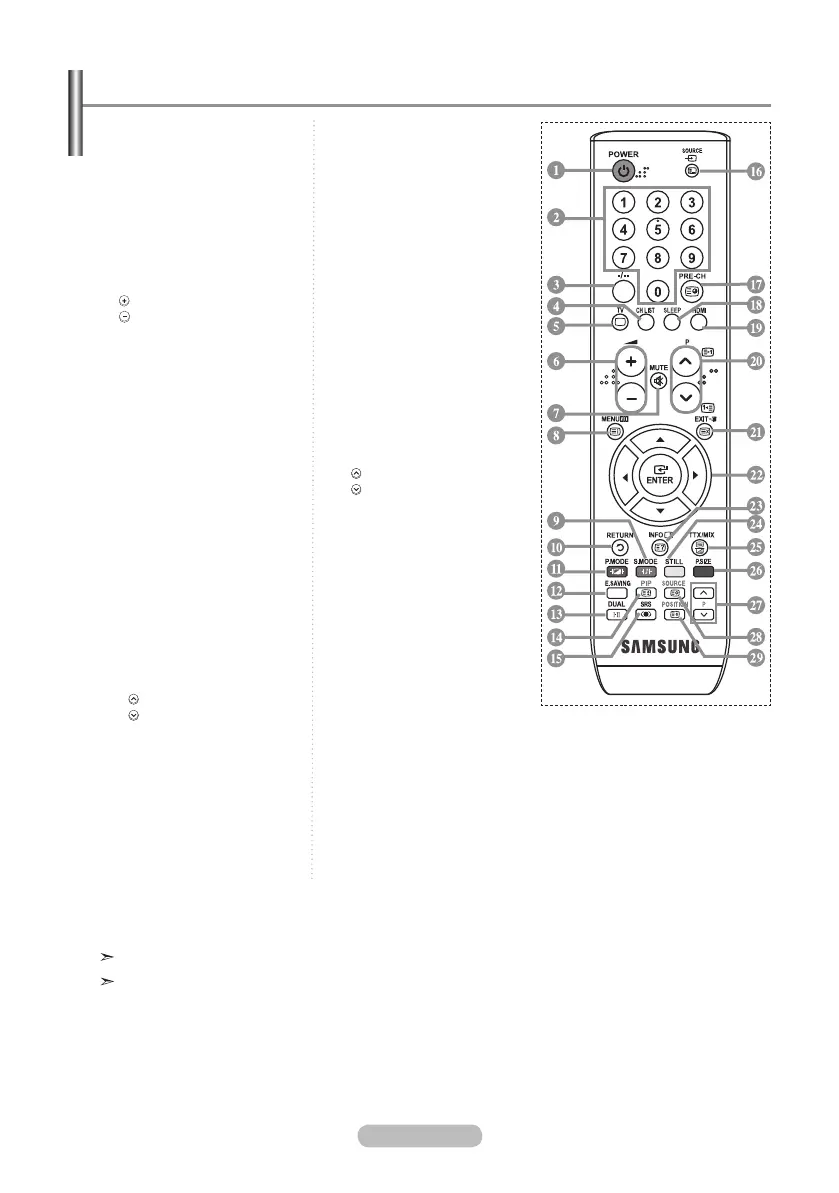
Viewing the Remote Control
The performance of the remote control may be affected by bright light.
This is a special remote control for the visually impaired and has Braille points on the Power,
Channel and Volume buttons.
1 Television Standby button
2 Number buttons for direct
channel access
3
One/Two-digit channel
selection
4 It display "Channel List"
on the screen.
5 Selects the TV mode directly
6 Volume increase
Volume decrease
7 Temporary sound switch-off
8 Menu display and
change confirmation
9 Sound mode selection.
0 Returns to the previous
menu
! Picture effect selection
@ Adjusts screen brightness to
save energy.
# Sound effect selection
% SRS TS XT selection
^ Available source selection
& Previous channel
* Automatic Power-off
( Selects the HDMI mode
directly.
) P : Next channel
P : Previous channel
a Exit the OSD
b Control the cursor in the
menu
c Use to see information on
the current broadcast
d Picture freeze
f Picture size selection
PIP Functions
$
PIP activation or deactivation
g Sub picture (PIP) channel
selection
h Sub picture (PIP) source
selection
i Sub picture (PIP) location
selection
Teletext Functions
5 Exit from the teletext display
8 Teletext index
$ Teletext hold
^ Teletext mode selection
(LIST/FLOF)
& Teletext sub page
) P : Teletext next page
P : Teletext previous page
a Teletext cancel
c Tele text reveal
e Alterna tely select Teletext,
Double or Mix.
h Teletext Store
i Teletext size selection
9!df
Fastext topic selection
BN68-01177H-X0Eng-0807(��).indd 6 2007-08-07 �� 4:22:11


 To Next Page
 Loading...