15
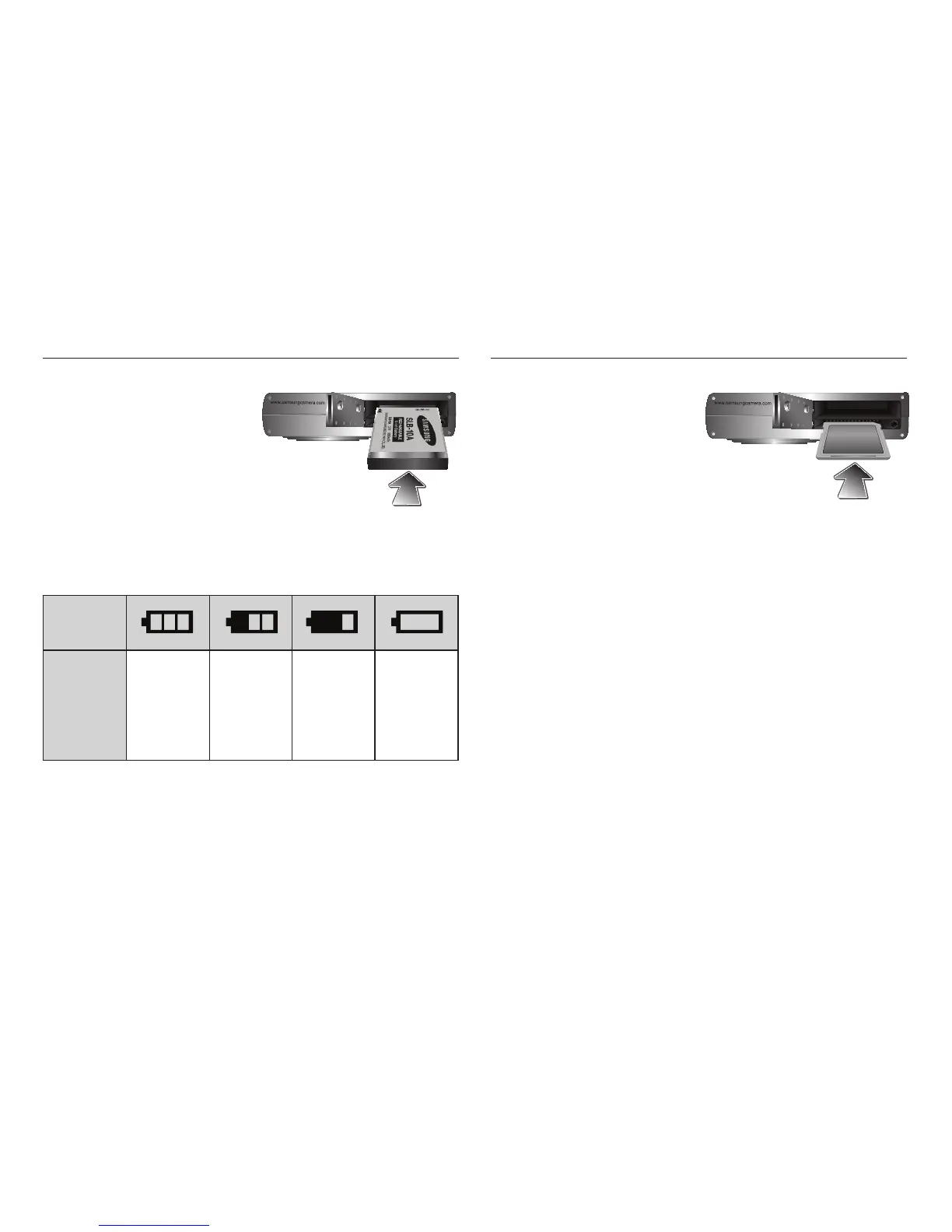
Inserting the battery
Insert the battery as shown
- If the camera does not turn on after
you have inserted battery, please
check whether the battery is inserted
with the correct polarity (+ / -).
- When the battery chamber cover
is opened, do not force it. This
may cause damage to the battery
chamber cover.
Inserting the memory card
Insert the memory card as shown.
- Turn off the camera’s power before
inserting the memory card.
- Have the front of the memory
card facing toward the back of the
camera (LCD monitor) and the card
pins toward the front of the camera
(Lens).
- Do not insert the memory card the wrong way round.
Doing so may damage the memory card slot.
There are 4 indicators for battery condition that are displayed on the LCD
monitor.
Battery
indicator
Battery
status
The battery is
fully charged
Low battery
capacity
(Prepare to
recharge or
use spare
battery)
Low battery
capacity
(Prepare to
recharge or
use spare
battery)
Battery empty
(Recharge
or use spare
battery)








 To Next Page