76
SETTINGS (
)
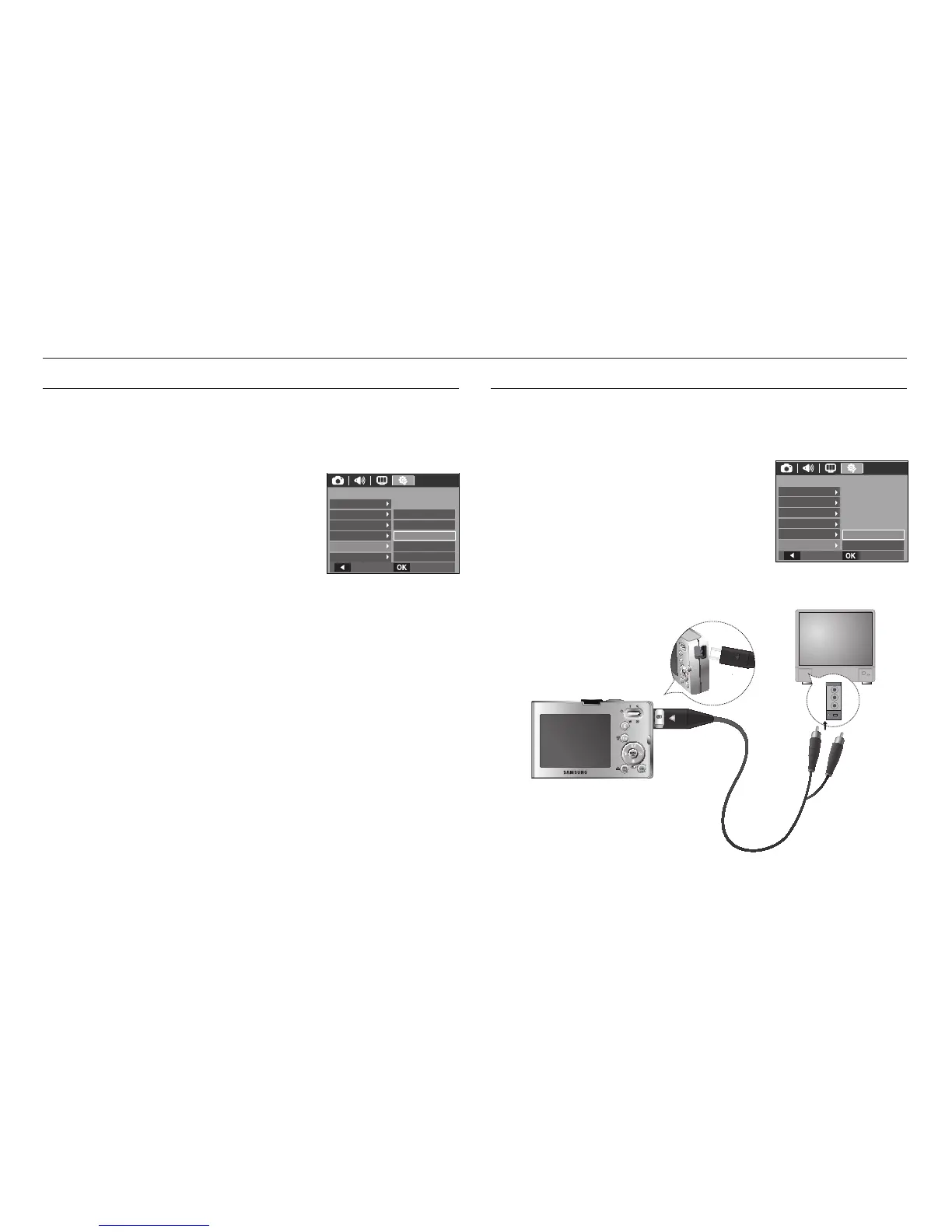
Auto power off
This function switches the camera off after a set amount of time in order to
prevent unnecessary battery drainage.
- Sub menus
[Off] : The power off function
will not operate.
[1, 3, 5, 10 min] : The power will turn off
automatically if not used
for the period of time
specifi ed.
- After replacing the battery, the power off
setting will be preserved.
- Note that the automatic power off function will not operate if the camera
is in the PC / Printer mode, multi slide show, playing back a voice
recording and playing back a movie.
Selecting Video out type
The Movie output signal from the camera can be NTSC or PAL.
Your choice of output will be governed by the type of device (monitor or TV,
etc.) to which the camera is connected. PAL mode can support only BDGHI.
Connecting to an external monitor
When the camera is connected to an external
monitor, the image and menus on the LCD
monitor will be visible on the external monitor
and the LCD monitor of the camera.
Yellow - Video
White - Sound
5min
10min
Off
Back
Set
3min
1min
SETTINGS
Reset
Format
File
Power Off
Video Out
Imprint
Back Set
NTSC
PA L
SETTINGS
Reset
Format
File
Power Off
Video Out
Imprint








 To Next Page