5
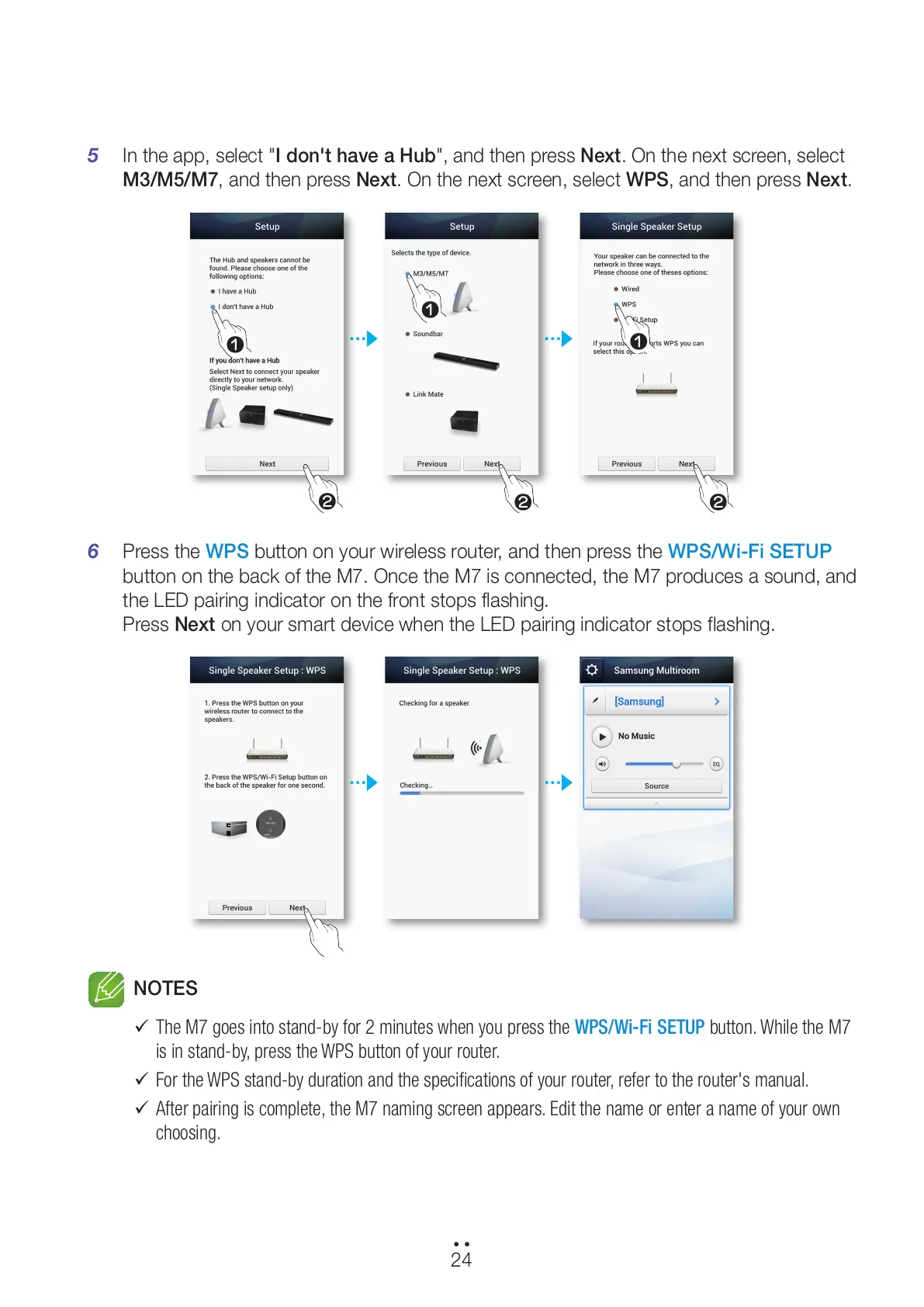
In the app, select "I don't have a Hub", and then press Next. On the next screen, select
M3/M5/M7, and then press Next. On the next screen, select WPS, and then press Next.
6 Press the WPS button on your wireless router, and then press the WPS/Wi-Fi SETUP
button on the back of the M7. Once the M7 is connected, the M7 produces a sound, and
the LED pairing indicator on the front stops flashing.
Press Next on your smart device when the LED pairing indicator stops flashing.
NOTES
9
The M7 goes into stand-by for 2 minutes when you press the WPS/Wi-Fi SETUP button. While the M7
is in stand-by, press the WPS button of your router.
9
For the WPS stand-by duration and the specifications of your router, refer to the router's manual.
9
After pairing is complete, the M7 naming screen appears. Edit the name or enter a name of your own
choosing.
24
44
1
2
1
1
2 2
All manuals and user guides at all-guides.com



 To Next Page