❚
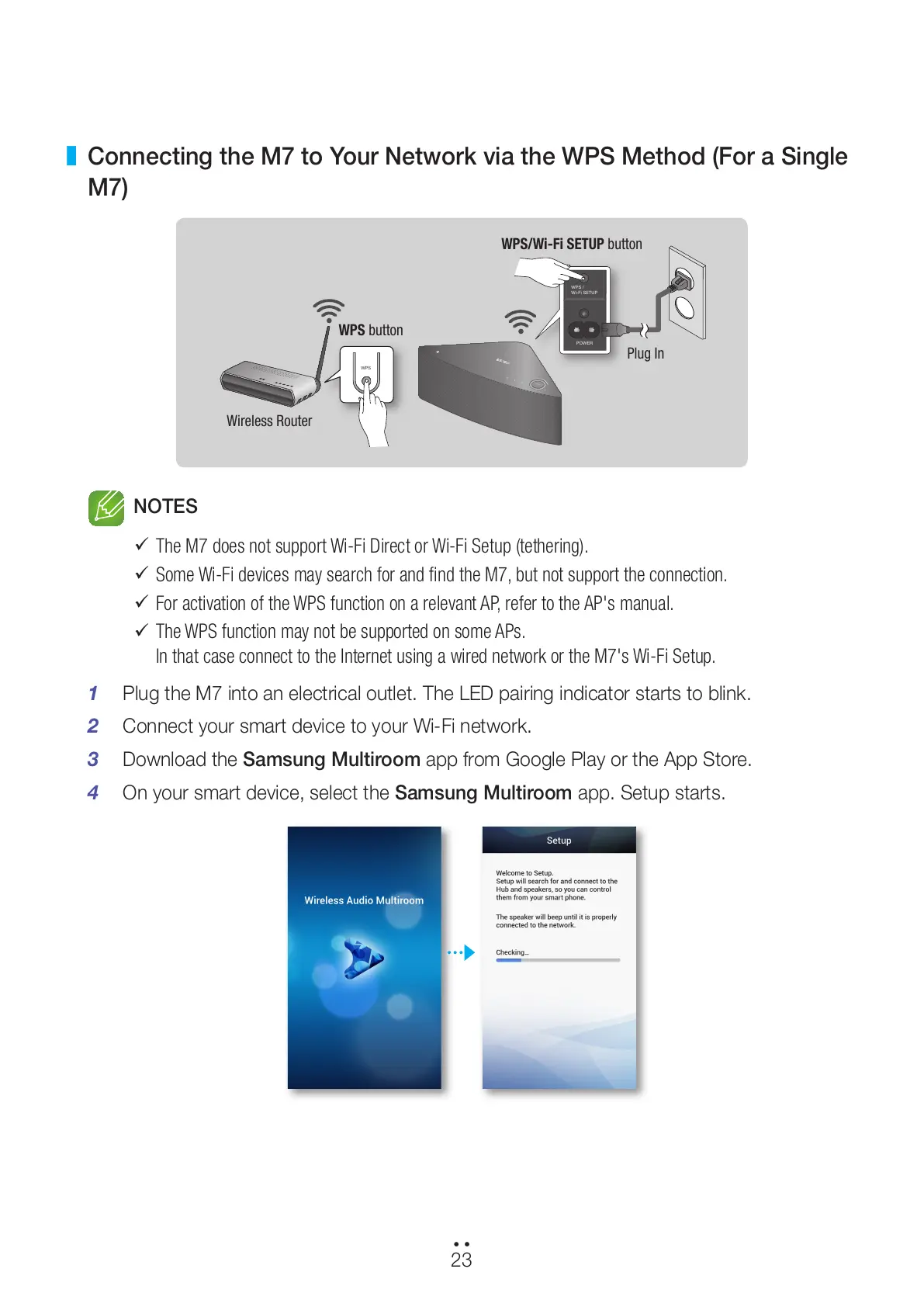
Connecting the M7 to Your Network via the WPS Method (For a Single
M7)
NOTES
9
The M7 does not support Wi-Fi Direct or Wi-Fi Setup (tethering).
9
Some Wi-Fi devices may search for and find the M7, but not support the connection.
9
For activation of the WPS function on a relevant AP, refer to the AP's manual.
9
The WPS function may not be supported on some APs.
In that case connect to the Internet using a wired network or the M7's Wi-Fi Setup.
1 Plug the M7 into an electrical outlet. The LED pairing indicator starts to blink.
2 Connect your smart device to your Wi-Fi network.
3 Download the Samsung Multiroom app from Google Play or the App Store.
4 On your smart device, select the Samsung Multiroom app. Setup starts.
WPS /
Wi-Fi SETUP
POWER
WPS
VOLUME
Wireless Router
WPS button
Plug In
WPS/Wi-Fi SETUP button
23
44
All manuals and user guides at all-guides.com



 To Next Page