GB
8
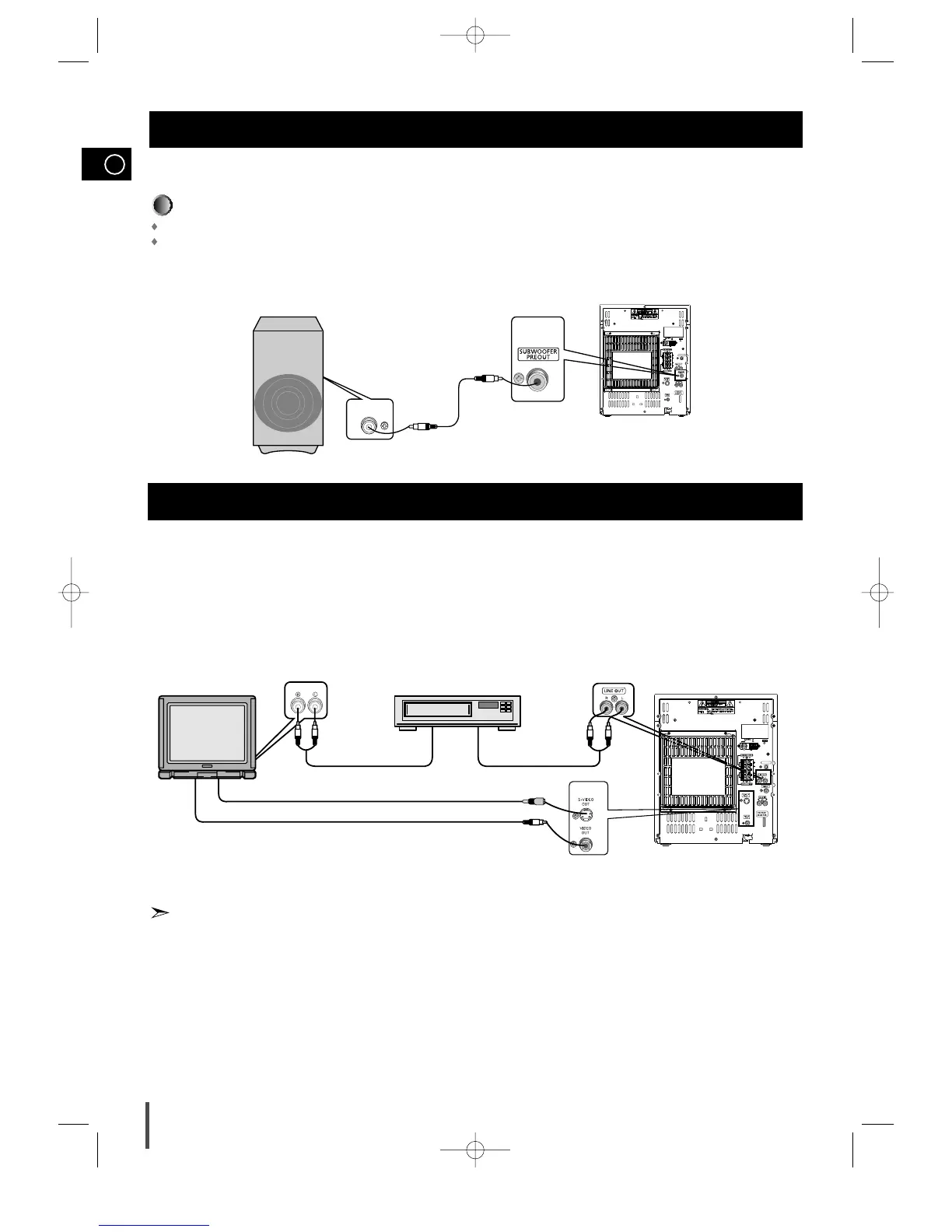
The following show examples of connections commonly used to connect the DVD player with a External Source.
(Example : TV, VCR, DAT CD-RW, etc)
• When S-VIDEO is connected, S-VIDEO has priority.
Connection of the TV monitor and VCR (optional)
LINE IN
TV monitor VCR
Audio cord Audio cord
LINE INLINE OUT
S-Video
Composite video (Supplied)
DIGITAL OUT
Connection of the subwoofer (optional)
The subwoofer generates low-pitched tones.
(Ex. Explosion, the sound of spacecraft flying, the sound of pondering, etc.)
Connect the subwoofer (not supplied)
Connect the subwoofer cord to the SUBWOOFER IN and SUB WOOFER PRE OUT terminal.
Plug the AC Cord on the rear of the SUBWOOFER into an appropriate socket.
MAX-DS750 GB-1~24 9/19/04 10:59 Page 8



 To Next Page