GB
19
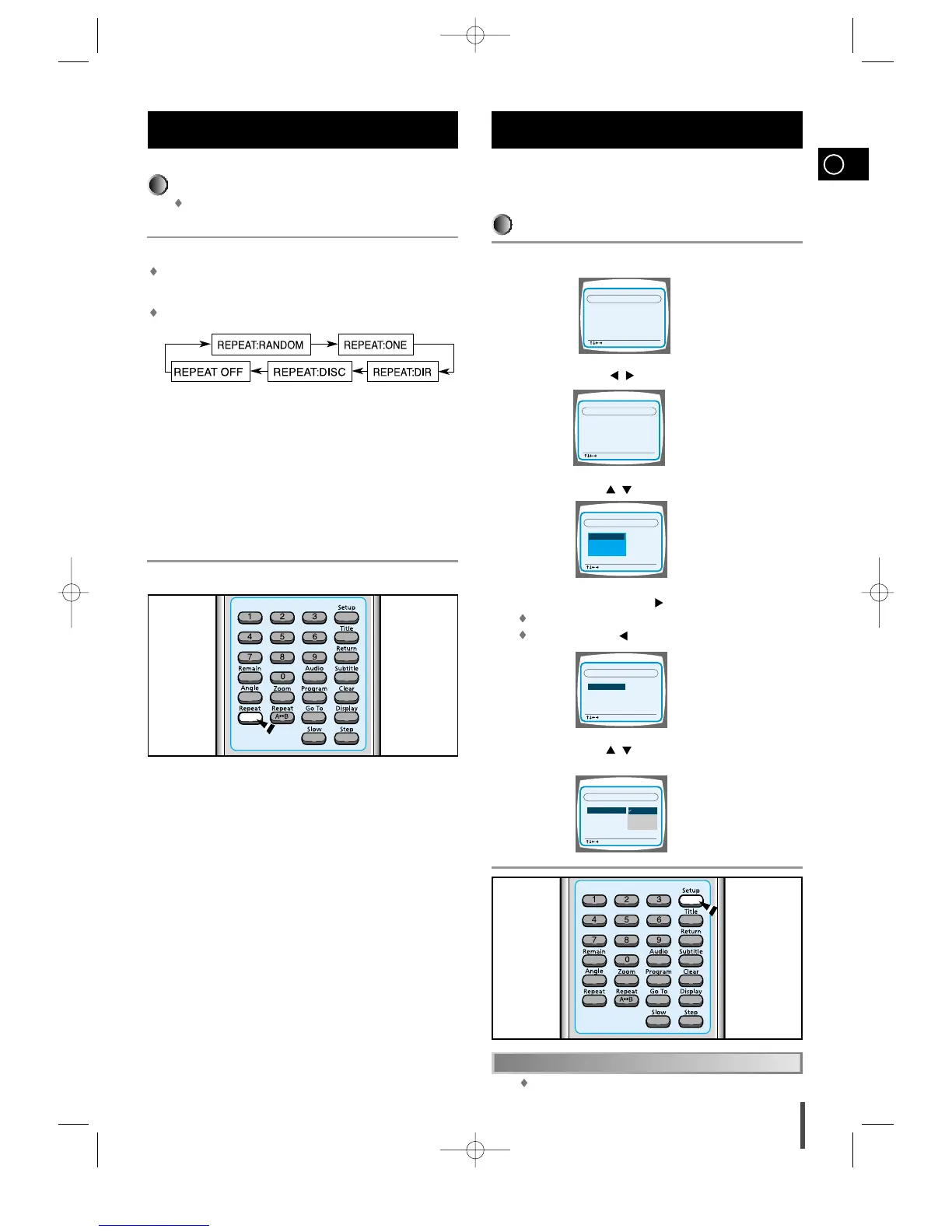
Repeating Playback
On an MP3 disc, Repeat A↔B cannot be used.
You can enjoy only repeat play.
Press the Repeat button.
The indication corresponding to the selected mode appears on the TV
screen.
Each time you press the button, repeat mode changes as follows:
REPEAT:RANDOM
: All tracks recorded on the disc will be played once at
REPEAT:ONE
: Current track will be repeated.
REPEAT:DIR
: Tracks in the current directory will be repeated.
REPEAT:DISC
: All tracks on the disc will be repeated.
REPEAT OFF
: Repeat play is canceled.(Normal play is resumed.)
MP3 Playback (Cont’d)
You can use the DVD player's Setup function to select the TV
screen ratio, rating limit, or digital output mode.
To Set up the System
From the stop mode, press the Setup button.
Press the Left/Right ( / ) button to select the system.
Press the Up/Down ( / ) button to select the desired item.
Press the Enter button or Right ( ) button.
Move to the detailed items.
Then press the Left ( ) button to return to the previous step.
Press the Up/Down ( / ) button to select the desired sub-item
and then press the Enter button.
System Setup
Press the Setup button again.
To End the System Setup
1
2
3
4
5



 To Next Page