While playing a DTS disc, no sound is
reproduced. In this case, connect to an
external amplifier.
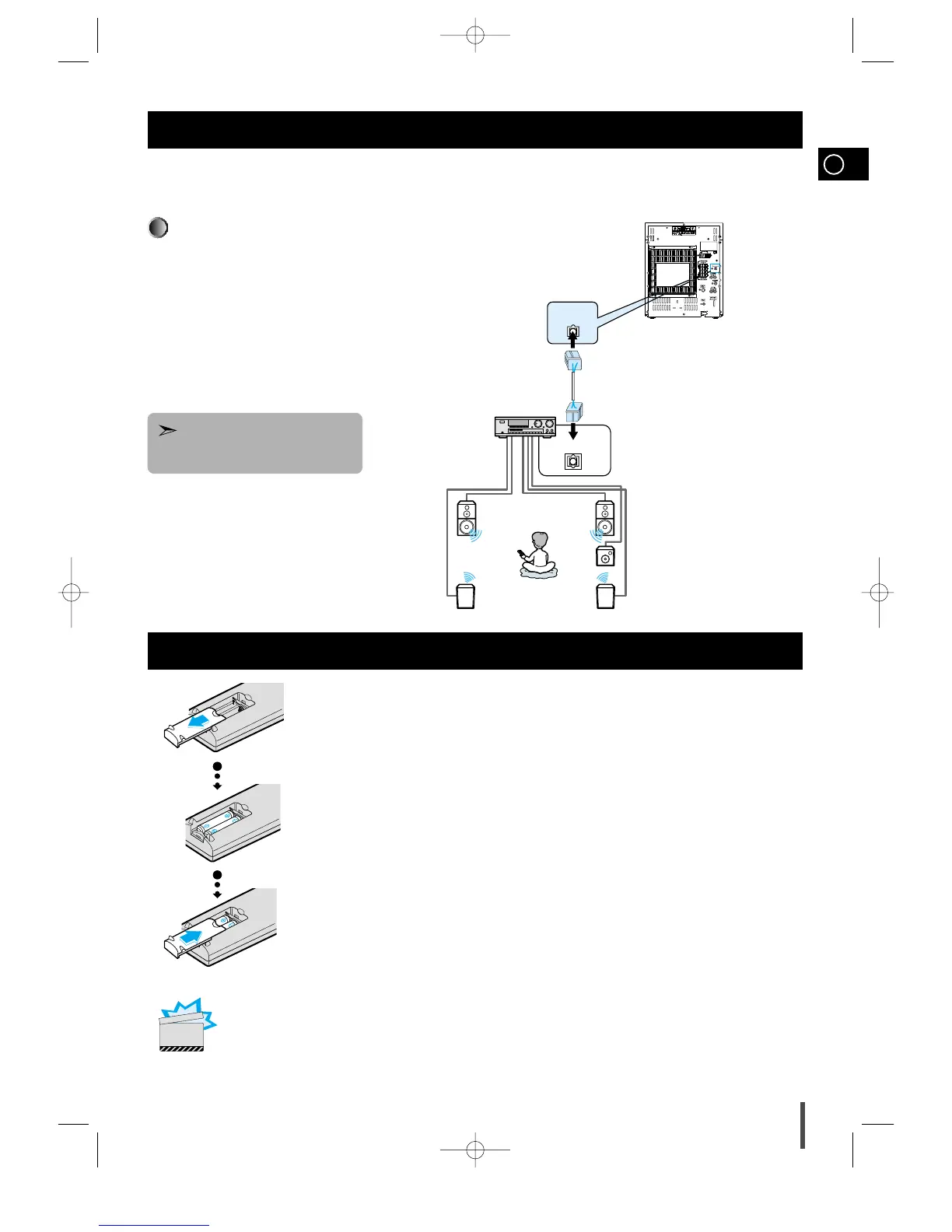
This unit can output DVD/CD digital sound signals
through this jack. Use an optical cable to connect digital
audio equipment. (DAT deck, MD recorder, etc.).
Remove the dust cap (1) from the DVD/CD DIGITAL OUT
jack. Then, connect an optical cable plug to the DVD/CD
DIGITAL OUT jack.
When the DVD/CD DIGITAL OUT jack is not being used
Attach the supplied dust cap.
DVD/CD Digital Out Jack
Remove the battery cover on the back of the remote by
pressing down and sliding the cover in the direction of
the arrow.
1
Insert two 1.5V AAA batteries, paying attention to the
correct polarities (+ and –).
2
Replace the battery cover.
3
Follow these precautions to avoid leaking or cracking cells:
•
Place batteries in the remote control so they match the polarity:(+) to (+)and (–)to (–).
•
Use the correct type of batteries.Batteries that look similar may differ in voltage.
•
Always replace both batteries at the same time.
•
Do not expose batteries to heat or flame.
CAUTION
MAX-DS750 GB-1~24 9/19/04 10:59 Page 9



 To Next Page