23
Repeat Playback
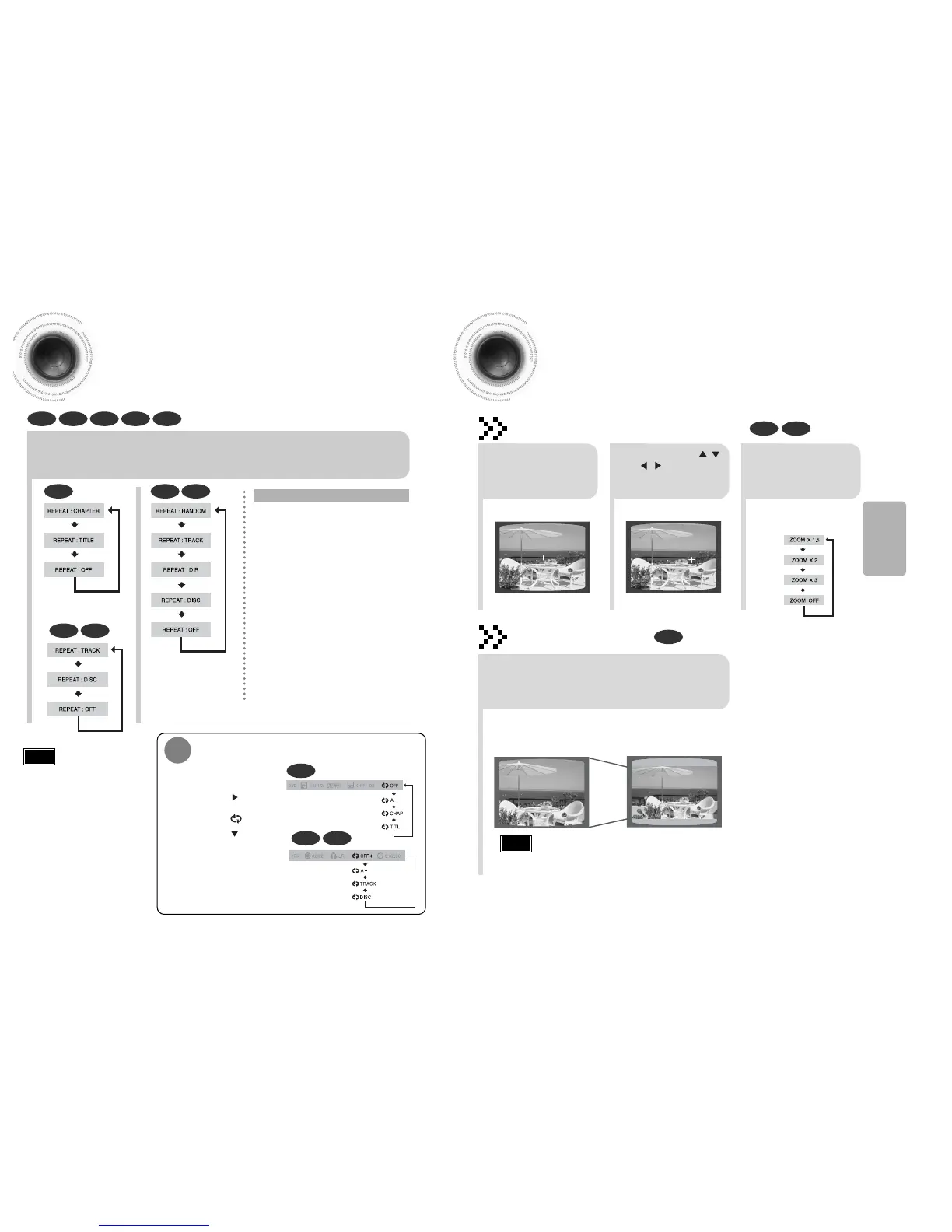
Repeat playback allows you to repeatedly play a chapter, title, track (song), or directory (MP3 file).
DVD
VCD CD
MP3 JPEG
24
OPERATION
Press REPEAT button.
•
Each time the button is pressed during playback, the repeat playback mode changes as follows:
•
Repeat playback operation is not
possible with version 2.0 VCD discs
if PBC is turned on. To use Repeat
Playback on a VCD with PBC, you
should set the PBC to OFF in the
disc menu. (See page 29.)
CHAPTER
Repeatedly plays the selected chapter.
TITLE
Repeatedly plays the selected title.
RANDOM
Plays tracks in random order.
(A track that has already been played may be
played again.)
TRACK
Repeatedly plays the selected track.
DIR
Repeatedly plays all tracks in the selected
folder.
DISC
Repeatedly plays the entire disc.
OFF
Cancels Repeat Playback.
To Select a Repeat Playback Mode in the Disc Information Screen
Press INFO button twice.
1
Press Cursor button to
move to REPEAT
PLAYBACK ( ) display.
2
Press Cursor button
to select the desired
Repeat Playback mode.
3
DVD
VCD CD
*
For MP3 and JPEG discs, you cannot select Repeat
Play from the information display screen.
Press ENTER button.
4
DVD VCD CD MP3 JPEG
Repeat Playback Options
Note
Zoom Function
This function allows you to enlarge a particular area of the displayed image.
Zoom (Screen Enlarge) Function
DVD VCD
EZ VIEW Function
DVD
2
Press Cursor , ,
, buttons to
move to the area
you want to enlarge.
1
Press ZOOM
button.
•
Each time the button is pressed,
the zoom level changes as
follows:
3
Press ENTER
button.
Press EZ VIEW button.
•
Each time the button is pressed, the zoom function will switch between On
and Off.
•
When a movie is played in Wide screen format, black bars at the top and
bottom of the TV screen can be removed by pressing the EZ VIEW button.
•
This function will not work if the DVD is recorded with multi-camera angle format.
•
Black bars may not disappear because some DVD discs have a built-in horizontal to vertical ratio.
Note
SELECT ZOOM POSITION
EZ VIEW OFFEZ VIEW



 To Next Page