Playing DVD-OK Discs
You can enjoy the feeling of a karaoke bar in the comfort of your home. Watch the video and
sing along the lyrics displayed on the TV screen against the accompaniment.
21
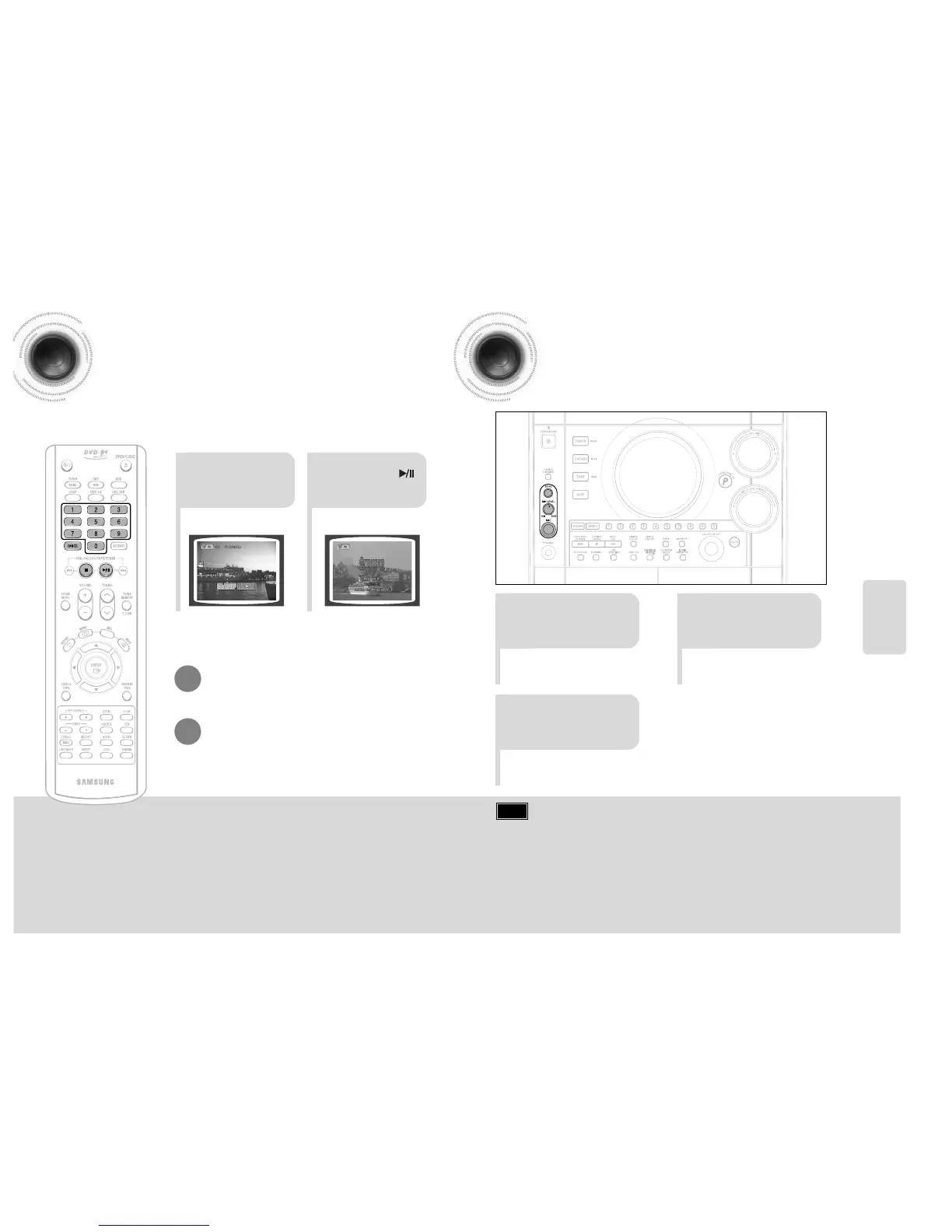
Use the NUMERIC
(0~9) buttons to select
the song you want to
play back.
Press the
PLAY/PAUSE( )
button or the
ENTER button.
•
The numeric and title of the song will be
displayed and the accompaniment starts.
41 42
•
Press the STOP button.
To Clear Incorrectly Entered Song Numeric
•
Press the STOP button.
To Stop During Accompaniment
Connecting Microphone
21
•
You can connect up to one microphones.
•
Each time the button is pressed, the
selection changes as follows:
ECHO 1 ➝ ECHO 2 ➝ ECHO OFF.
Turn the MIC LEVEL
to adjust the volume
of the micro phone.
Connect the
microphone to the MIC
jack on the front panel.
3
Press the ECHO
button.
Note
• To record your voice with microphone, press the REC/PAUSE button.
• If you hear strange noises (squealing or howling) while using the Karaoke
feature, move the microphone away from the speakers. Turning down the
microphone volume or the speaker volume is also effective.
SETUP



 To Next Page