11
English
11
Installation
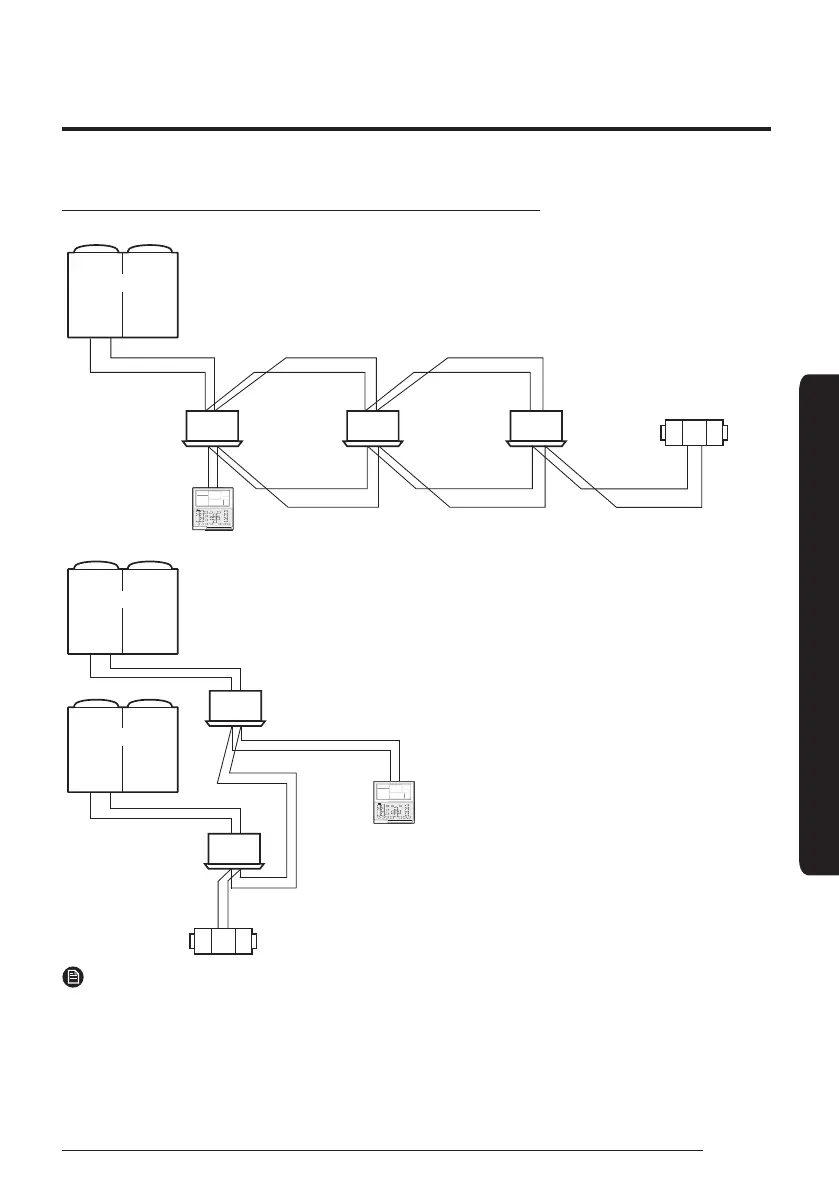
When Connected to an Indoor Unit and an ventilator(ERV) together
• Using One Wired Remote Controller to control multiple indoor units and ventilator(ERV)
COM2 (F3, F4)
COM1 (F1, F2)
COM1 (F1, F2) COM1 (F1, F2)
COM2 (F3, F4) COM2 (F3, F4)
Outdoor Unit
Wired Remote
Controller
Indoor Unit Indoor Unit Indoor Unit
Ventilator
(ERV)
• Using One Wired Remote Controller to control indoor units connected to different outdoor unit and ventilator(ERV)
COM1 (F1, F2)
COM1 (F1, F2)
COM2 (F3, F4)
COM2 (F3, F4)
Outdoor Unit
Indoor Unit
Wired Remote Controller
Outdoor Unit
Indoor Unit
Ventilator
(ERV)
NOTE
• Regardless of the indoor unit’s group address (RMC address), only the indoor units and ventilator(ERV) connected to
COM2 are controlled in group.
• When controlling indoor units and ventilator(ERV) together in group, you can control maximum of 16 indoor units and
ventilator(ERV).
• If you want to use the power saving function, you have to connect Wired Remote Controller to only one indoor unit and
one ventilator(ERV).
• The power cable (V1, V2) is not connected between indoor units.
• The power cable for your Wired Remote Controller (V1, V2) should be connected to only one indoor unit.











 To Next Page