EasyManua.ls Logo

Samsung NV51K7770DG - User Manual

Samsung NV51K7770DG
64 pages
Print Icon
To Next Page IconTo Next Page
Loading...
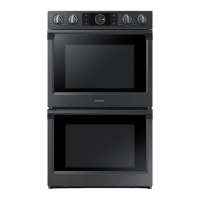
Built-In Electric Wall Oven
User manual
NV51K7770D*
NV51K7770D_AA_DG68-00856A-03_EN+MES+CFR.indb 1 2018-08-29  1:08:34

Questions and Answers

  • B
    butlercathyAug 14, 2025
    Why is my Samsung NV51K7770DG smoking excessively when broiling?
    • C
      carlsonwayneAug 15, 2025
      Excessive smoking during broiling in your Samsung Oven can occur due to several reasons. The oven controls might not be properly set. The meat may be too close to the element; reposition the rack to increase the distance and preheat the broil element. Excess fat on the meat can also cause smoking, so remove excess fat and trim fatty edges. Lastly, built-up grease on oven surfaces can contribute to smoke, so regular cleaning is necessary.
  • M
    Maria HarrisAug 18, 2025
    What to do if my Samsung NV51K7770DG will not turn on?
    • J
      Jeffery WalkerAug 18, 2025
      If your Samsung Oven isn't turning on, first ensure it's fully plugged into a properly grounded electrical outlet. Check your home's fuse box or circuit breaker and replace the fuse or reset the breaker if needed. Also, allow the oven to cool down if it is too hot. In case of incomplete service wiring, call for service. If there is a power outage, contact your local electric company.
  • B
    Benjamin HunterAug 21, 2025
    What to do if my Samsung Oven door will not open after a self-cleaning cycle?
    • K
      Karen HamiltonAug 21, 2025
      If your Samsung oven door won't open after a self-cleaning cycle, it's likely because the oven is still too hot. Allow the oven to cool down completely, and then try opening the door again.
  • T
    turnerjessicaAug 25, 2025
    Why is my Samsung NV51K7770DG not clean after a self-cleaning cycle?
    • A
      awigginsAug 25, 2025
      If your Samsung oven isn't clean after a self-cleaning cycle, it could be due to a couple of reasons. The oven controls may not have been set correctly. Also, if the oven was heavily soiled, wipe up heavy spillovers before starting the self-cleaning cycle. For heavily soiled ovens, you may need to self-clean again or for a longer period.
  • B
    bryanlloydAug 28, 2025
    Why is there excessive smoking during a self-cleaning cycle in my Samsung NV51K7770DG?
    • J
      Julie CarrollAug 28, 2025
      Excessive smoking during a self-cleaning cycle in your Samsung oven usually indicates there's excessive soiling inside. Press OFF, open the windows to clear the smoke, wait for the cycle to cancel, wipe up the excessive soil, and then restart the self-cleaning cycle.
  • A
    Amy Cline MDAug 31, 2025
    Why won't my Samsung NV51K7770DG self-clean?
    • P
      Phillip BellAug 31, 2025
      Your Samsung oven might not start a self-cleaning cycle if the oven temperature is too high. Allow it to cool down before resetting the controls. Also, if the oven lockout feature is activated, you'll need to deactivate it first.
  • J
    Jared RogersSep 4, 2025
    Why is food not baking or roasting properly in my Samsung NV51K7770DG?
    • A
      Anna CooperSep 4, 2025
      If food isn't baking or roasting properly in your Samsung Oven, it could be because the oven controls haven't been set correctly, or the oven rack has been positioned incorrectly or is not level. Also, the oven thermistor may need to be adjusted.
  • U
    uwolfeSep 7, 2025
    Why is food not broiling properly in my Samsung Oven?
    • D
      Diane CarterSep 7, 2025
      If your food isn't broiling properly in your Samsung oven, the serving size may not be appropriate. The rack may also not be properly positioned. The cookware might not be suitable for broiling. In some areas, the power (voltage) may be low, so preheat the broil element for 10 minutes.
  • A
    Angel KennedySep 10, 2025
    Why are the oven racks difficult to slide in my Samsung Oven?
    • S
      Steven WadeSep 10, 2025
      If the oven racks in your Samsung oven are difficult to slide, especially if they are shiny and silver-colored, it's possible they were cleaned during a self-cleaning cycle. To resolve this, apply a small amount of vegetable oil to a paper towel and wipe the edges of the oven racks with it.

Summary

Regulatory Notice

FCC Notice

Information regarding FCC compliance for digital devices and potential interference.

IC Notice

Information regarding Industry Canada compliance and interference rules.

Important safety instructions

Safety Symbols and Precautions

Explains the meaning of warning and caution symbols used in the manual.

Electrical and Child Safety

Guidelines for safe electrical connections, servicing, installation, and child safety.

Oven Operation Safety

Covers general safety for oven operation, installation, usage, and cleaning.

Introducing your new oven

Overview

Visual identification of oven components and parts.

Whats included with your oven

List of accessories and items provided with the oven.

Before you begin

Energy Saving Tips

Recommendations for efficient oven energy consumption during use.

Water Reservoir Usage

Instructions on locating, filling, and using the water reservoir for steam functions.

Operating the oven

Control Panel and Display

Description of the oven's control panel buttons, display indicators, and functions.

Temperature and Time Settings

Methods for setting oven temperature, cook time, and using the kitchen timer.

Cooking Modes and Features

Overview of cooking modes, temp probe, twin cooking, healthy/gourmet cook, and smart control.

Cleaning Functions

Instructions for Self-Clean, Hybrid Clean, Descale, and Draining functions.

Maintaining your appliance

Oven Care and Cleaning

Guidelines for cleaning oven surfaces, racks, and the oven door.

Oven Door Maintenance

Instructions for cleaning the oven door and its components.

Removing and Replacing Oven Doors

Step-by-step guide on how to safely remove and reinstall the oven doors.

Troubleshooting

Control Display Issues

Troubleshooting common problems related to the oven's control display and buttons.

Oven Operational Issues

Solutions for common oven problems like not turning on, smoking, or temperature issues.

Information Codes

Explanation of error codes displayed by the oven and their troubleshooting steps.

Warranty (U.S.A)

Warranty (CANADA)

Open Source Announcement

Samsung NV51K7770DG Specifications

General IconGeneral
Capacity5.8 cu. ft.
Self-CleaningYes
Wi-Fi ConnectivityYes
ColorStainless Steel
Oven TypeElectric
Total Capacity5.8 cu. ft.
Convection TypeTrue Convection
Burners5
ConvectionYes
Cooking ModesBake, Broil, Convection Bake, Convection Roast
Control TypeTouch
Width29.9 in.

Related product manuals