
 Need help?
Do you have a question about the Samsung OFFICESERV DS-5014D and is the answer not in the manual?
Instructions for unpacking and connecting the ITP-5000D Series IP phone.
Instructions for unpacking and connecting the DS-5000D Series Digital phone.
Explains the function and status indicated by button LEDs and the phone's status light.
Adjusting volume for handset, speakerphone, and ringer on the phone.
Instructions for initiating and managing calls between phone extensions.
Instructions for initiating and managing calls to external numbers, including authorization.
Managing active calls by placing them on hold or transferring to other extensions.
Overview of navigation buttons and menu selection procedures.
Accessing call history and programming speed dials by number and name.
Configuring call forwarding rules and setting up reminder alarms.
Displaying caller's number or name on the LCD panel and setting preferences.
Saving caller numbers and reviewing past caller ID information.
List of default dial codes and programmed messages for phone features.
 General
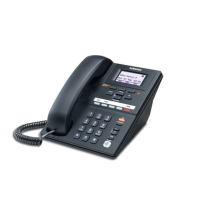
| Display | LCD |
|---|---|
| Programmable Buttons | 14 |
| Speakerphone | Yes |
| Headset Jack | Yes |
| Ethernet Port | Yes |
| Power over Ethernet (PoE) | Yes |
| Type | IP Phone |
| Lines | Multiple line support |
| Power | PoE |
| Supported Protocols | Proprietary protocol |







 To Next Page