10-4
Chapter 10 Special Features
Alarm Features
Appointment Reminder/Alarm Clock
This feature serves as an alarm clock. Up to three alarms may be set. Each alarm
may be set as a one-day (today) alarm or daily alarm. You set a time for each
alarm: if set for today it will ring at the set time, unless cancelled; if set as a daily
alarm it will ring at the set time each day, unless cancelled.
When activated, you will hear a series of short rings and “Alarm Reminder”
displays on the LCD. Lift the handset to answer the alarm. If you do not answer,
the alarm will repeat a number of times at set intervals before cancelling.
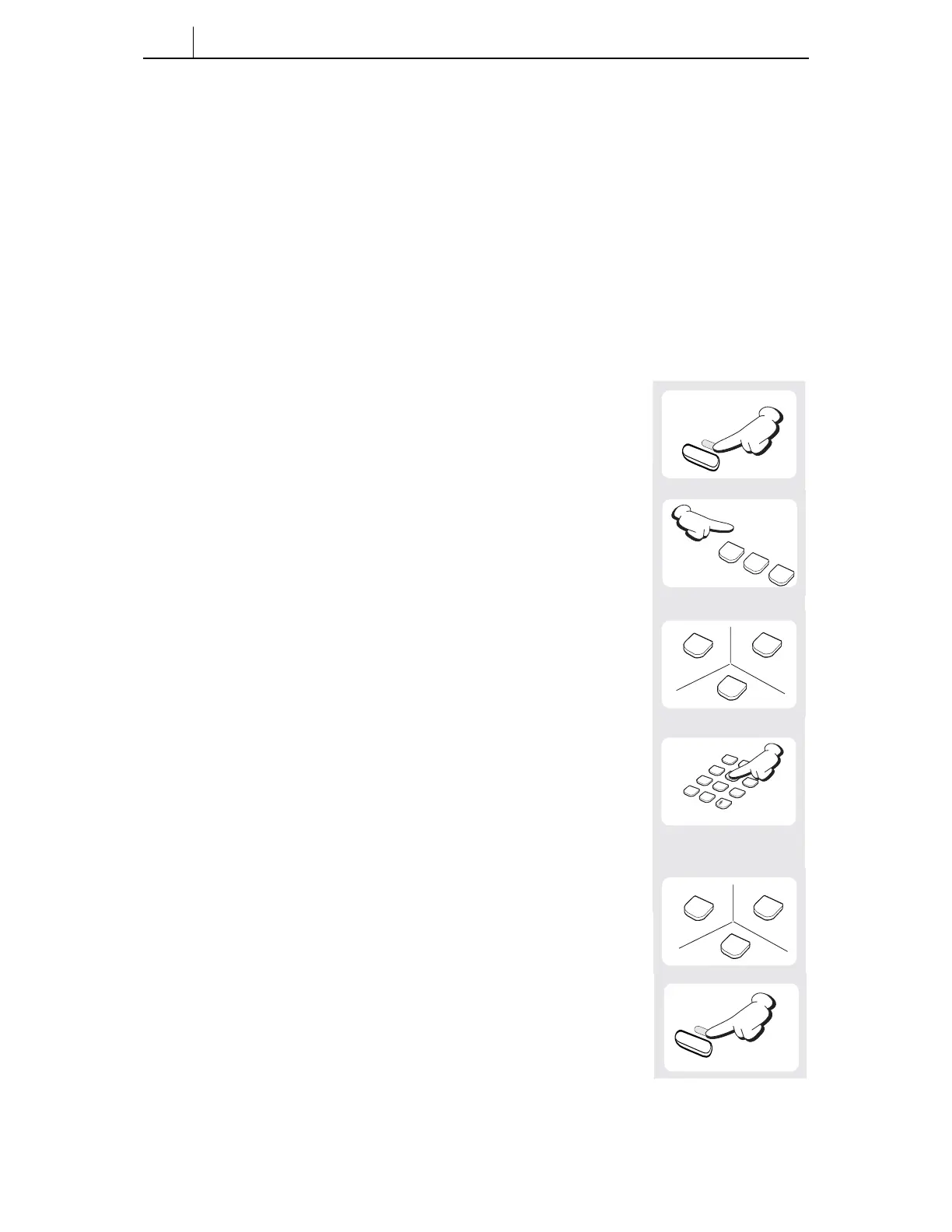
1. Press the [Transfer] button.
2. Dial [1][1][2].
3. Select the alarm number [1], [2] or [3].
4. Enter the time at which you want the alarm to sound.
Enter the time as HHMM (hours and minutes) using the
24-hour clock format (e.g. 1330 is 1.30 pm).
5. Select the alarm type: [0] (Not Set), [1] (Today) or
[2] (Daily).
1
1
2
ABC
1
2
ABC
3
DEF
1
2
3
4
5
6
7
8
9
*
0
ABC
DEF
GHI
JKL
MNO
PQRS
TUV
WXYZ
1
2
ABC
0
Transfer
Transfer
6. Press the [Transfer] button to save settings.








 To Next Page