064
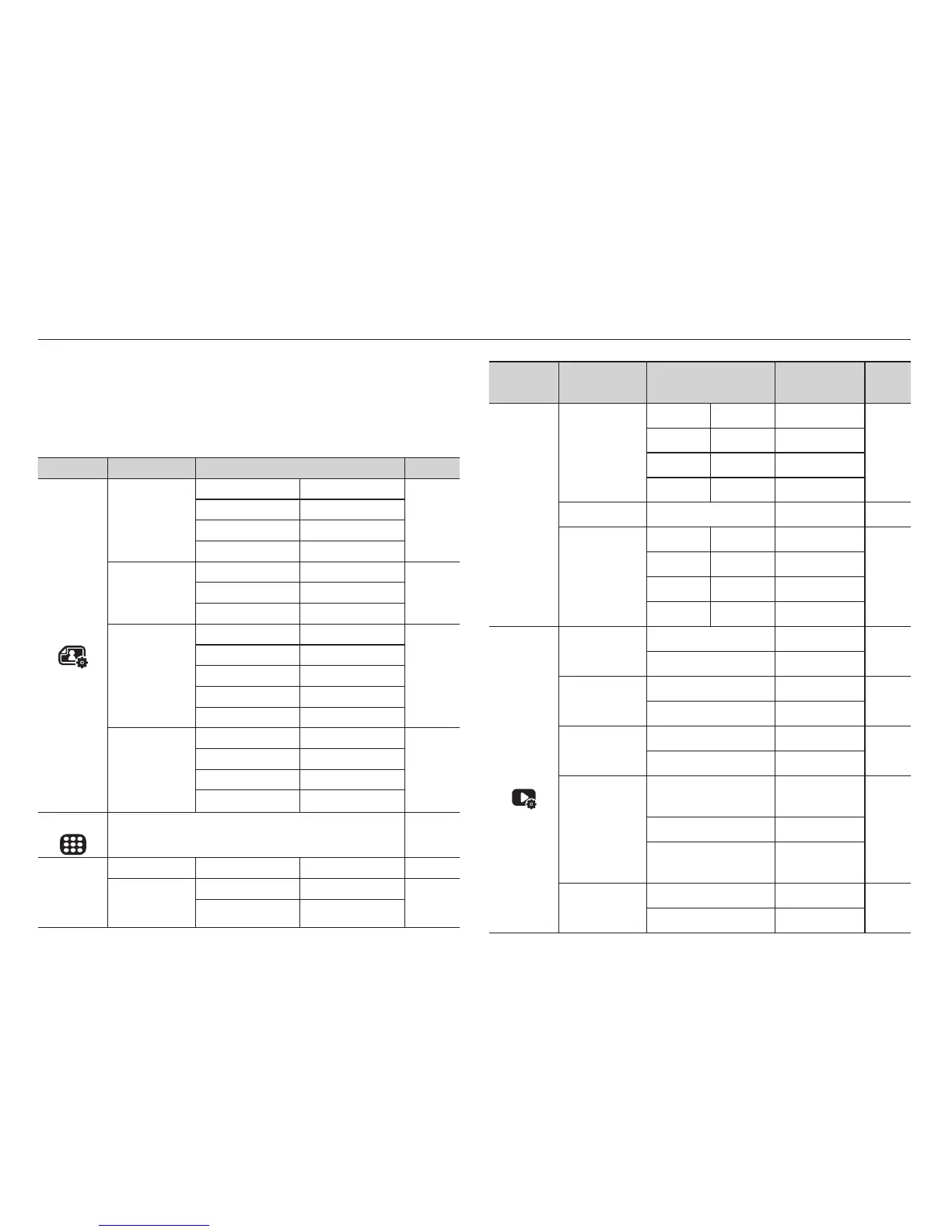
Setting up the play back function using the LCD monitor
Menu Tab Main Menu Sub Menu
Secondary
Menu
Page
Multi Slide
Show
(
)
Effect
Off Calm -
p.71
Sweet Rural -
Vivid Lively -
Shine Relax -
Interval 1, 3, 5, 10 sec - p.72
Music
Off Mist -
p.72
Muse Fall -
Dawn Party -
Drops Trip -
File
Options
(
)
Delete
Select -
p.72
All Yes / No
Protect
Select -
p.73
All Unlock / Lock
Voice memo
Off -
p.73
On -
DPOF
Standard
Select / All /
Reset
p.74
~
p.75
Index Yes / No
Size
Select / All /
Reset
Copy To Card
Yes
-
p.76
No
-
PLAY mode functions can be changed by using the LCD monitor.
In the PLAY mode, pressing the MENU button displays the menu on
the LCD monitor. The menus you can set up in Play mode are as fol-
lows. To capture an image after setting up the play menu, press the
PLAY mode button or shutter button.
Menu Tab Main Menu Sub Menu Page
Edit
(
)
Resize
2592x1944 2048x1536
p.66
1024X768 2592X1728
1776X1184 2560X1440
1792X1008 Start Image
Rotate
Right 90˚ Left 90˚
p.67180˚ Horizontal
Vertical -
Photo Style
Selector
Normal Soft
p.67
Vivid Forest
Retro Cool
Calm Classic
Negative Custom
Image Adjust
Off ACB
p.68
Red-eye Fix Face Retouch
Brightness Contrast
Saturation Add Noise
View
(
)
Single, 3, 9, 20 p.70
Multi Slide
Show
(
)
Start Play / Repeat - p.70
Images
All Date
p.71
Select -



 To Next Page