To keep your product up-to-date with new Digital Television features then software upgrades are
periodically broadcast as part of the normal Television signal. It will automatically detect these signals
and display the software upgrade banner. You are given the option to install the upgrade.
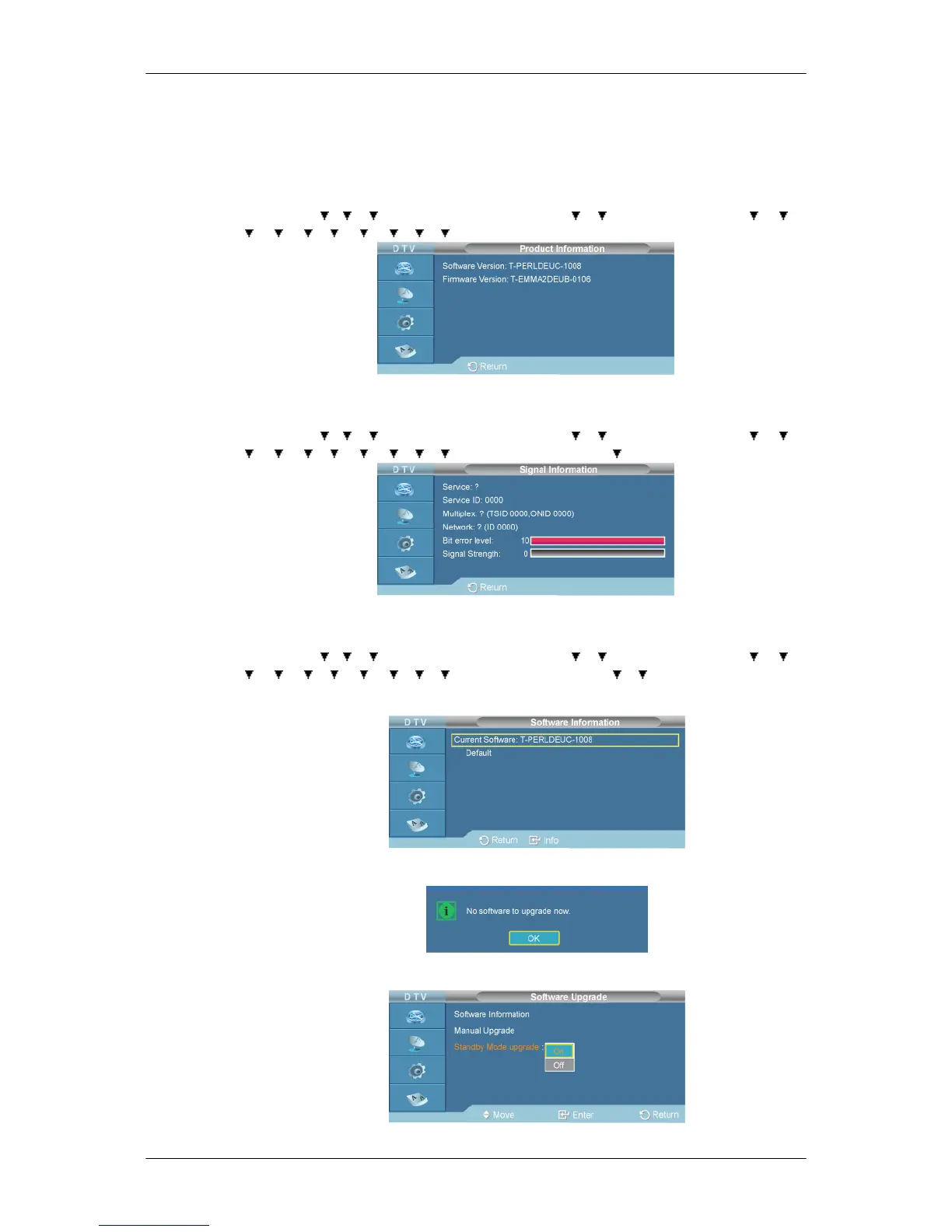
1. Product Information
D.MENU → → → →[Digital Menu] → ENTER→ → →[Setup]→ENTER → → →
→ → → → → → → → [System] → ENTER → ENTER
2. Signal Information
D.MENU → → → →[Digital Menu] → ENTER→ → →[Setup]→ENTER → → →
→ → → → → → → → [System] → ENTER → →ENTER
3. Software Upgrade
D.MENU → → → →[Digital Menu] → ENTER→ → →[Setup]→ENTER → → →
→ → → → → → → → [System] → ENTER → → →ENTER
• Software Information
• Manual Upgrade
• Standby Mode upgrade



 To Next Page