Samsung Electronics5-4
Alignment and Adjustment
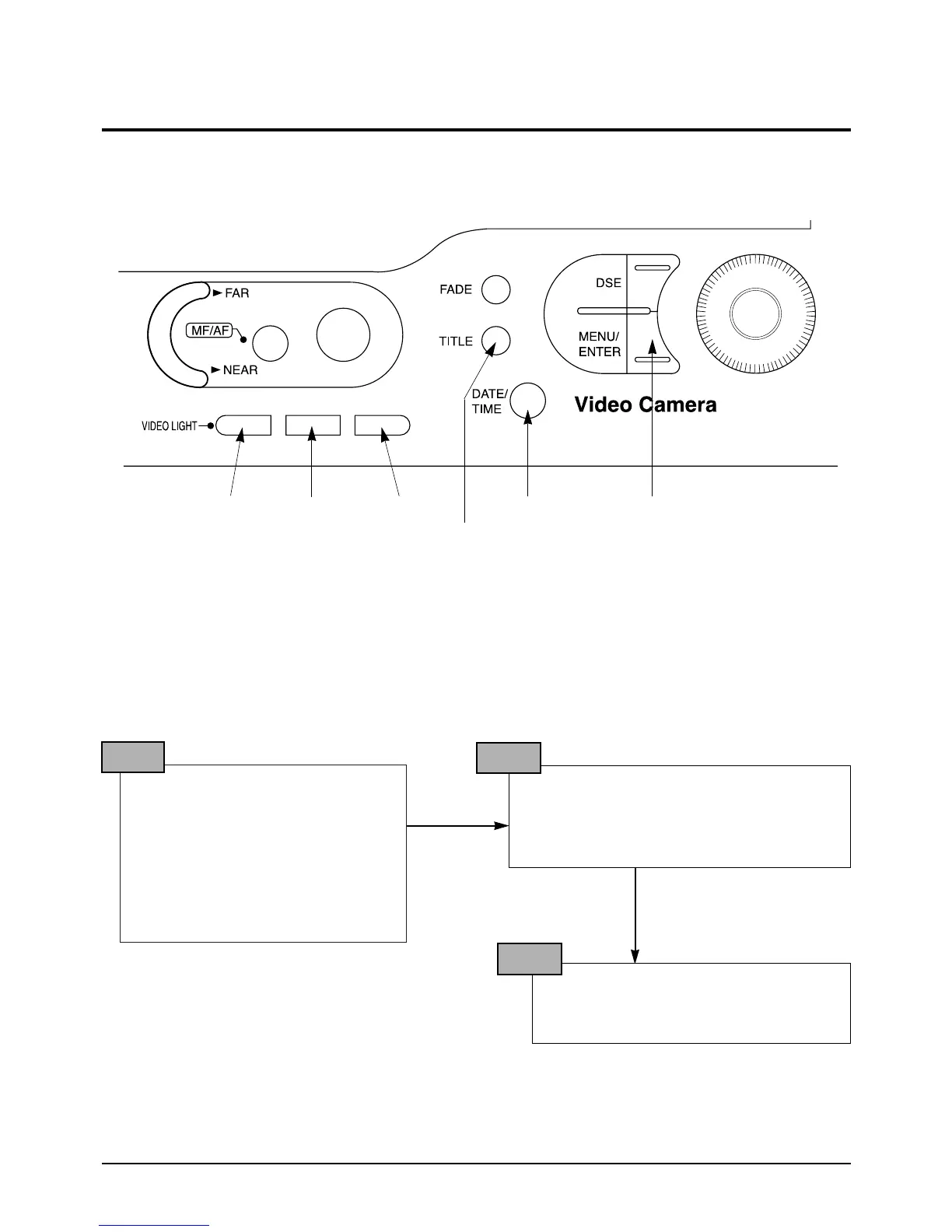
The function keys left case is required to adjust the camera section.
DATA DOWN DATA UP OSD ON/OFF
MODE DOWN
MODE UP CONFIRM
✤ ZOOM LEVER : ZOOM TELE/WIDE
Note : In service adjustment mode, button names are different from those in customer camera function
control mode. EX) MENU/ENTER button is the same as confirm.
5. How to get into service “ADJUST” mode
1. Remove the lithium battery from the
camcorder.
2. Connect the power source (battery/
DC cable).
3. Eject the tape if it is in the unit.
4. Set the power switch of the
camcorder to “CAMERA” position.
5. Set OSD on state.
STEP 1
1. Press and hold the “EJECT” button and
“STOP” button on the camcorder at the same
time for more than 5 seconds.
Then unit goes into service mode.
STEP 2
On screen display show “ODF. T.INI XX XX”
CAMERA ADJUSTMENT mode has suc-
cessfully been activated.
STEP 3
Note : When “XX XX” is shown in service adjustment procedures, this indicates variable values.



 To Next Page