16
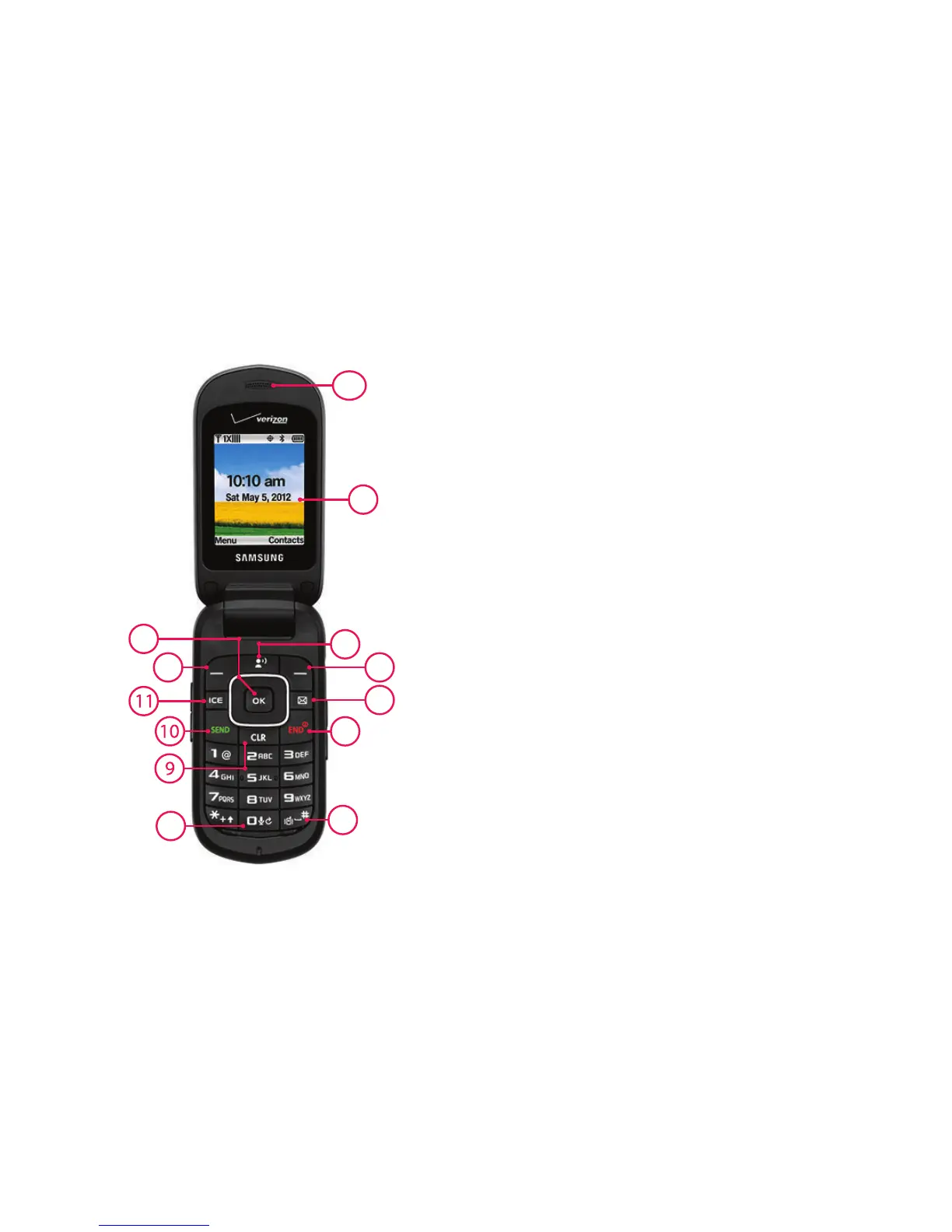
Open View of Your Phone
Features
1.
Earpiece
: Allows you to hear the caller.
2.
Main Screen
: Displays phone features.
3.
Voicemail Key
: Press to access voicemail.
4.
Right Soft Key
: Press to select the command at the
lower right area of the display screen.
5.
Messaging Key
: Press to access the Messaging menu.
6.
End/Power Key
: Press to end a call. Press and hold to
turn the phone On or Off.
7.
Vibrate Mode Key
:
Press and hold to activate Vibrate Mode
.
8.
Voice Commands Key
: Press and hold for Voice
Commands
.
9.
Clear Key
: Press to delete numbers or characters from
the display, or to return to the previous item or screen.
10.
Send Key
: Press to place or receive a call. From the
Home screen, press once to access the All Calls log.
11.
In Case of Emergency (ICE) Key
: Press to access stored
emergency numbers and information.
12.
Left Soft Key
: Press to select the command at the lower
left area of the display screen.
13.
Directional and OK Keys
: Press left, right, up and down
to scroll lists or screens, or to select a highlighted item.














 To Next Page