Understanding Your Phone 23
Understanding the Home Screen
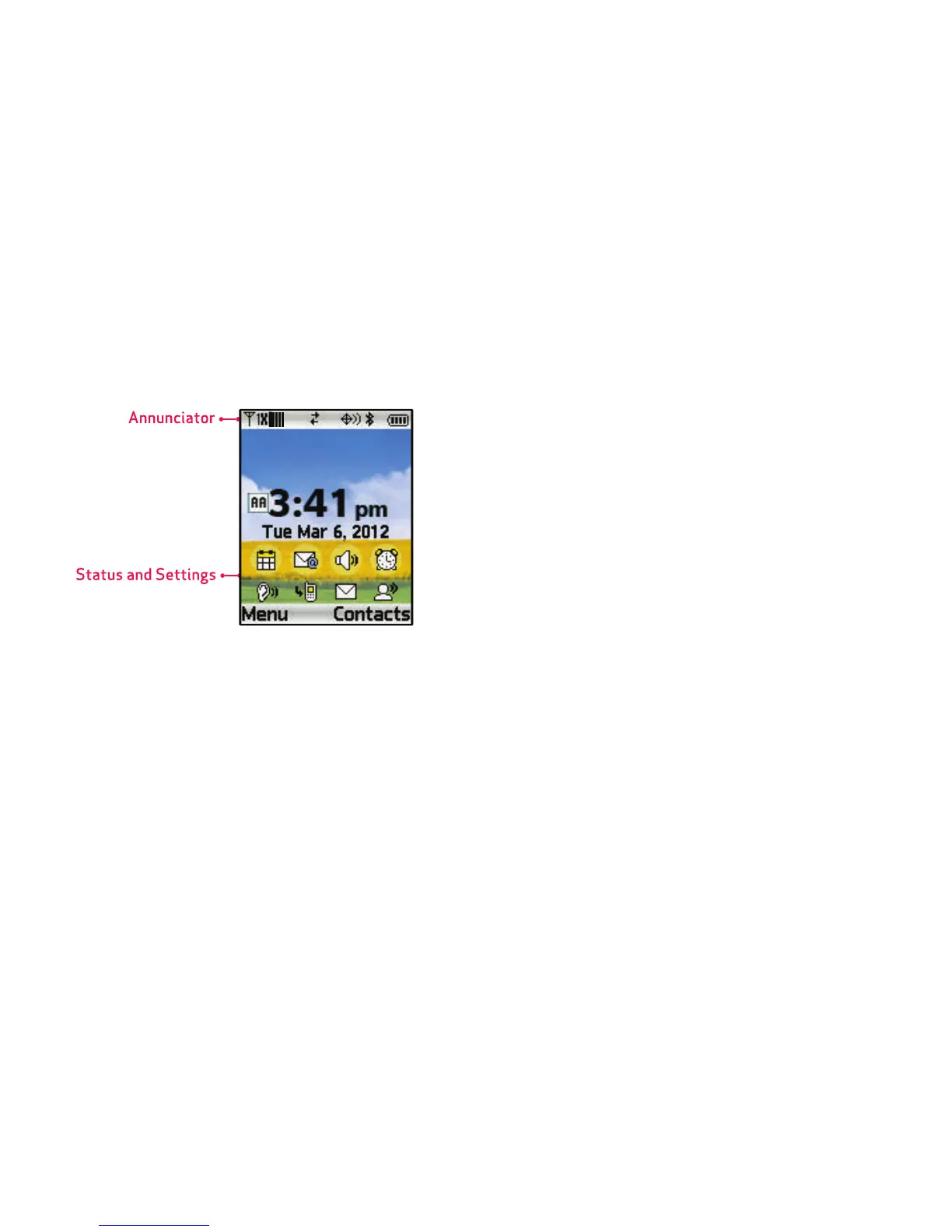
The Home screen is the starting point for using your phone.
•
Annunciator
: Presents icons to show network status, battery
power, and connection details. For a list of icons, see
“Annunciator Icons”
on page 24.
•
Status and Settings
: Presents icons indicating active alerts,
reminders, alarms and current settings. For a list of icons, see
“Status and Settings Icons”
on page 25.
Customizing the Home screen
You can customize the Home screen to suit your preferences.
•
Wallpaper
: Select a background image for the Lock Screen and
Home screen, from pre-loaded images, or your own pictures. For
more information, see
“Wallpaper”
on page 112.
•
Banners
: Create a personal banner, or enable a network status
banner, to appear on the Home screen. For more information, see
“Banner”
on page 110.
•
Clock Format
: Choose a format and color for the clock on the
Home screen. For more information, see
“Clock Format”
on
page 116.
•
Font Size
: Choose the size of fonts in your phone’s displays with
the Fonts settings. For more information, see
“Fonts”
on
page 115.
•
Display Theme
: Display themes offer coordinated looks for all
your phone’s screens, including the Home screen. For more
information, see
“Themes”
on page 113.














 To Next Page