EasyManua.ls Logo

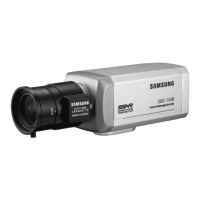
Samsung SDC-313B - User Manual

Samsung SDC-313B
21 pages
Print Icon
To Next Page IconTo Next Page
Loading...
Before installing and operating this product,
please read this manual thoroughly.
ENGLISH
High Resolution Color Camera SDC-313B User Guide

Other manuals for Samsung SDC-313B

Questions and Answers

  • J
    Jeff JonesAug 15, 2025
    Why does nothing appear on my Samsung SDC-313B Security Camera screen?
    • K
      Karen MathewsAug 15, 2025
      If nothing is appearing on the screen of your Samsung Security Camera, there might be a few reasons. First, verify the power connection is secure. Second, check the video signal line connection. Third, if using a DC (VIDEO) lens, ensure the auto lens switch is set to DC (VIDEO). Finally, examine the brightness of the Auto Iris lens.
  • T
    Timothy LaneAug 18, 2025
    How to fix a blurry video image on my Samsung Security Camera?
    • A
      Anita BassAug 18, 2025
      If the video image from your Samsung Security Camera is not clear, try these steps: * Check if the lens is clean and, if necessary, clean it with a clean cloth or brush. * Adjust the contrast feature of the monitor. * Ensure the screen is not exposed directly to bright light; reposition the camera if needed. * Readjust the back focus of the camera.
  • J
    Jonathan LeachAug 21, 2025
    Why is motion detection not working on my Samsung Security Camera?
    • B
      Brad GambleAug 22, 2025
      If the motion detection function on your Samsung Security Camera isn't working, consider these potential solutions: * First, ensure that 'MOTION DETECTION' mode is turned on. * Next, verify that the MD LEVEL is not set too low. * Finally, check the setting of the MD AREA.
  • B
    brianthompsonAug 26, 2025
    What to do if my Samsung SDC-313B Security Camera screen is dark?
    • B
      Bryan WintersAug 26, 2025
      If the screen of your Samsung Security Camera is dark, try the following: Adjust the contrast feature of the monitor. If you're using an intermediate device, ensure the 75?/ Hi-z is set properly and check the terminals. Also, if you are using an auto iris lens, check and adjust the brightness level.
  • T
    Thomas PopeAug 28, 2025
    Why is the SENS-UP function not working on my Samsung Security Camera?
    • G
      George MunozAug 28, 2025
      If the SENS-UP function isn't working on your Samsung Security Camera, verify that the AGC menu is not set to the OFF position. Also, check if the SHUTTER menu is set to MANUAL mode. Finally, check the limit of Sens-UP AUTO mode.
  • R
    rogersmithAug 31, 2025
    Why is COLOR (DAY & NIGHT) mode not working on my Samsung SDC-313B Security Camera?
    • C
      cmyersSep 1, 2025
      If the COLOR (DAY & NIGHT) mode is not working on your Samsung Security Camera, check if the AGC menu is set to the OFF position.
  • K
    Kendra SimonSep 4, 2025
    Why is my Samsung SDC-313B Security Camera screen flickering?
    • T
      Tabitha SmithSep 4, 2025
      If your Samsung Security Camera screen is flickering, here are a few things to check: Make sure the camera isn't facing directly into sunlight or fluorescent light. Check if an auto iris lens is being used. Also, verify the connection of the lens connector cable.
  • A
    Andrew BrownSep 7, 2025
    What causes a Samsung Security Camera to overheat and display black stripes?
    • C
      Christy GonzalezSep 7, 2025
      If your Samsung Security Camera's surface is too hot and black stripes appear on the screen, check whether the power source being used complies with the manufacturer's standard requirements or if the voltage keeps changing.
  • C
    collinscrystalSep 12, 2025
    Why can't I select L/L mode on my Samsung SDC-313B Security Camera?
    • A
      Alexander RogersSep 12, 2025
      If you're unable to select L/L mode on your Samsung Security Camera, check if you have connected your camera to a DC power source. Instead, connect it to an AC power source.

Summary

Features Overview

Horizontal Resolution and Image Quality

Details the camera's clear image quality achieved by a high-pixel CCD.

Electronic Day and Night Functionality

Explains the camera's automatic electronic mode selection for day and night conditions.

Electronic IRIS for Shutter Control

Describes the continuous automatic control of the shutter speed by the electronic IRIS function.

Privacy Zone Masking

Covers the function that conceals specific areas on the screen.

Lens Type Selection

Explains the selection between video drive and DC drive lenses via a switch.

High Sensitivity Imaging

Highlights the camera's ability to capture clear images in low light conditions.

Samsung Super Noise Reduction (SSNR)

Details the SSNR function for reducing low light noise and improving image quality.

On-Screen Display (OSD) Menu Control

Explains how the camera can be controlled using the On-Screen Display menu.

Additional Camera Functions

Lists other available functions like SENS-UP, MOTION DETECTION, MIRROR, etc.

Safety Warnings

Inspection and Malfunction Handling

Advises on periodic inspections and stopping use upon malfunction.

Installation and Handling Safety

Warns against improper installation surfaces and handling with wet hands.

Operational Safety Precautions

Cautions against disassembling the camera or using it near gas/oil leaks.

Handling Precautions

Environmental and Physical Precautions

Covers installation in extreme temperatures, humidity, shock, liquids, and radioactivity.

Light Exposure and Lens Care

Advises on avoiding strong light exposure and touching the camera lens.

Electrical Safety and Notes

Notes on power source compliance and potential issues with strong light.

Product Components

Component Identification

Identifies the main camera components: camera, lens plug, C-Mount adapter, and manual.

Names and Functions of Parts

Details the parts on the Front, Side, Bottom, and Back of the camera.

Installation Guide

Lens Installation

Provides instructions for installing auto iris, C-Mount, and CS-Mount lenses.

Connecting to Monitor

Explains how to connect the camera's video output to a monitor.

Connecting to Power

Details power connection types and specifications for different camera models.

Camera Operation

Menu and Settings Overview

Introduces the camera's menu structure and general settings navigation.

Lens Selection and Adjustment

Guides on selecting and adjusting lens parameters like brightness.

Shutter and White Balance Control

Explains how to configure shutter speed and white balance for optimal imaging.

Image Enhancement Features

Covers Backlight Compensation, Auto Gain Control (AGC), and SSNR for image quality.

Low Light and Special Functions

Details SENS-UP for low light and special features like Motion Detection and Privacy.

System Configuration and Exit

Covers special settings like Mirror, Sharpness, Camera ID, and exiting menus.

Troubleshooting Guide

Image Display Issues

Addresses problems like no image, unclear video, or dark screens.

Operational and Feature Problems

Solves issues with motion detection, color, flickering, and sync modes.

Specific Function Errors

Resolves problems with SENS-UP and AGC not working correctly.

Technical Specifications

Model Specifications

Provides detailed technical specifications for different camera models.

Samsung SDC-313B Specifications

General IconGeneral
Power Supply12V DC
ConnectivityBNC
SynchronizationInternal
Lens3.6mm
Operating Temperature-10°C to +50°C
Mount TypeCeiling/Wall
Signal SystemNTSC

Related product manuals