SAMSUNG Proprietary-Contents may change without notice
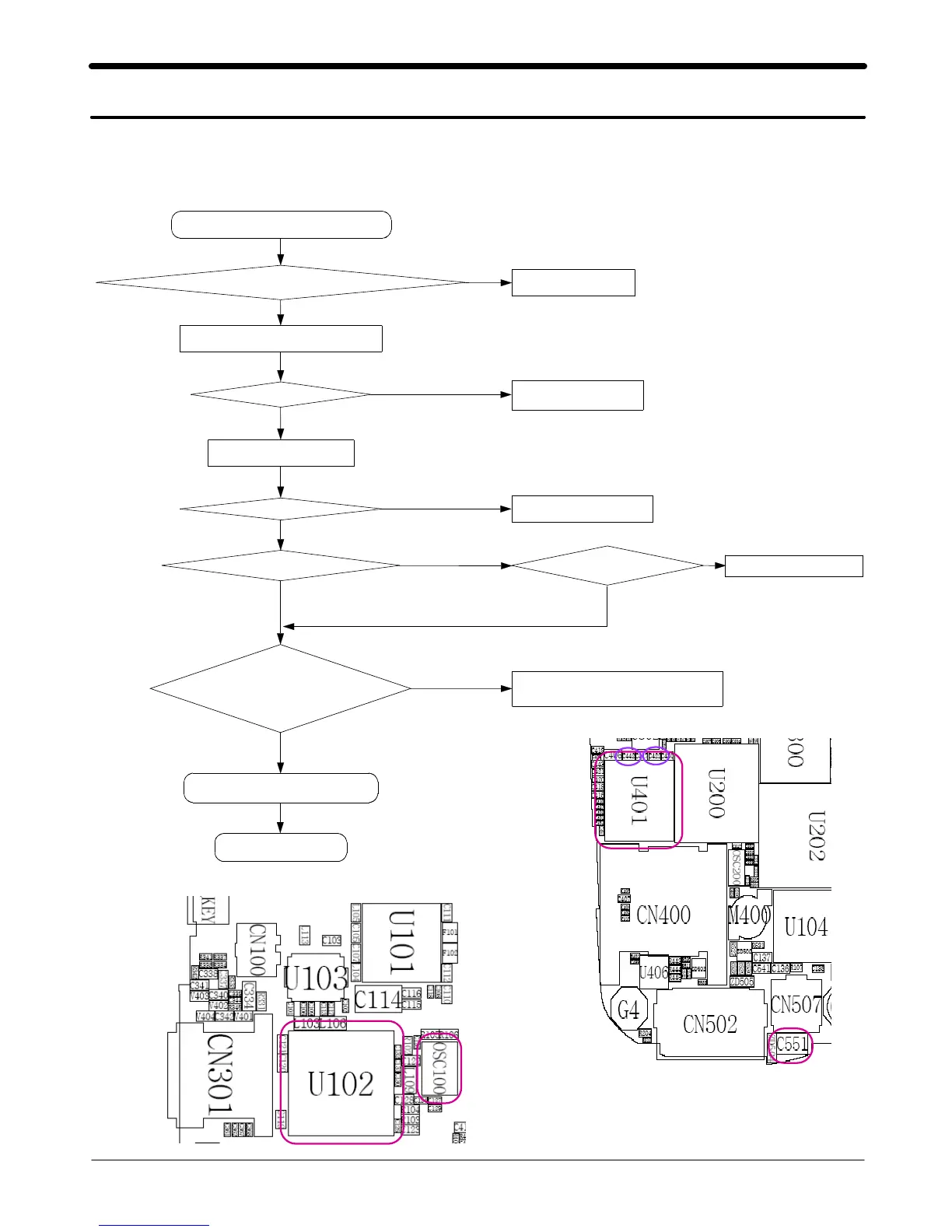
2. SGH-E530 Flow Chart of Troubleshooting
2-3
This Document can not be used without Samsung's authorization
2-1.Baseband
2-1-1. Power ON
'Power On' does not work
Voltage >=3.3V
Binary re_download
Charge the Battery
Pin#J12 >= 2.8V Check U401 and C422
Check U401 and C442
Freq = 13MHz
Vrms >= 300mV
Vpp
≒
900mV
at the pin#27 of U102
Check the clock generation circuit
(related to OSC100)
Check the ini tial operation
END
No
Yes
Yes
Yes
Yes
Yes
No
No
No
No
pin#G11 = 1.5V
No
Yes
Check the Vbat Voltage of C551
Check the pin of U401
Current consumption >= 100mA
Pin#A13, A14 =2.8V



 To Next Page