COLOR CCD CAMERA User’s Manual
17
COLOR CCD CAMERA User’s Manual
16
Operating Your Camera
Menu Setup
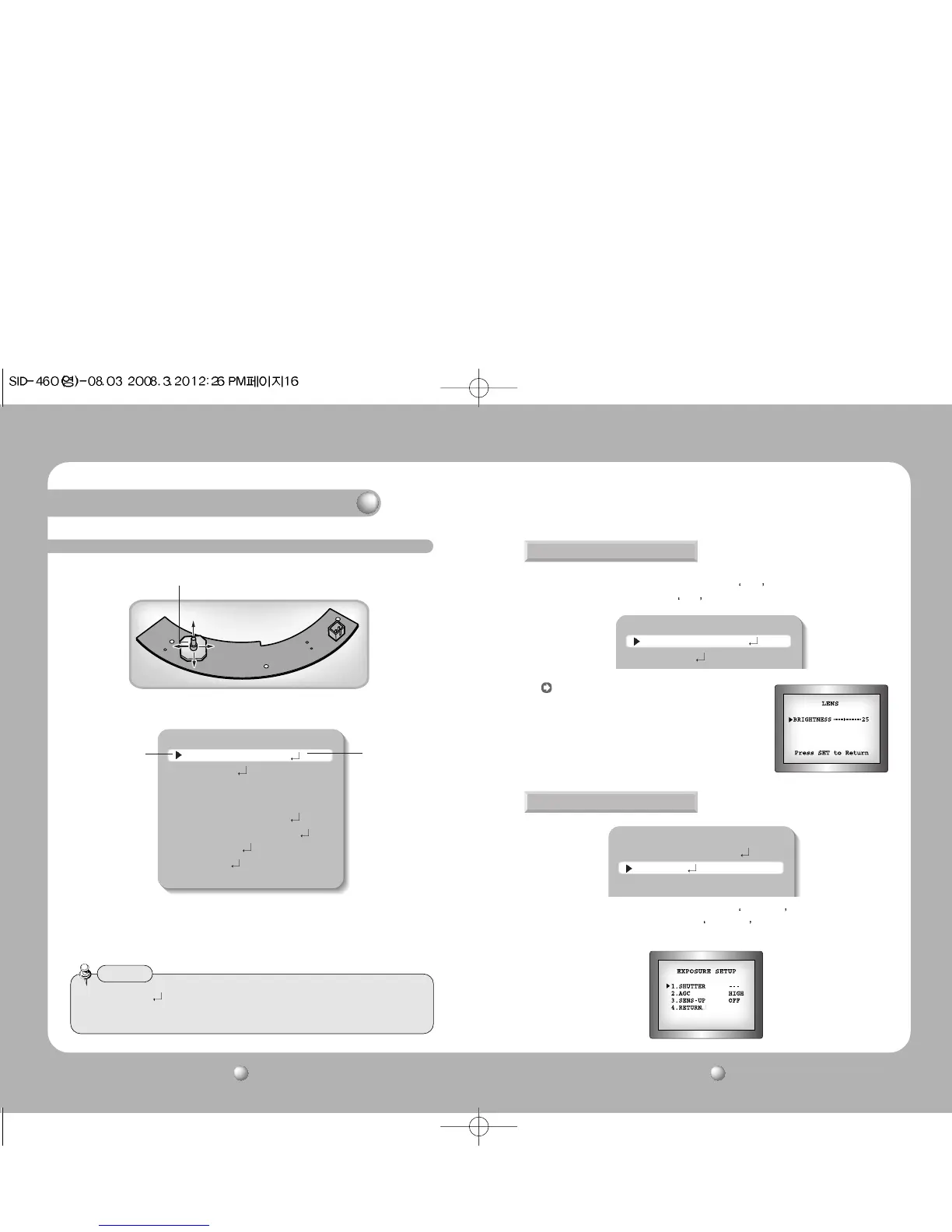
Use the Function Setup switch on back of the camera.
1. Press the Function Setup switch.
• Main setup menu is displayed on the monitor screen.
2. Select a desired function using the Function Setup switch.
• Place the cursor over a desired item.
3. Set up a selected item by using the Function Setup switch.
4. To finish the setting, select ‘EXIT’ and press the Function Setup switch.
MAIN SETUP
1.LENS DC
2.EXPOSURE
3.WHITE BAL ATW
4.BACKLIGHT OFF
5.SSNR ON
6.DAY/NIGHT AUTO
7.IMAGE ADJ
8.SPECIAL
9.EXIT
MAIN SETUP
1.LENS DC
2.EXPOSURE
3.WHITE BAL ATW
MAIN SETUP
1.LENS DC
2.EXPOSURE
Select the function by
moving up or down
direction of function
setup switch.
Change the status by
moving right or left
direction of function
setup switch.
• An item with the icon also has sub menus. To select a sub menu, select an item
with the icon and press the Function Setup switch.
• An item with the - - - icon is unavailable due to function settings.
Notes
Using this function, you can control screen brightness.
1. When the SETUP menu screen is displayed, select
LENS by using the Function Setup
switch so that the arrow indicates
LENS .
LENS
1. When the SETUP menu screen is displayed, select EXPOSURE by using the Function
Setup switch so that the arrow indicates
EXPOSURE .
2. Select a desired mode using the Function Setup switch.
EXPOSURE
DC : Select Auto Iris Lens
• When DC is selected, you can control screen
brightness. The range of brightness control is
between 1 and 70. Adjust the brightness
appropriately for optimal screen brightness.
Function Setup switch



 To Next Page