EasyManua.ls Logo

Samsung SIR-4150 - User Manual

Samsung SIR-4150
20 pages
Print Icon
To Next Page IconTo Next Page
Loading...
Thank you for purchasing a SAMSUNG CCD CAMERA.
Before attempting to connect or operate this product,
please read these instructions carefully and save this manual for future use.
ENGLISH
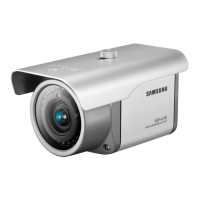
High Resolution Day & Night IR Camera SIR-4150
User’s Manual
P/No. : Z6806082001A
VAN 07. 07
www.samsungtechwin.com
www.samsungcctv.com
SAMSUNG TECHWIN CO., LTD.
333-1, Sangdaewon 1-dong, Jungwon-gu, Seongnam-si,
Gyeonggi-do 462-807, Korea
TEL : +82-31-730-8931~3 FAX : +82-31-730-8950
SAMSUNG OPTO-ELECTRONICS UK, LTD.
Samsung House, 1000 Hillswood Drive, Hillswood Business
Park Chertsey, Surrey KT16 OPS
TEL : +44-1932-45-5308 FAX : +44-1932-45-5325
TIANJIN SAMSUNG OPTO-ELECTRONICS CO., LTD.
7 Pingchang Rd, Nankai Dist. Tianjin 300190, P.R China
TEL : +86-22-2761-4724(33821) FAX : +86-22-2761-6514
SALES NETWORK
Question and Answer IconNeed help?

Do you have a question about the Samsung SIR-4150 and is the answer not in the manual?

Summary

Features

Day & Night (ICR) Functionality

Automatically switches between color (day) and BW (night) modes for optimal image quality.

Precautions for Operation

Physical Handling and Care

Do not drop, shock, or touch the lens. Avoid radioactivity exposure to protect the CCD.

Lens Adjustment

Adjusting Zoom and Focus

Step-by-step guide to adjust lens zoom and focus using levers and securing the front cover.

Installation Procedures

Power Connection Guidelines

Recommends DC 12V/4A adapter and checks for voltage drop for reliable camera operation.

RS-485 Communication Setup

Connects camera for OSD menu control via RS-485 with PC or System Controller.

Operating Your Camera - Backlight & AGC

Backlight Compensation

How to compensate for strong backlights to improve image clarity and subject visibility.

Operating Your Camera - Noise Reduction & Low Light

SSNR Noise Reduction

Reduces low light noise for clearer images, detailing noise reduction levels and potential ghosting.

SENS UP for Low Light

Enhances brightness in low light by adjusting sensitivity; supports AUTO mode.

Operating Your Camera - Special Settings Part 2

Operating Your Camera - Special Settings Part 3

Troubleshooting Common Issues

Problem Diagnosis and Solutions

Provides guidance for common operational problems like no image, poor clarity, or control failures.

Product Specifications

Technical Camera Specifications

Detailed specifications for SIR-4150N/P models, including sensor, resolution, and environmental data.

Overview

The SIR-4150 is a high-resolution Day & Night IR Camera manufactured by SAMSUNG TECHWIN. This user's manual provides comprehensive information for its operation, maintenance, and technical specifications.

Function Description

The SIR-4150 is designed for surveillance applications, offering clear imaging in various lighting conditions, including low-light and complete darkness, thanks to its built-in IR-LEDs. It features a high-sensitivity COLOR CCD for superior image quality. The camera supports both NTSC (SIR-4150N) and PAL (SIR-4150P) signal systems.

Key functions include:

  • Ultra High Sensitivity: The built-in high-sensitivity COLOR CCD ensures clear images even in 0 Lux (B/W, IR-LED ON) conditions.
  • High Resolution: It boasts 520 TV lines horizontal resolution in color mode and 570 TV lines in B/W mode, utilizing a Sony 410,000 pixel CCD for clean, noiseless, high-quality images.
  • DAY&NIGHT (ICR): This function automatically switches between color mode for daytime and B/W mode for night-time to optimize image quality. In AUTO mode, the IR Cut Filter automatically switches based on luminance.
  • SSNR (Samsung Super Noise Reduction): Equipped with a SAMSUNG TECHWIN-manufactured SSNR Chip, it significantly reduces low-light noise, improves the signal-to-noise ratio (S/N), and enhances horizontal resolution for clear and sharp images in dark environments.
  • Outdoor Visibility Range 30M: In B/W mode with IR-LEDs on, the camera guarantees an outdoor visibility range of 30 meters at 0 Lux.
  • RS-485 Function: Allows for remote control of OSD menu settings via RS-485 communication using a SAMSUNG TECHWIN System Controller or DVR.
  • IP65 Approved/Dust and Rain Resistant: Its robust design allows for outdoor installation under building eaves or in places exposed to dust and rain.
  • Privacy Masking Function: Conceals up to four user-defined areas on the screen that are not intended for viewing.
  • Additional Functions: Includes SENS-UP (low illuminance), MIRROR (horizontal image inversion), SHARPNESS, and MOTION DETECTION.

Important Technical Specifications

  • Power: DC12V±10%, 460mA/5.5W (LED ON).
  • Sensor: 1/3 inch, Sony Super HAD CCD.
  • Total Pixels:
    • SIR-4150N: 811(H) x 508(V)
    • SIR-4150P: 795(H) x 596(V)
  • Effective Pixels:
    • SIR-4150N: 768(H) x 494(V)
    • SIR-4150P: 752(H) x 582(V)
  • Scanning System: 2:1 Interlace.
  • Synchronization: Internal Fixed.
  • Frequency:
    • SIR-4150N: H:15.734 KHz, V:59.94 Hz
    • SIR-4150P: H:15.625 KHz, V:50.00 Hz
  • Resolution: 520 Lines (Color) / 570 Lines (B/W).
  • Video Output: CVBS: 1.0Vp-p/75Ω.
  • S/N (Y signal): 50 dB (AGC Off/Weight ON).
  • Min. Illumination: 0 Lux (LED ON), 0.3 Lux (Color), 0.002 (Sens-up) @F1.2 (LED OFF).
  • IR LED Number: 24EA.
  • Water Resistance: IP65.
  • Gain Control: NORMAL/HIGH/OFF Selectable.
  • White Balance: ATW (1800°K ~ 10,500°K)/AWC/Manual.
  • Electronic Shutter Speed: 1/60 Fixed / Flickerless (NTSC), 1/50 Fixed / Flickerless (PAL).
  • Back Light Compensation: LOW/MIDDLE/HIGH/OFF Selectable.
  • SSNR: LOW/MIDDLE/HIGH/OFF Selectable.
  • Sens-Up: AUTO/OFF (selectable limit X2_X128).
  • Communication: RS-485 (9600, 19200, 38400 and 57600bps selectable), Pelco-D Protocol available.
  • Lens: X2.5 Vari-Focal Lens (F1.2, f= 3.8mm ~ 9.5 mm).
  • Operating Temperature/Humidity: -10°C to +50°C / 30% to 80%.
  • Dimension: 74(W) x 74(H) x 134.5(D)mm.
  • Weight: 585g.

Usage Features

The camera's operation is primarily managed through an On-Screen Display (OSD) menu, which can be accessed and controlled remotely via RS-485 communication using a compatible controller like the SCC-3100A (Pelco-D Protocol).

Adjusting the Lens:

  1. Loosen the front cover fixing screw and separate the cover.
  2. Unlock the Zoom or Focus lever.
  3. Adjust the zoom or focus by moving the levers to WIDE (NEAR) or TELE (FAR) positions.
  4. After adjustment, tighten the zoom or focus lever, ensuring the position does not change.
  5. Close the cover and tighten the front cover fixing screw. Note: If the front cover fixing screw is not pinched correctly, the camera may not be waterproof.

Connecting to a Monitor:

  • Connect the video output terminal on the back of the camera to a monitor.
  • Ensure the power is off before connecting.
  • For intermediate video TV sets, select "Hi-Z" on the 75Ω/Hi-Z switch. For intermediate devices, select "75Ω".

Connecting to Power:

  • The recommended adapter is DC 12V/4A.
  • Ensure the power source meets standard requirements (DC 12V±10%).
  • Voltage drop can occur over long wire distances; refer to the provided resistance table to ensure proper voltage.
  • Connect power only after installation is complete.

RS-485 Communication Control:

  • Connect the camera's RS-485 CONTROL TERMINAL (TRX+, TRX-) to a PC via an RS-485 converter or to a DVR/System Controller's 485 control board.
  • The PELCO-D PROTOCOL is recommended for external control systems.
  • When connecting, peel off the outer skin inside the RS-485 CONTROL TERMINAL.

OSD Menu Navigation:

  • Press the SETUP button to display the OSD menu.
  • Use UP/DOWN buttons to navigate through menu items.
  • Use LEFT/RIGHT buttons to change modes or values.
  • The SETUP button also acts as a selection/confirmation button for sub-menus.
  • A joystick on the controller can move the cursor in four directions (Up/Down/Left/Right).

Specific OSD Settings:

  • LENS: Adjusts screen brightness (e.g., BRIGHTNESS 1-70).
  • SHUTTER: Fixed at 1/60 (NTSC) or 1/50 (PAL). 'FLK' mode can be selected to address flickering due to illumination/frequency imbalance.
  • WHITE BALANCE: Select from ATW (Auto Tracking White Balance), AWC (Auto White Balance Control), or MANUAL. ATW operates within 1,800°K ~ 10,500°K. AWC requires directing the camera at white paper for optimum balance. Manual mode allows fine adjustment of red and blue color values.
  • BACKLIGHT (Backlight Compensation): Compensates for strong backlighting. Modes include OFF, LOW, MIDDLE, HIGH. HIGH/MIDDLE/LOW allow adjustment of BLC sensitivity, window size, and position.
  • AGC (Auto Gain Control): Adjusts gain level. Modes include OFF (fixed 6dB gain), NORMAL (6dB ~ 30dB gain), and HIGH (6dB ~ 34dB gain). Higher gain increases brightness but also noise.
  • SSNR (Samsung Super Noise Reduction): Reduces noise in low light. Modes include OFF, LOW, MIDDLE, HIGH.
  • SENS-UP (Low Illuminance): Increases image magnification in low light. Modes include OFF and AUTO (X2-X128).
  • SPECIAL Menu:
    • CAMERA ID: Assigns an ID (1-255) to the camera, displayed on the monitor.
    • DAYNIGHT (ICR TYPE): Selects COLOR, B/W, or AUTO mode. AUTO automatically switches between color and B/W based on luminance.
    • MOTION DETECTION: Detects movement in up to four programmable zones. Displays "MOTION DETECTED" on screen.
    • PRIVACY: Masks up to four privacy areas on the screen.
    • COMM ADJ: Configures communication settings (CAM ID, DISP CAM ID, BAUD RATE, UART MODE).
    • IMAGE ADJ: Includes MIRROR (horizontal image inversion) and SHARPNESS.
    • RESET: Returns settings to manufacturer defaults.
    • RETURN: Returns to the SETUP menu.
  • EXIT: Saves all settings and exits the menu.

Maintenance Features

Precautions:

  • Temperature: Operate between -10°C and +50°C. Ensure good ventilation in high-temperature conditions.
  • Humidity: Avoid high humidity environments to prevent image quality degradation.
  • Physical Shock: Do not drop the camera or subject it to physical shock, as this can cause malfunctions.
  • Strong Light: Never point the camera directly at strong light sources (e.g., spotlights, direct sun) to prevent smear, blooming, and CCD damage.
  • Unstable Lighting: Avoid installation under unstable or flickering lighting conditions, which can hinder normal operation.
  • Lens Care: The lens is crucial; avoid touching it with fingerprints.
  • Radioactivity: Do not expose the camera to radioactivity, as it can damage the CCD.
  • Power Source: Ensure the power source complies with normal specifications.
  • IR LED: Do not look directly at the IR LED when it is lit.

Troubleshooting: The manual provides a troubleshooting guide for common issues:

  • No image on screen: Check power connection and video signal line.
  • Unclear video image: Clean the lens, adjust monitor contrast, ensure the screen is not exposed to bright light.
  • Dark screen: Adjust monitor contrast, ensure proper 75Ω/Hi-Z settings for intermediate devices.
  • Camera overheating/black stripes: Check power source compliance and voltage stability.
  • Incorrect color: Check WHITE BAL setting.
  • DAY&NIGHT/SENS-UP not operating: Check AGC menu (must not be OFF), DAYNIGHT mode setting (AUTO or B/W).
  • IR-LED not lit: Check DAYNIGHT function setting.
  • OSD control not operating: Confirm communication settings (Pelco-D Protocol) and RS-485 terminal connection.

For persistent problems, contact the agent from whom the product was purchased.

Samsung SIR-4150 Specifications

General IconGeneral
BrandSamsung
ModelSIR-4150
CategorySecurity Camera
LanguageEnglish

Related product manuals