COLOR CCD CAMERA User’s Manual
15
COLOR CCD CAMERA User’s Manual
14
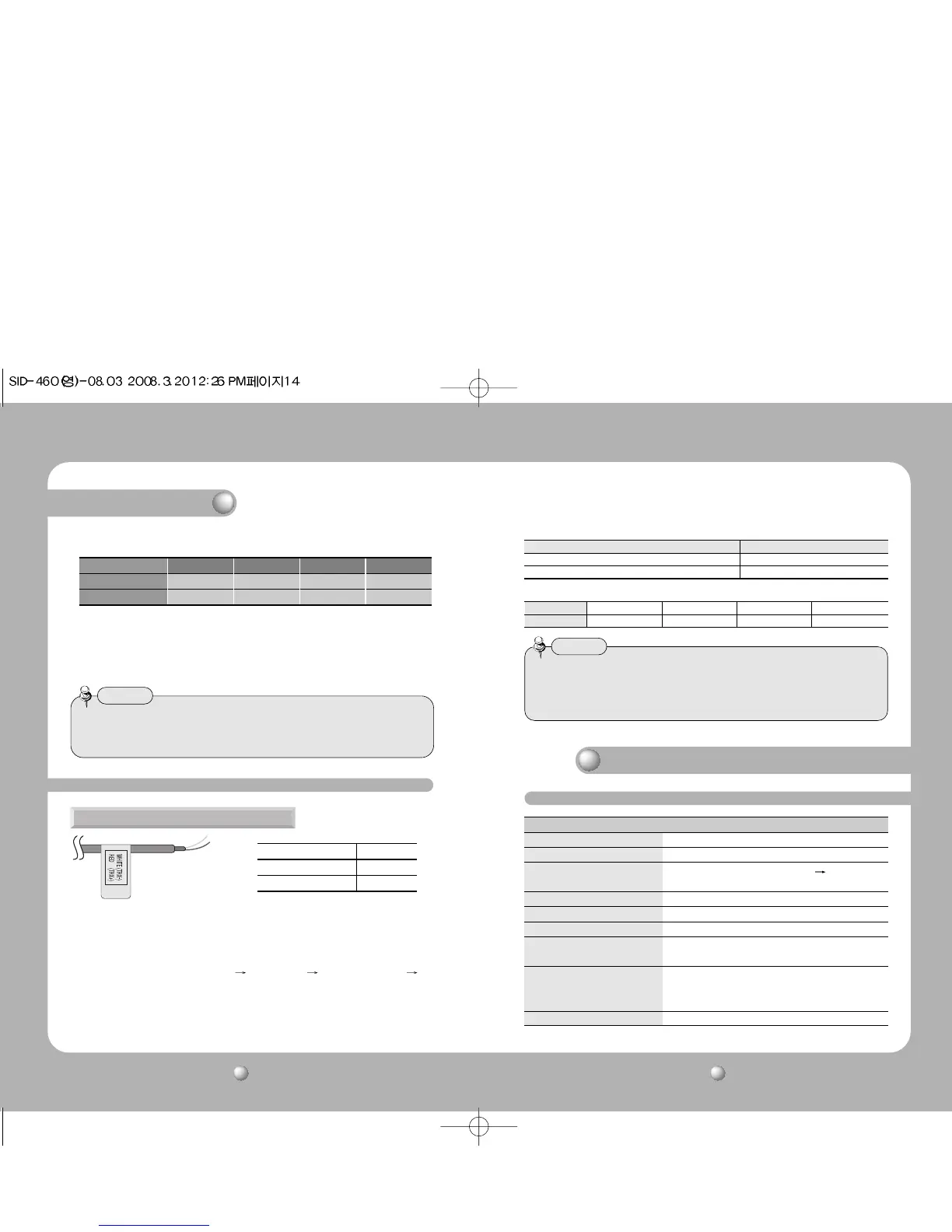
• As shown in the table above, voltage decreases as the wire gets longer. Therefore use
of an excessively long adaptor output line for connection to the camera may affect the
performance of the camera.
*Standard voltage for camera operation : DC 12V ± 10%
*There may be some deviation in voltage drop depending on the type of wire and the manufacturer.
Copper wire size (AWG)
#24(0.22mm
2
) #22(0.33mm
2
) #20(0.52mm
2
)#18(0.83mm
2
)
Resistance (Ω / m) 0.078 0.050 0.030 0.018
Voltage Drop (V/m) 0.028 0.018 0.011 0.006
• Be sure to connect power only after all the installation is complete.
• Note that DC adaptor is not supplied with camera.
• Ground should be connected to the GND terminal.
Notes
When the resistance value of copper wire is at [20°C(68°F)]
Connection
RS-485 communication control
Setup Menu
LENS • DC
EXPOSURE • SHUTTER • AGC • SENS-UP • RETURN
WHITE BALANCE • ATW • MANUAL • AWC
SET
• OUTDOOR • INDOOR
BACKLIGHT • OFF • BLC • HLC
SSNR • ON • OFF
DAY/NIGHT • COLOR • B/W • AUTO
IMAGE ADJUSTMENT • FREEZE • V-REV • H-REV
(IMAGE ADJ.) • D-ZOOM • SHARPNESS • RETURN
SPECIAL • CAMTITLE • MOTION DET • PRIVACY
• DIS • COMM ADJ • LANGUAGE
• RESET • RETURN
EXIT
Connecting to RS-485 Control Cable
CONTROL CABLE SPEC
RED (TRX+) RS-485+
WHITE(TRX-) RS-485-
Using a RS-485 communication, it will be able to control the OSD menu at the SAMSUNG
TECHWIN System Controller or DVR.
(1) The case which it controls from the PC
Using a RS-485 converter, It connects to RS-485 control cable outside camera and serial cable
EX) SERIAL PORT OF THE PC(COM1) SERIAL CABLE RS-485 CONVERTER
RS-485 CONTROL CABLE
(2)The case which it controls from the DVR or System Controller
It connects the RS-485 control cable in the connection terminal of 485 control boards
which are connected with the DVR or System Controller.
• When you construct external control systems for a camera control, please use to the
SAMSUNG TECHWIN PROTOCOL or PELCO-D PROTOCOL.
• When you connecting to RS-485 control cable, please peel off the outer skin inside the
RS-485 control cable.
Notes
* RS-485 Communication establishment initial value
485 Control Board Connection Port RS-485 Control Port
(+) CONNECTION TERMINAL RED (TRX+)
(-) CONNECTION TERMINAL WHITE (TRX-)
Item
Initial value
Camera ID BAUD RATE UART MODE PET PKT
1 9600 8-NONE-1 ENABLE
Menu Configuration
Operating Your Camera



 To Next Page