EasyManua.ls Logo

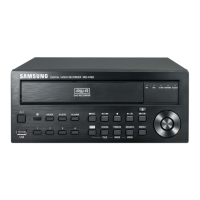
Samsung SRD-440 - User Manual

Samsung SRD-440
120 pages
Print Icon
To Next Page IconTo Next Page
Loading...
4 CHANNEL DVR
User Manual
SRD-440

Table of Contents

Questions and Answers

  • S
    Scott MeltonAug 19, 2025
    Why does my Samsung DVR say 'Need to reset date/time'?
    • B
      bharrisAug 19, 2025
      If your Samsung DVR displays a message saying “Need to reset date/time,” this indicates a problem with the internal clock's time setting or an error within the clock itself. Contact the retailer or the service center for assistance.
  • C
    charles65Aug 21, 2025
    How to fix Samsung DVR if it does not turn on?
    • H
      Herbert RobinsonAug 21, 2025
      If your Samsung DVR system does not turn on and the front panel indicator is not working, check whether the power supply is properly connected. Also, check the system's input voltage from the power source. If the problem continues, replace the power supplier with a new one.
  • R
    Rose SchultzAug 23, 2025
    What to do if ESC key doesn't exit fullscreen on Samsung DVR WebViewer?
    • T
      Tiffany IrwinAug 23, 2025
      If you press the ESC key in full screen mode of the WebViewer and the Samsung DVR system does not switch to a normal split mode, press the ALT+TAB keys to select ‘ACTIVE MOVIE’ and press the ESC key again.
  • A
    Amanda SanfordAug 26, 2025
    What to do if my Samsung SRD-440 shows 'NO HDD' error?
    • A
      alexandra76Aug 26, 2025
      If the “NO HDD” icon and an error message are displayed on your Samsung DVR, check the HDD connection. If the problem persists, contact the nearest service center to have the HDD checked.
  • T
    Tiffany Miller DDSAug 28, 2025
    Why are some channels black on my Samsung SRD-440 DVR?
    • R
      Rebecca HubbardAug 28, 2025
      If some channels on your Samsung DVR display a black screen even when they receive video sources, verify that the camera connected to the system is properly displaying the image and that the camera is properly supplied with power. If the video signal from a video distributor connected to multiple systems is weak, input the camera's video source directly into the DVR.
  • T
    Tiffany NguyenAug 30, 2025
    Why is my Samsung DVR not recording when I press REC?
    • M
      Matthew WallsAug 30, 2025
      If pressing the [REC] button on the remote control does not make the REC indicator flash, and the Samsung DVR player does not start recording, check if there is free space on the HDD for recording. Also, check if the record mode is set to ON in the record mode setting.
  • H
    Holly HessSep 1, 2025
    How to turn off alarm on Samsung SRD-440?
    • D
      Donna JohnsonSep 1, 2025
      If the alarm sounds, but pressing the [ALARM] button on your Samsung DVR does not release it, press the [MENU] button to release the alarm: 1) To release the event monitoring mode: Monitoring Mode – set the duration of the event monitoring to Off. 2) To release the alarm sound: Event Record Mode - Alarm (Motion Detection/Video Loss) – deactivate the alarm sound. 3) To release the event: Event Record Mode - Alarm (Motion Detection/ Video Loss) – set the mode to Off.
  • T
    Tyler JohnsonSep 4, 2025
    Why doesn't the channel button work on my Samsung SRD-440 DVR?
    • S
      staceysullivanSep 4, 2025
      If the Channel button does not work on the Live screen of your Samsung DVR, it's likely because the current screen is in event monitoring mode. In the event monitoring screen, press the [ALARM] button to exit the screen and select a channel.
  • B
    brentblackSep 6, 2025
    How to improve recording quality on Samsung SRD-440?
    • K
      kathrynbishopSep 6, 2025
      If the image quality of the recording data from your Samsung DVR is not good, increase the resolution and quality level in Menu – Record – Quality / Resolution. 1) Resolution: Select a bigger size when specifying the recording size. (4CIF> 2CIF>CIF). 2) Record Quality: Specify a bigger level for the recording quality.
  • J
    jamierodriguezSep 8, 2025
    Why can't I select the start button in calendar search on my Samsung DVR?
    • B
      Briana SalasSep 9, 2025
      If the cursor will not move to the Start button when you start the calendar search on your Samsung DVR, check if the channel and the date that you want to play are marked with the V symbol. Both channel and date should be checked before you can start playing with the Start button.

Summary

OVERVIEW

Important Safety Instructions

Instructions to ensure safe operation and handling of the apparatus before use.

Features

Highlights the key features and capabilities of the DVR.

Part Names and Functions (Front)

Identifies and explains the function of the front panel components.

CONNECTING WITH OTHER DEVICE

LIVE

USING THE DVR

Permission Management

How to set user permissions and manage administrator access for the DVR.

SETTING THE RECORDING

How to set up scheduled, event, and other recording-related settings.

SETTING THE EVENT

How to set recording options for sensor, motion, and video loss events.

NETWORK CONFIGURATION

How to configure network settings for remote monitoring and event mail forwarding.

CONTROLLING A PTZ DEVICE

How to control PTZ cameras connected to the DVR for pan, tilt, and zoom operations.

SEARCH & PLAY

PLAYBACK

How to play stored data from the HDD or backup, and manage playback functions.

WEB VIEWER

MOBILE VIEWER

backup viewer

appendix

TROUBLESHOOTING

Common symptoms and their countermeasures for troubleshooting DVR issues.

Samsung SRD-440 Specifications

General IconGeneral
Video Inputs4 channels
Compression FormatH.264
Power Supply12V DC
Hard Drive Support1 SATA HDD
Audio Output1 channel
Operating SystemEmbedded Linux
Video Outputs1 BNC, 1 VGA
Network Interface10/100 Ethernet
USB Ports2 USB ports

Related product manuals